SQL Problem Solving: Writing Queries
Concept. Most queries you write are one of five shapes: filter to a subset, rank within groups, accumulate over time, compare to a group, or flag outliers. Then you can combine one or more of these patterns, to solve bigger problems.
Intuition. Recognize the shape of sub-parts of the problem. "Top 3 songs per genre" is a ranking; "users who played but never shared" is a set difference. The five patterns below give each shape a skeleton.
Five Query-Writing Patterns
Picture the result rows you want, then pick the clauses that build them. For each pattern, name what one output row represents before writing the query.
Each pattern uses its own small illustrative schema.
-
The Funnel: find drop-offs (listened, but never shared).
-
The Comparison: individual vs. group metrics (artist vs. genre average).
-
The Ladder: rank items within groups (top songs per genre).
-
The Timeline: track cumulative behavior (running total of listens).
-
The Exception (optional): spot outliers (viral surges in daily listening).
Pattern 1: The Funnel
Keep users who appear in the listens set and exclude those in the shares set. As in the earlier NOT IN trap, this comparison assumes the shares user IDs contain no NULLs.
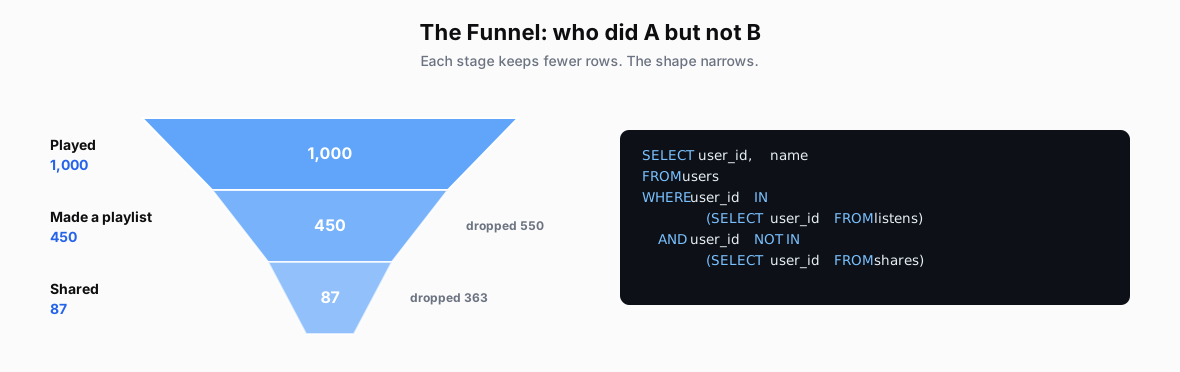 Figure: The Funnel pattern: keep listeners, subtract sharersA funnel narrowing from played 1000 to playlist 450 to shared 87, paired with a SELECT ... WHERE user_id IN (listens) AND user_id NOT IN (shares) query.
SELECT user_id, name
FROM users
-- Keep users who have listened.
WHERE user_id IN
  (SELECT user_id FROM listens)
-- Exclude users who have shared.
-- Assumes shares.user_id contains no NULLs.
  AND user_id NOT IN
  (SELECT user_id FROM shares)
Pattern 2: The Comparison
The window computes a genre average without collapsing the artist rows. Subtract that average from each artist’s plays: positive means above average, negative means below.
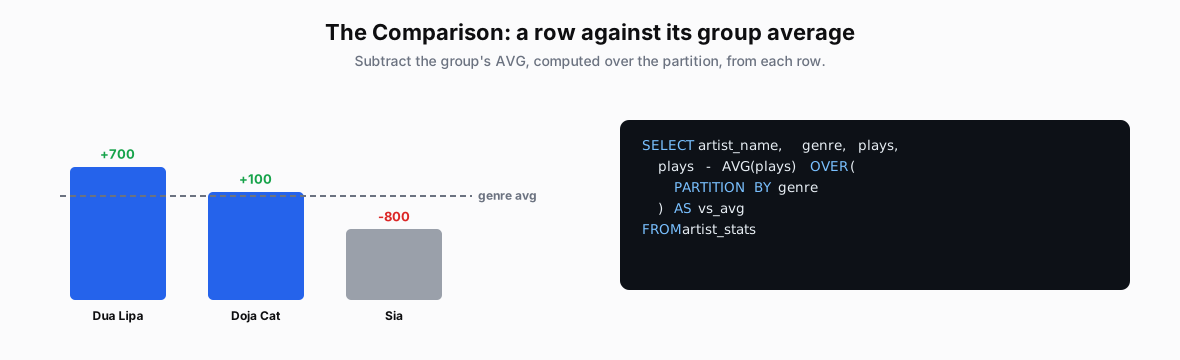 Figure: The Comparison pattern: plays minus the genre averageBars for three Pop artists against a dashed genre-average line, two above and one below, paired with plays - AVG(plays) OVER (PARTITION BY genre). Dua Lipa is 700 plays above the genre average, Doja Cat 100 above, and Sia 800 below.
SELECT artist_name, genre, plays,
  -- Subtract this genre's average.
  plays - AVG(plays) OVER (
    PARTITION BY genre
  ) AS vs_avg
  -- Positive: above average; negative: below.
FROM artist_stats
Pattern 3: The Ladder
PARTITION BY restarts numbering for each genre; ORDER BY plays DESC puts the most-played songs first. The outer query then keeps row numbers 1 through 3.
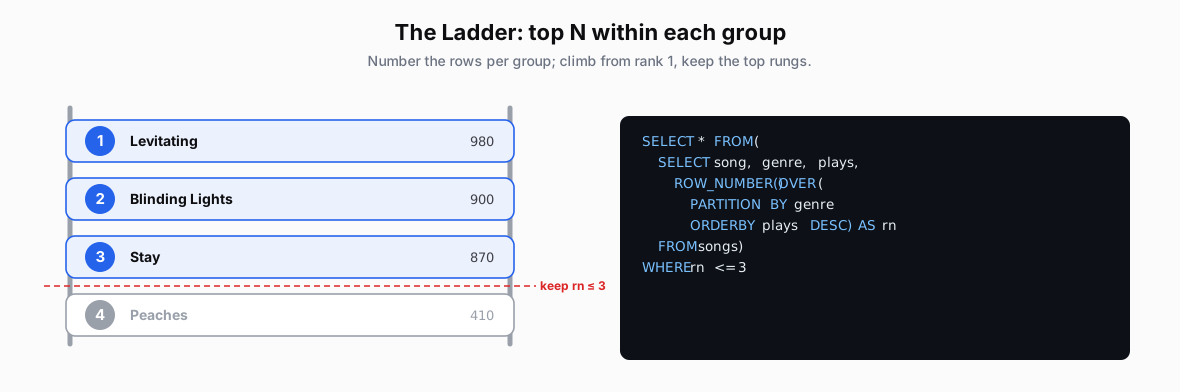 Figure: The Ladder pattern: top 3 songs per genre via ROW_NUMBERA ladder of Pop songs numbered by plays; ranks 1 to 3 kept on the top rungs, rank 4 cut below the line, paired with ROW_NUMBER() OVER (PARTITION BY genre ORDER BY plays DESC) <= 3. Kept: 1 Levitating, 980 plays; 2 Blinding Lights, 900; 3 Stay, 870. Cut: 4 Peaches, 410.
SELECT * FROM (
  SELECT song, genre, plays,
    ROW_NUMBER() OVER (
      -- Number songs separately in each genre.
      PARTITION BY genre
      -- Most plays first.
      ORDER BY plays DESC
    ) AS rn
  FROM songs
) ranked
-- Keep up to three songs per genre.
WHERE rn <= 3
Pattern 4: The Timeline
An ordered SUM keeps each daily row and adds the hours up through that date. This example has one row per day: 3, then 3 + 5 = 8, then 10, then 14 cumulative hours.
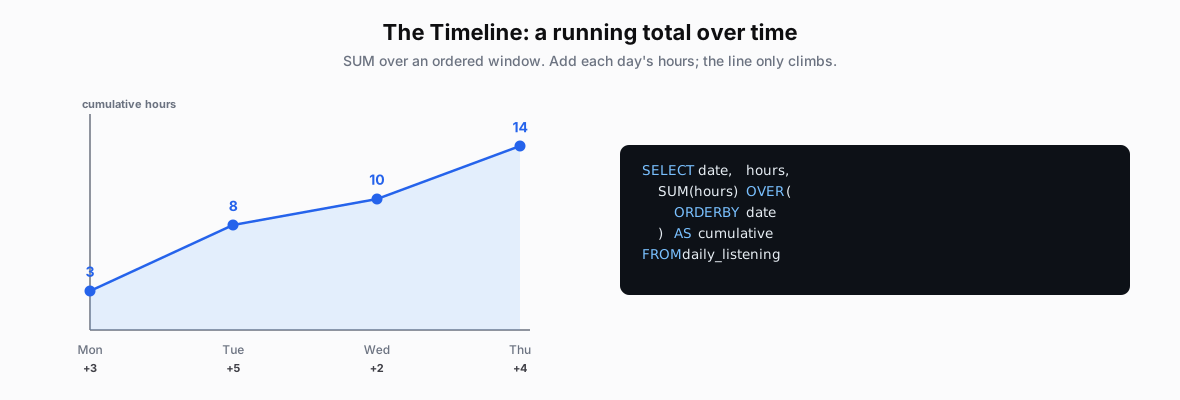 Figure: The Timeline pattern: running total with SUM OVER ORDER BYA line climbing over four days as the running total accumulates 3, 8, 10, 14, paired with SUM(hours) OVER (ORDER BY date).
| Mon | Tue | Wed | Thu |
|---|---|---|---|
| +3 | +5 | +2 | +4 |
SELECT date, hours,
  SUM(hours) OVER (
    -- Add hours from earlier dates and today.
    ORDER BY date
  ) AS cumulative_hours
FROM daily_listening
Pattern 5: The Exception (Optional)
LAG(listens) supplies the previous row’s listen count within each song, ordered by date. The first row has no predecessor, so its value is NULL. Compare the current count to that prior count, then filter the percentage change; NULLIF in the query avoids division by zero.
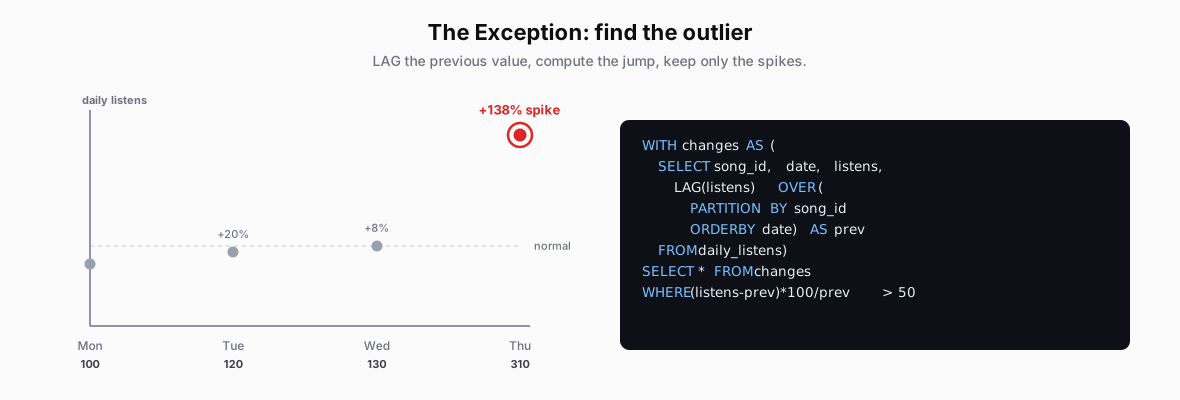 Figure: Optional: flag the listen spike with LAGA scatter of daily listens sitting near a normal band, with Thursday spiking to 310, a 138 percent jump, circled in red, paired with LAG(listens) and a percent-change > 50 filter.
| Mon | Tue | Wed | Thu |
|---|---|---|---|
| 100 | 120 | 130 | 310 |
WITH changes AS (
  SELECT song_id, date, listens,
    -- Previous count for this song.
    LAG(listens) OVER (
      PARTITION BY song_id ORDER BY date
    ) AS prev_listens
  FROM daily_listens
),
with_pct AS (
  SELECT *,
    -- Percentage change; NULL for a zero baseline.
    (listens - prev_listens) * 100.0
      / NULLIF(prev_listens, 0) AS pct_change
  FROM changes
)
SELECT * FROM with_pct
-- Keep increases over 50%.
WHERE pct_change > 50
Example 1: Breakout Artists (Optional)
Problem: identify breakout artists with over 50% month-over-month growth in the last 3 months. Patterns used: Timeline (LAG for the previous month) and Comparison (the percent change).
Step 1: Count monthly plays. Establish a baseline: count plays for each artist per month.
WITH monthly_plays AS (
  SELECT
    artist_id,
    DATE_TRUNC('month', play_date) AS month,   -- round to the month
    COUNT(*) AS play_count
  FROM listens
  GROUP BY artist_id, month                     -- one row per artist-month
)
-- artist_id | month   | play_count
-- 1234      | 2024-09 | 1000        (Sept baseline)
-- 1234      | 2024-10 | 1600        (Oct growth)
-- 1234      | 2024-11 | 2500        (Nov spike)
Step 2: Calculate the growth rate. Compare each month to the previous one with LAG().
, artist_growth AS (
  SELECT
    artist_id, month, play_count,
    LAG(play_count) OVER (
      PARTITION BY artist_id        -- reset per artist
      ORDER BY month                -- in time order
    ) AS prev_month_plays,
    ROUND(
      (play_count - LAG(play_count) OVER (PARTITION BY artist_id ORDER BY month))
      * 100.0 / NULLIF(LAG(play_count) OVER (PARTITION BY artist_id ORDER BY month), 0),
      1
    ) AS growth_pct
  FROM monthly_plays
)
-- artist_id | month   | play_count | prev | growth_pct
-- 1234      | 2024-09 | 1000       | NULL | NULL      (no prior month)
-- 1234      | 2024-10 | 1600       | 1000 | 60.0      (+60%)
-- 1234      | 2024-11 | 2500       | 1600 | 56.3      (+56%)
Step 3: Find the breakout artists. Filter to over 50% growth in the last 3 months.
SELECT a.name AS artist_name, g.month, g.play_count, g.growth_pct
FROM artist_growth g
JOIN artists a ON g.artist_id = a.artist_id
WHERE g.growth_pct > 50                                        -- the breakout filter
  AND g.month >= DATE_TRUNC('month', CURRENT_DATE) - INTERVAL '3 months'
ORDER BY g.growth_pct DESC, g.month DESC

-- artist_name | month   | play_count | growth_pct
-- Dua Lipa    | 2024-10 | 1600       | 60.0        (+60% on Sept, artist 1234 above)
-- Dua Lipa    | 2024-11 | 2500       | 56.3        (+56% on Oct)
Takeaway
Start with the desired output, then build the intermediate results needed to produce it.