Subqueries: Basic Patterns
Concept. A subquery is a SELECT nested inside another query. Logically, the outer query consumes the inner query's result as a single value, a set of values, or a boolean from an existence test.
Intuition. To find songs nobody played, the inner query lists every played song_id and the outer query keeps the songs NOT IN that list.
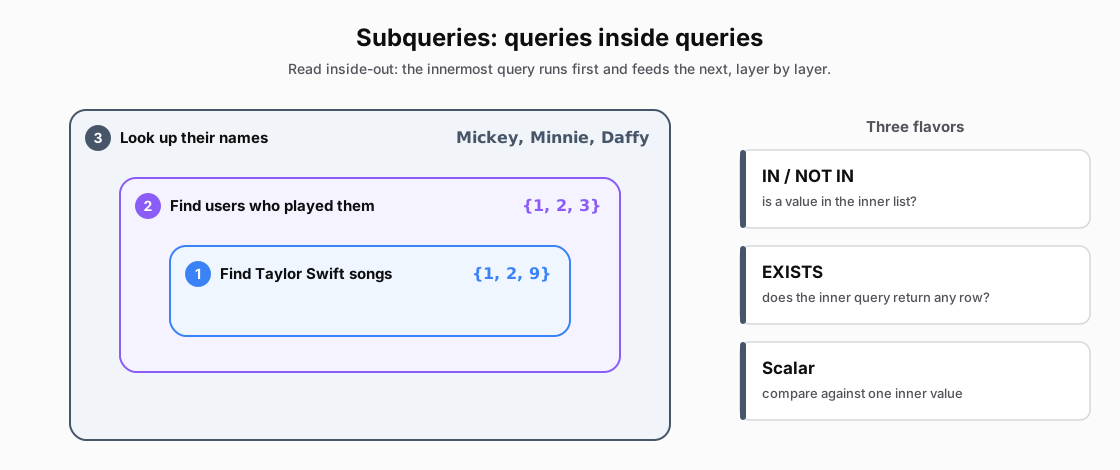 Figure: A subquery nests queries inside queries, read inside-outThree concentric boxes. The innermost finds Taylor Swift songs (1, 2, 9); the middle finds the users who played them (1, 2, 3); the outer looks up their names (Mickey, Minnie, Daffy). Beside them, the three flavors of subquery, IN/NOT IN, EXISTS and Scalar, shown as equal peers.
Figure 1. A subquery is a query inside a query, read inside-out: the innermost finds Taylor Swift songs, the middle finds who played them, the outer returns their names. The same nesting drives IN / NOT IN, EXISTS, and Scalar.
IN Subquery: Find Taylor Swift Listeners
-- Step 3 (LAST): pick names for the users found in Step 2.
SELECT name
FROM Users
WHERE user_id IN (
    -- Step 2: distinct users who listened to those songs.
    SELECT DISTINCT user_id
    FROM Listens
    WHERE song_id IN (
        -- Step 1 (FIRST): all Taylor Swift song IDs. Returns {1, 2, 9}.
        SELECT song_id
        FROM Songs
        WHERE artist = 'Taylor Swift'
    )
)
Walking the Data Inside-Out
Inside-out is how you read it, not necessarily how the database executes it.
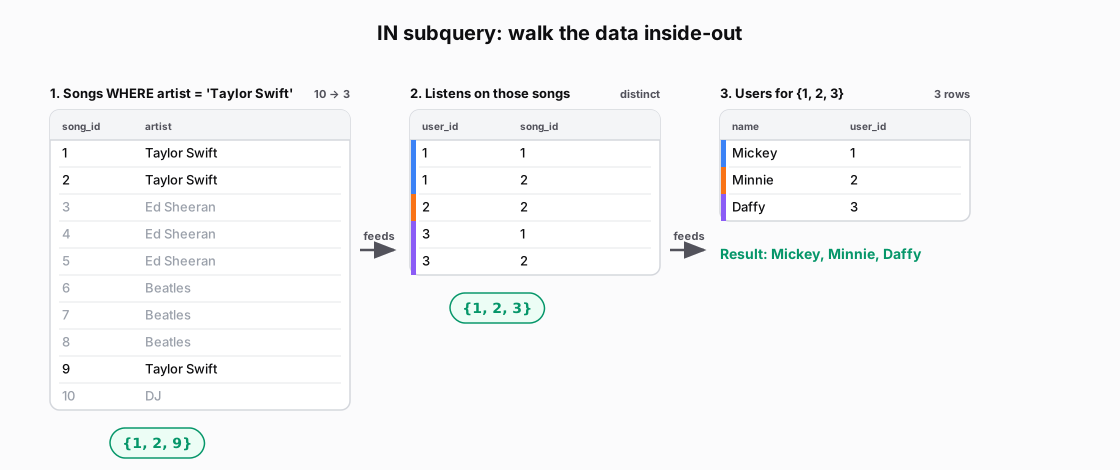 Figure: Walking an IN subquery inside-out across three stepsStep 1 filters Songs to Taylor Swift, leaving song_ids 1, 2, 9. Step 2 finds the listens on those songs and takes the distinct users 1, 2, 3. Step 3 looks those users up in Users, giving Mickey, Minnie, Daffy.
| song_id | artist |
|---|---|
| 1 | Taylor Swift |
| 2 | Taylor Swift |
| 3 | Ed Sheeran |
| 4 | Ed Sheeran |
| 5 | Ed Sheeran |
| 6 | Beatles |
| 7 | Beatles |
| 8 | Beatles |
| 9 | Taylor Swift |
| 10 | DJ |
| user_id | song_id |
|---|---|
| 1 | 1 |
| 1 | 2 |
| 2 | 2 |
| 3 | 1 |
| 3 | 2 |
| name | user_id |
|---|---|
| Mickey | 1 |
| Minnie | 2 |
| Daffy | 3 |
NOT IN Subquery: Non-Taylor Swift Fans
-- Find users who never listened to any Taylor Swift song.

-- Step 3 (LAST): pick names for users NOT in the Step 2 list.
SELECT name
FROM Users
WHERE user_id NOT IN (
    -- Step 2: distinct users who listened to those songs.
    SELECT DISTINCT user_id
    FROM Listens
    WHERE song_id IN (
        -- Step 1: all Taylor Swift song IDs.
        SELECT song_id
        FROM Songs
        WHERE artist = 'Taylor Swift'
    )
)
The inner queries still return users {1, 2, 3}. NOT IN keeps the remaining user, Pluto.
Step 3: WHERE user_id NOT IN {1, 2, 3} · 4 users → 1 row (the three who listened are crossed out)
| user_id | name | in {1, 2, 3}? | |
|---|---|---|---|
| 1 | Mickey | yes | |
| 2 | Minnie | yes | |
| 3 | Daffy | yes | |
| 4 | Pluto | no |
Scalar Subquery: Above Average Ratings
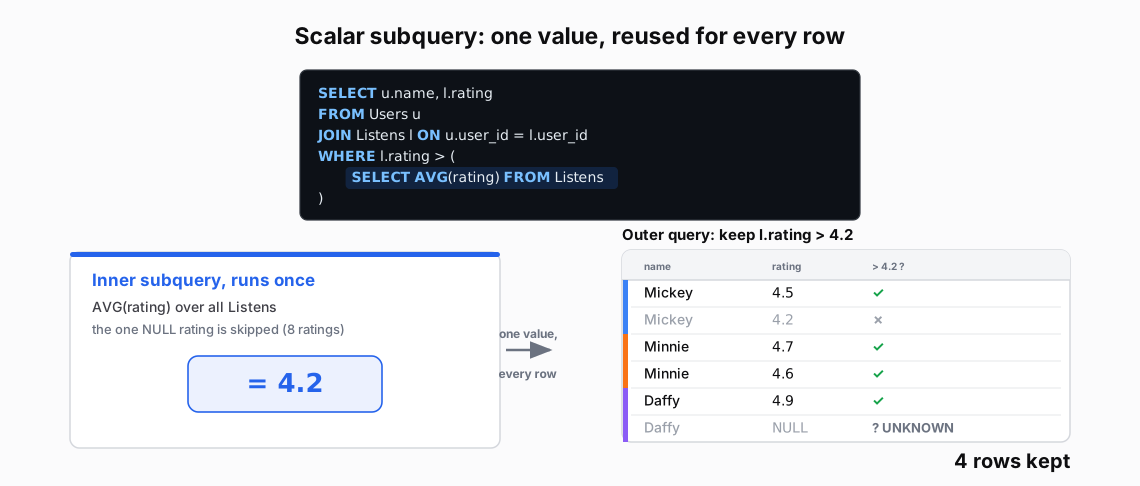 Figure: A scalar subquery returns one value that the outer query reuses for every rowThe inner subquery runs once: AVG(rating) over all Listens, skipping the one NULL, gives 4.2 (blue, the single value). The outer query reuses 4.2 to keep every listen rated above it: Mickey 4.5, Minnie 4.7 and 4.6, Daffy 4.9 are kept. Of the 9 joined rows, Mickey 4.2 is not strictly greater, the two 3.9s and Daffy's 2.9 are below, and Daffy's NULL is UNKNOWN; those 5 are struck out, leaving 4 rows. Color key: blue = the one scalar value; the per-user bars are identity; grey strike = a dropped row.
| name | rating |
|---|---|
| Mickey | 4.5 |
| Mickey | 4.2 |
| Mickey | 3.9 |
| Minnie | 4.7 |
| Minnie | 4.6 |
| Minnie | 3.9 |
| Daffy | 2.9 |
| Daffy | 4.9 |
| Daffy | NULL |
Figure 2. A scalar subquery returns one value. The inner query computes AVG(rating) over Listens and skips the NULL, producing 4.2. The outer query compares each row's rating to 4.2 and keeps four rows. Mickey's 4.2 fails a strict > comparison, and Daffy's NULL > 4.2 evaluates to UNKNOWN, so both rows drop.
EXISTS: Test Whether a Match Exists
EXISTS: ask for a yes-or-no answer
-- Check if ANY high-value listeners exist.

SELECT 'High-value listeners found!' AS result
-- EXISTS is TRUE when the inner query returns any row.
WHERE EXISTS (
    -- SELECT 1 is convention; the value is ignored.
    SELECT 1
    FROM Listens
    WHERE rating > 4.5
)
EXISTS needs only a yes-or-no answer. An executor can stop after finding a match, while COUNT(*) must produce a complete count. As we will see in Module M3, the query optimizer still chooses the physical plan, and we can use EXPLAIN to compare how plans are picked on real data.
Subquery Types Comparison
| Type | Returns | Example | Use When |
|---|---|---|---|
| IN | List of values | WHERE id IN (SELECT...) | Checking membership |
| NOT IN | List to exclude | WHERE id NOT IN (...) | Finding non-members |
| EXISTS | TRUE/FALSE | WHERE EXISTS (...) | Any match suffices |
| NOT EXISTS | TRUE/FALSE | WHERE NOT EXISTS (...) | Ensuring absence |
| Scalar | Single value | WHERE x > (SELECT AVG...) | Comparing to aggregate |
| Table | Full result set | FROM (SELECT...) AS t | Derived tables |
The NULL in NOT IN Trap
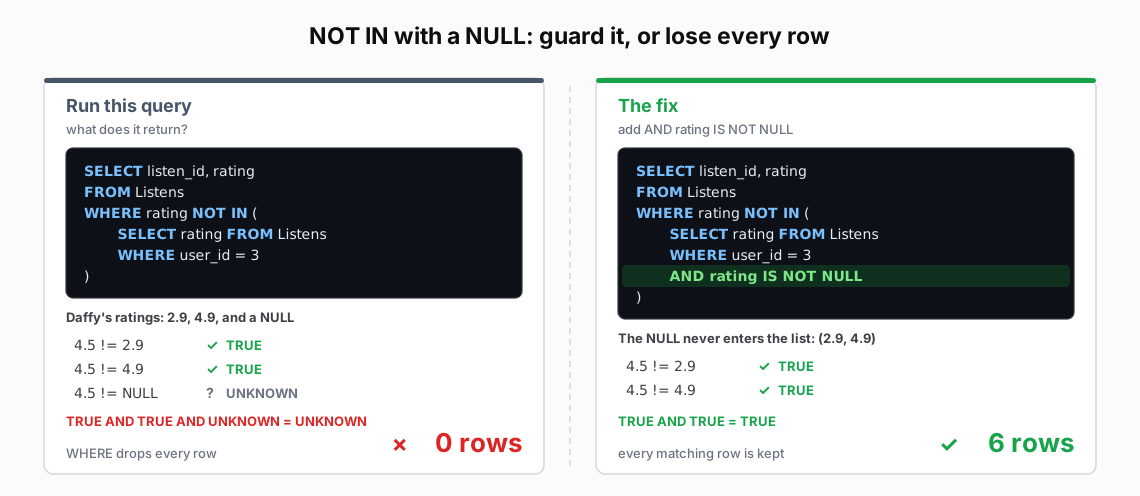 Figure: The NULL-in-NOT-IN TrapFor rating 4.5, comparisons with 2.9 and 4.9 are TRUE; comparison with NULL is UNKNOWN. AND combines these to UNKNOWN, so WHERE drops this row. With NULL in the list, no row passes NOT IN: the query returns zero rows. Filtering NULL out of the list makes both comparisons for 4.5 TRUE, so this row passes. The filtered query returns six rows.
| Run this query |
|---|
| SELECT listen_id, rating |
| FROM Listens |
| WHERE rating NOT IN ( |
| SELECT rating FROM Listens |
| WHERE user_id = 3 |
| ) |
| The fix |
|---|
| SELECT listen_id, rating |
| FROM Listens |
| WHERE rating NOT IN ( |
| SELECT rating FROM Listens |
| WHERE user_id = 3 |
| AND rating IS NOT NULL |
| ) |
Why This Happens (Step by Step)
For rating 4.5, NOT IN (2.9, 4.9, NULL) requires all three comparisons to hold:
4.5 != 2.9 AND 4.5 != 4.9 AND 4.5 != NULL
-- TRUE AND TRUE AND UNKNOWN → UNKNOWN
WHERE keeps only TRUE. Other ratings may produce FALSE instead of UNKNOWN, but none can make this NOT IN condition TRUE while the list contains NULL.
Real Example with Our Data
-- Find every listen NOT rated the way Daffy rated something.

-- WRONG: Daffy's ratings include a NULL, so this returns 0 rows.
SELECT listen_id, rating FROM Listens
WHERE rating NOT IN (
    -- Daffy's ratings: 2.9, 4.9, and one NULL.
    SELECT rating FROM Listens WHERE user_id = 3
)

-- CORRECT: filter the NULL out of the subquery first.
SELECT listen_id, rating FROM Listens
WHERE rating NOT IN (
    -- Critical filter to avoid the NOT IN NULL trap.
    SELECT rating FROM Listens WHERE user_id = 3
    AND rating IS NOT NULL
)
Safe Patterns to Use Instead
-- Option 1: Filter NULLs (shown above)
WHERE id NOT IN (SELECT id FROM TABLE WHERE id IS NOT NULL)

-- Option 2: Use NOT EXISTS (NULL-safe)
WHERE NOT EXISTS (
    SELECT 1 FROM Listens l
    WHERE l.song_id = s.song_id
)

-- Option 3: Use LEFT JOIN with NULL check
FROM Songs s
LEFT JOIN Listens l ON s.song_id = l.song_id
WHERE l.song_id IS NULL
The Multiple Values Error
-- WRONG: subquery returns multiple rows, but `=` expects one.
WHERE rating = (SELECT rating FROM Listens)

-- CORRECT: use IN for multiple values.
WHERE rating IN (SELECT rating FROM Listens)

-- OR: use scalar aggregation to get a single value.
WHERE rating = (SELECT MAX(rating) FROM Listens)
Takeaway
Match the operator to the inner result: membership, existence, or one value. Check whether the inner result can contain NULL before using NOT IN.