SQL Problem Solving: Reading Complex Queries
Concept. Read a query in logical evaluation order: FROM, then WHERE, then GROUP BY, then HAVING, then SELECT, then ORDER BY. Each clause outputs a row set that becomes the input to the next clause.
Intuition. To see what a six-clause query returns, trace it one clause at a time, watching the row set shrink and reshape at each step.
Read the Query as a Sequence of Tables
Start with the inputs, not the first line of SQL.
-
Name one row. After FROM and JOIN, is it a listen, a user, or a user–genre pair?
-
Read each named result. For each CTE, identify its columns and what one output row represents before reading the query that uses it.
-
Track what changes. WHERE and HAVING remove rows or groups. GROUP BY combines rows; a window adds a value while keeping the rows.
-
Describe the answer. Check SELECT, DISTINCT, ORDER BY, and LIMIT: which columns, which duplicates, which order, and how many rows?
Next example: join listens to users and songs → group by user and genre → keep groups with at least two listens.
Example 1: Finding Top Genres Per User
Trace the query in logical clause order
-- Goal: For each user, find genres with 2+ listens.
-- Read in logical order: FROM/JOIN → WHERE → GROUP BY → HAVING → SELECT → ORDER BY

SELECT u.name, s.genre,                   -- Step 5: project columns
       COUNT(*)      AS song_count,
       AVG(l.rating) AS avg_rating
FROM Listens l                            -- Step 1a: read Listens
JOIN Songs   s ON l.song_id = s.song_id   -- Step 1b: join Songs
JOIN Users   u ON u.user_id = l.user_id   -- Step 1c: join Users for the name
WHERE s.genre IS NOT NULL                 -- Step 2: drop NULL genres
GROUP BY u.user_id, u.name, s.genre       -- Step 3: form groups
HAVING COUNT(*) >= 2                      -- Step 4: keep groups with 2+ listens
ORDER BY u.user_id, avg_rating DESC;      -- Step 6: sort output
The Mental Model
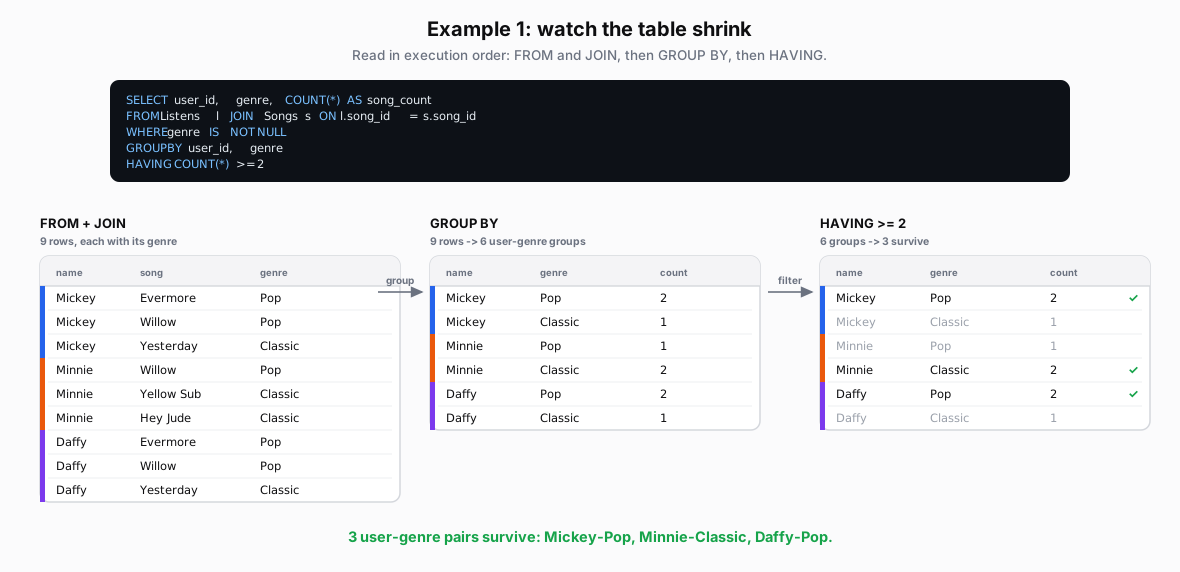 Figure: Example 1: watch the table shrinkReuse the debug trace: join the rows, form groups, then filter the groups. The table transforms clause by clause; rows the final clause drops are greyed and struck through, survivors carry a green check. Color key: grey strike = a dropped row, green check = a surviving row.
Example 2: Finding Power Users
The Query
| name | song | genre |
|---|---|---|
| Mickey | Evermore | Pop |
| Mickey | Willow | Pop |
| Mickey | Yesterday | Classic |
| Minnie | Willow | Pop |
| Minnie | Yellow Sub | Classic |
| Minnie | Hey Jude | Classic |
| Daffy | Evermore | Pop |
| Daffy | Willow | Pop |
| Daffy | Yesterday | Classic |
| name | genre | count |
|---|---|---|
| Mickey | Pop | 2 |
| Mickey | Classic | 1 |
| Minnie | Pop | 1 |
| Minnie | Classic | 2 |
| Daffy | Pop | 2 |
| Daffy | Classic | 1 |
| name | genre | count |
|---|---|---|
| Mickey | Pop | 2 |
| Mickey | Classic | 1 |
| Minnie | Pop | 1 |
| Minnie | Classic | 2 |
| Daffy | Pop | 2 |
| Daffy | Classic | 1 |
-- Goal: Find the top-half users by average rating.
-- Three layers: per-user metrics (CTE 1), percentile rank (CTE 2), final filter.

WITH user_stats AS (                                -- CTE 1: per-user metrics
SELECT user_id,
       COUNT(*)    AS listen_count,
       AVG(rating) AS avg_rating
FROM Listens
GROUP BY user_id
),
ranked_users AS (                                   -- CTE 2: percentile rank
SELECT user_id, listen_count, avg_rating,
       PERCENT_RANK() OVER (ORDER BY avg_rating DESC) AS rating_rank
FROM user_stats
)
SELECT u.name,                                      -- final layer: name + filter
     r.listen_count,
     r.avg_rating
FROM ranked_users r
JOIN Users u ON r.user_id = u.user_id
WHERE r.rating_rank < 0.5                           -- top half
ORDER BY r.avg_rating DESC;
How to Read This Query
Read each CTE before the query that uses it. PERCENT_RANK() gives (RANK - 1) / (row count - 1) within its window (or 0 for a single row). Here, descending averages put Minnie first: the three ranks are 0, 0.5, and 1. The strict < 0.5 filter keeps only Minnie; it does not promise to keep half the rows.
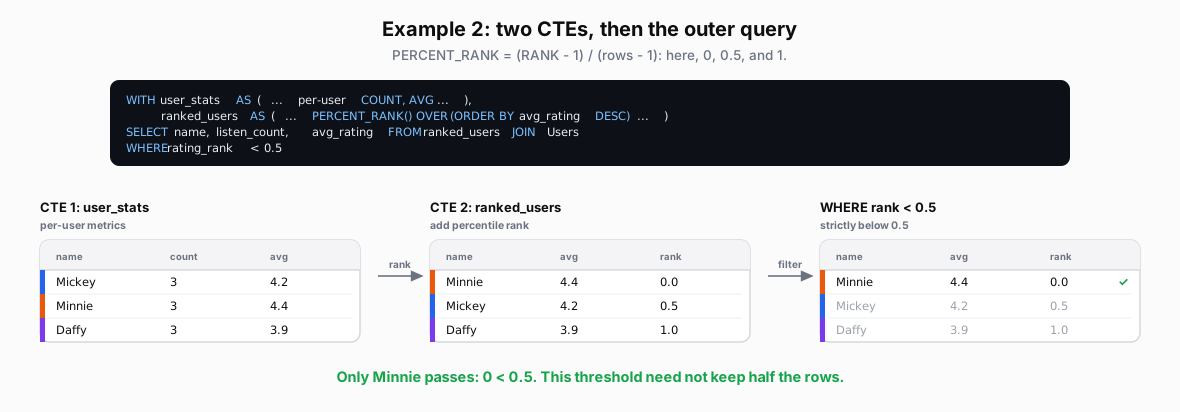 Figure: Example 2: two CTEs, then the outer queryPERCENT_RANK = (RANK - 1) / (rows - 1): here, 0, 0.5, and 1. The table transforms clause by clause; rows the final clause drops are greyed and struck through, survivors carry a green check. Color key: grey strike = a dropped row, green check = a surviving row.
| name | count | avg |
|---|---|---|
| Mickey | 3 | 4.2 |
| Minnie | 3 | 4.4 |
| Daffy | 3 | 3.9 |
| name | avg | rank |
|---|---|---|
| Minnie | 4.4 | 0.0 |
| Mickey | 4.2 | 0.5 |
| Daffy | 3.9 | 1.0 |
| name | avg | rank |
|---|---|---|
| Minnie | 4.4 | 0.0 |
| Mickey | 4.2 | 0.5 |
| Daffy | 3.9 | 1.0 |
Takeaway
Identify what one row represents, then follow how each clause changes the table.