SELECT-FROM-WHERE: The SQL Foundation
Concept. A basic query has three clauses. FROM chooses the table. WHERE keeps rows that make its predicate TRUE. SELECT chooses the output columns.
Intuition. You write SELECT-FROM-WHERE, but it runs FROM, then WHERE, then SELECT: load all of Listens, drop the rows that fail the rating test, then keep just the columns you asked for. That is, state the input, then Logic, then Output.
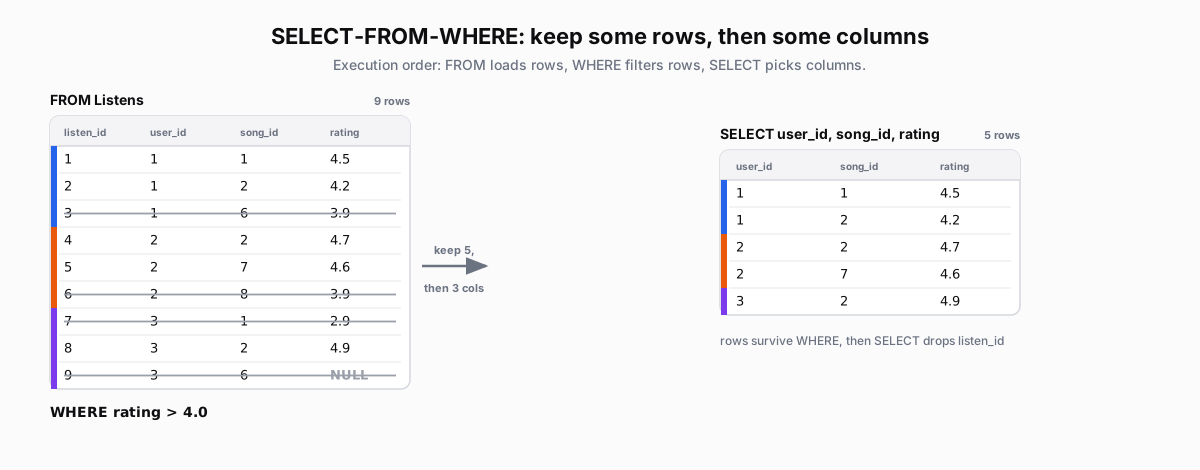 Figure: SELECT-FROM-WHERE keeps some rows, then some columnsFROM Listens loads nine rows with columns listen_id, user_id, song_id, rating, colored by user. WHERE rating greater than 4.0 strikes the four failing rows (3.9, 3.9, 2.9, and the NULL which is UNKNOWN). SELECT user_id, song_id, rating projects the five survivors to three columns, dropping listen_id. Color key: Mickey blue, Minnie orange, Daffy purple; struck rows fail WHERE.
| listen_id | user_id | song_id | rating |
|---|---|---|---|
| 1 | 1 | 1 | 4.5 |
| 2 | 1 | 2 | 4.2 |
| 3 | 1 | 6 | 3.9 |
| 4 | 2 | 2 | 4.7 |
| 5 | 2 | 7 | 4.6 |
| 6 | 2 | 8 | 3.9 |
| 7 | 3 | 1 | 2.9 |
| 8 | 3 | 2 | 4.9 |
| 9 | 3 | 6 | NULL |
| user_id | song_id | rating |
|---|---|---|
| 1 | 1 | 4.5 |
| 1 | 2 | 4.2 |
| 2 | 2 | 4.7 |
| 2 | 7 | 4.6 |
| 3 | 2 | 4.9 |
Figure 1. FROM produces nine Listens rows. WHERE keeps the five rows where rating > 4.0 evaluates to TRUE and drops rows where it evaluates to FALSE or UNKNOWN, including the NULL rating. SELECT returns only user_id, song_id, and rating and drops listen_id.
Basic Query Structure: Execution Order
-- Get listens with high ratings (above 4.0)
SELECT user_id, song_id, rating    -- choose only 3 columns for output
FROM Listens                       -- picks the table (9 rows)
WHERE rating > 4.0                 -- keeps rows where the test is TRUE
-
Execution Order: FROM → WHERE → SELECT. Execution runs FROM, then WHERE, then SELECT.
-
Row Filtering: WHERE evaluates each row individually
-
Column Selection: SELECT determines output columns
Imagine a python function for why: you start with the input, then you write the logic, then finally the return (output). That's the execution order. It's the same idea in SQL. FROM (input), then logic, then SELECT (output).
WHERE with AND and OR
-- AND: both conditions must hold
SELECT user_id, rating
FROM Listens
WHERE user_id = 1 AND rating > 4.0

-- OR: either condition is enough
SELECT user_id, rating
FROM Listens
WHERE user_id = 1 OR rating > 4.0
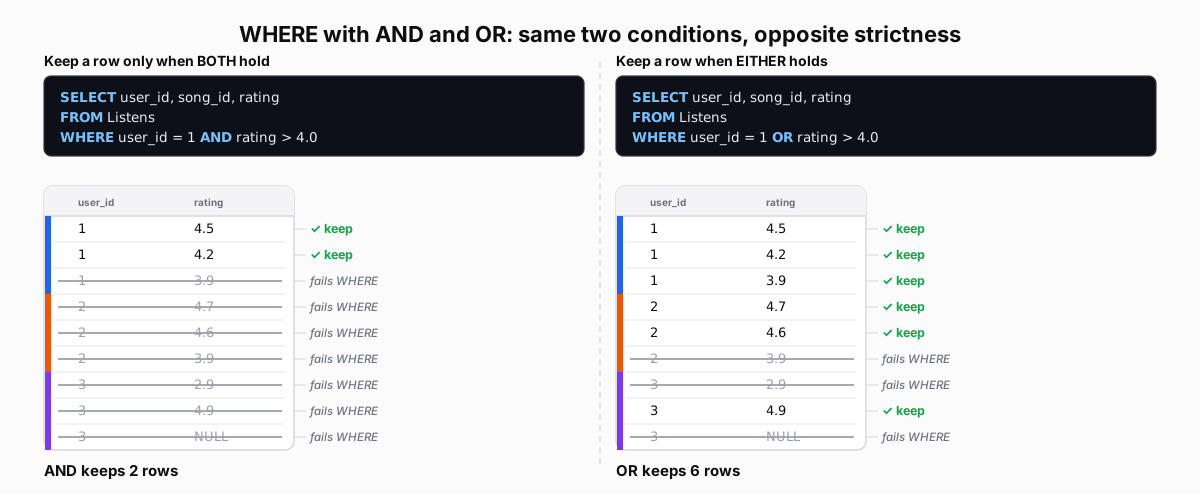 Figure: AND keeps a row only when both conditions hold; OR when either doesTwo queries side by side on the same nine rows. Left: WHERE user_id = 1 AND rating > 4.0 keeps only rows where both are true, two rows (Mickey 4.5 and 4.2); the rest are struck out. Right: WHERE user_id = 1 OR rating > 4.0 keeps a row when either is true, six rows. The NULL rating makes rating > 4.0 UNKNOWN, so that row is dropped by both. Color key: Mickey blue, Minnie orange, Daffy purple; green check keeps, grey strike drops.
Figure 2. AND keeps a row when both predicates evaluate to TRUE, so two rows survive. OR keeps a row when either predicate evaluates to TRUE, so six rows survive. The NULL rating makes rating > 4.0 evaluate to UNKNOWN, and UNKNOWN does not satisfy WHERE.
| user_id | rating |
|---|---|
| 1 | 4.5 |
| 1 | 4.2 |
| 1 | 3.9 |
| 2 | 4.7 |
| 2 | 4.6 |
| 2 | 3.9 |
| 3 | 2.9 |
| 3 | 4.9 |
| 3 | NULL |
| user_id | rating |
|---|---|
| 1 | 4.5 |
| 1 | 4.2 |
| 1 | 3.9 |
| 2 | 4.7 |
| 2 | 4.6 |
| 2 | 3.9 |
| 3 | 2.9 |
| 3 | 4.9 |
| 3 | NULL |
Understanding Aliases (AS Keyword)
An alias gives a column a new name in the output with AS. But because WHERE runs before SELECT, the alias does not exist yet when WHERE is evaluated, so WHERE cannot use it.
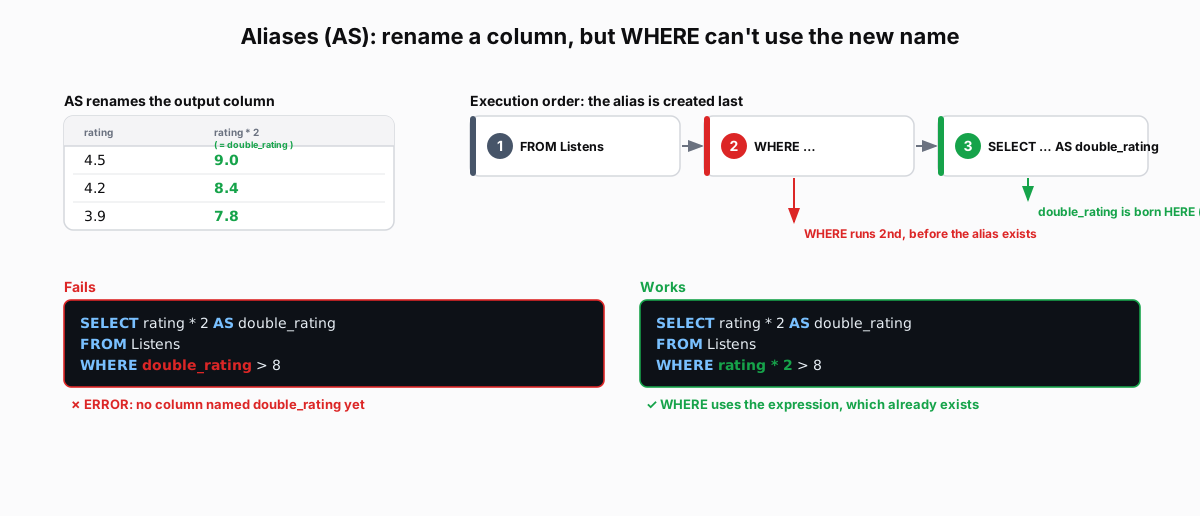 Figure: An alias renames the output column, but WHERE cannot use itAS renames a column in the result: rating * 2 AS double_rating, so 4.5 shows as 9.0. Then the same filter written two ways: WHERE double_rating > 8 fails, because no column of that name exists yet, and WHERE rating * 2 > 8 works, because the expression already exists. Last, the reason: execution order runs FROM, then WHERE, then SELECT, and the alias is created in SELECT, after WHERE has finished. Color key: green is the alias and the working query, red is the failing reference.
Figure 3. AS names an expression in the result produced by SELECT. WHERE runs earlier, so WHERE double_rating > 8 fails. WHERE can evaluate WHERE rating * 2 > 8 because it uses the underlying expression.
| rating | rating * 2 |
|---|---|
| 4.5 | 9.0 |
| 4.2 | 8.4 |
| 3.9 | 7.8 |
SELECT with Calculations
SELECT can also compute new columns. rating * 2 AS double_rating doubles a value; CASE ... WHEN is SQL's if-then-else.
SELECT
    user_id,
    rating,
    rating * 2 AS double_rating,
    CASE
        WHEN rating >= 4.5 THEN 'Excellent'
        WHEN rating >= 4.0 THEN 'Good'
        ELSE 'Average'
    END AS category
FROM Listens
WHERE rating IS NOT NULL
| user_id | rating | double_rating | category | |
|---|---|---|---|---|
| 1 | 4.5 | 9.0 | Excellent | |
| 1 | 4.2 | 8.4 | Good | |
| 1 | 3.9 | 7.8 | Average | |
| 2 | 4.7 | 9.4 | Excellent | |
| 3 | 4.9 | 9.8 | Excellent |