HAVING: Filtering Group Aggregates
Concept. HAVING filters groups after GROUP BY by evaluating aggregate expressions such as COUNT and AVG. WHERE filters input rows before grouping; HAVING filters the grouped result.
Intuition. "Users averaging above 4.0" cannot use WHERE, since no single row holds an average. Group the Listens by user, then HAVING AVG(rating) > 4.0 keeps the user groups that pass.
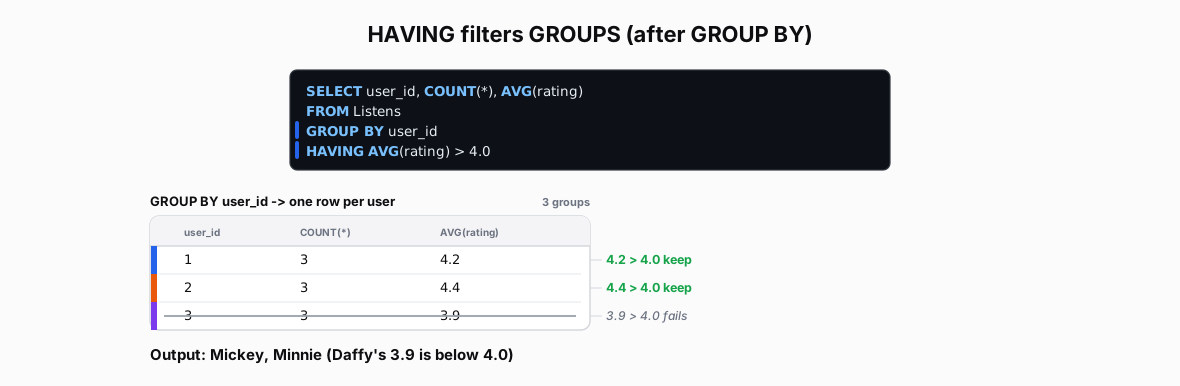 Figure: HAVING filters groups by their AVG(rating)An average rating filter on groups: HAVING tests each group's AVG(rating); Mickey 4.2 and Minnie 4.4 pass, Daffy 3.9 is below 4.0 and the whole group drops. Color key: Mickey blue, Minnie orange, Daffy purple; struck rows/groups are filtered out.
Figure 1. HAVING tests each group by its aggregate after grouping; a group passes or drops whole. Of three user groups, two pass AVG(rating) > 4.0; Daffy's 3.9 average drops his whole group.
| user_id | COUNT(*) | AVG(rating) |
|---|---|---|
| 1 | 3 | 4.2 |
| 2 | 3 | 4.4 |
| 3 | 3 | 3.9 |
Simple HAVING
-- Find users whose average rating exceeds 4.0
SELECT                         -- Last: Select columns to output
    user_id,
    COUNT(*) AS listen_count,
    AVG(rating) AS avg_rating
FROM Listens                   -- First: Get rows
GROUP BY user_id               -- Next: Create groups
HAVING AVG(rating) > 4.0       -- Then: Filter groups by aggregate condition
ORDER BY user_id               -- Last: Sort surviving groups
Step 1: GROUP BY
| user_id | COUNT(*) | AVG(rating) | Notes | |
|---|---|---|---|---|
| 1 | 3 | (4.5+4.2+3.9)/3 | User 1's | |
| 2 | 3 | (4.7+4.6+3.9)/3 | User 2's | |
| 3 | 3 | (2.9+4.9+NULL)/2 | User 3's |
Step 2: HAVING AVG() > 4
| user_id | AVG(rating) | AVG > 4.0 | |
|---|---|---|---|
| 1 | 4.2 | 4.2 > 4.0 | |
| 2 | 4.4 | 4.4 > 4.0 | |
| 3 | 3.9 | 3.9 > 4.0 |
Output
| user_id | listen_count | avg_rating | |
|---|---|---|---|
| 1 | 3 | 4.2 | |
| 2 | 3 | 4.4 |
-
GROUP BY first, HAVING second
-
FALSE = entire group gone
-
No partial elimination
HAVING with COUNT
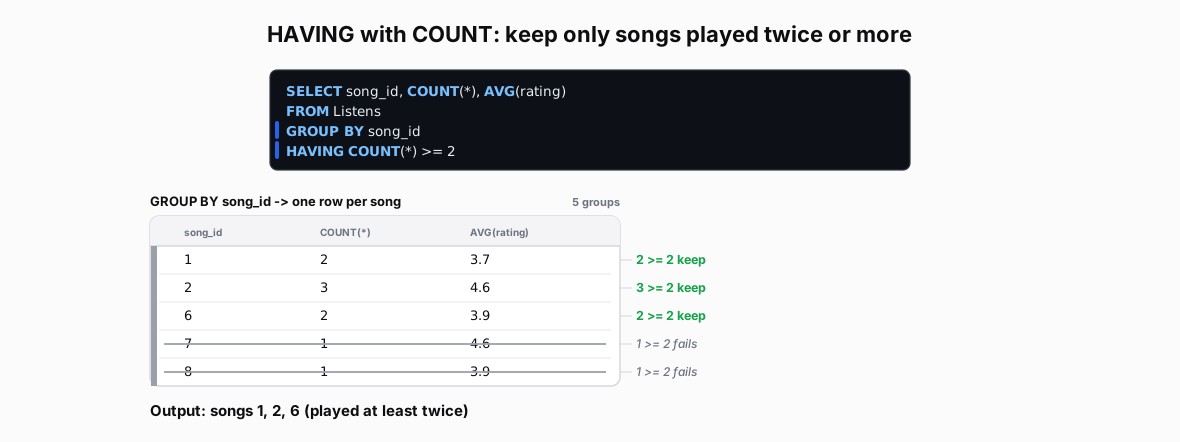 Figure: HAVING COUNT(*) >= 2 on the groups from GROUP BY song_idA dark SQL card above the five groups GROUP BY song_id produces, drawn as a table of song_id, COUNT(*) and AVG(rating). To the right of each row a margin note gives the HAVING test that row faces, and every row that fails is struck through. A line under the table gives the output. Color key: a green margin note keeps the group, a struck row is filtered out.
Figure 2. Grouping listens by song_id and keeping only groups with COUNT(*) >= 2. Songs 1, 2 and 6 were played at least twice; songs 7 and 8 were played once, so they drop.
| song_id | COUNT(*) | AVG(rating) |
|---|---|---|
| 1 | 2 | 3.7 |
| 2 | 3 | 4.6 |
| 6 | 2 | 3.9 |
| 7 | 1 | 4.6 |
| 8 | 1 | 3.9 |
Key Points:
-
Unpopular songs eliminated
-
Threshold: 2+ plays
-
NULLs counted in COUNT(*)
HAVING with Multiple Conditions
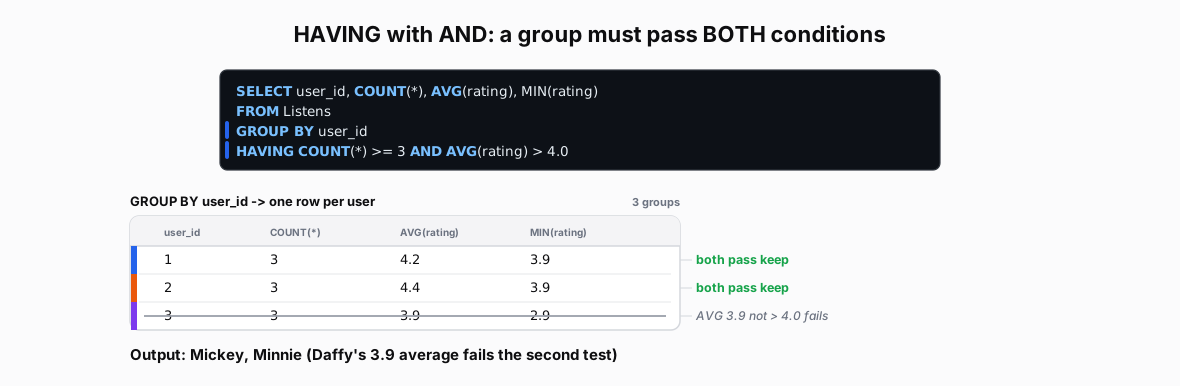 Figure: HAVING with AND: a group must pass both conditionsA dark SQL card above the three groups GROUP BY user_id produces, drawn as a table of user_id, COUNT(*), AVG(rating) and MIN(rating), one row per user with a colored identity bar. To the right of each row a margin note gives the verdict from the two conditions, and the row that fails is struck through. A line under the table gives the output. Color key: Mickey blue, Minnie orange, Daffy purple; a struck row is filtered out.
Figure 3. Two HAVING conditions joined by AND: a group survives only if it passes both. Mickey and Minnie clear COUNT(*) >= 3 and AVG(rating) > 4.0; Daffy has three listens but his 3.9 average fails the second test.
| user_id | COUNT(*) | AVG(rating) | MIN(rating) |
|---|---|---|---|
| 1 | 3 | 4.2 | 3.9 |
| 2 | 3 | 4.4 | 3.9 |
| 3 | 3 | 3.9 | 2.9 |
Key Points:
- Mix any aggregates
WHERE and HAVING
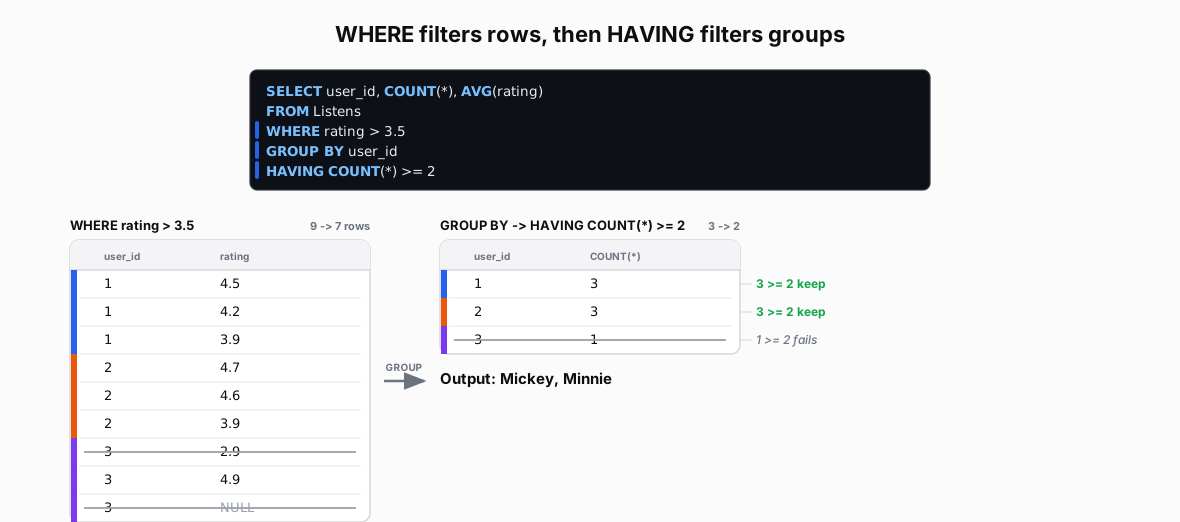 Figure: WHERE filters rows, then HAVING filters groupsWHERE rating > 3.5 strikes Daffy's 2.9 and NULL first; the survivors group into Mickey 3 rows (AVG 4.2), Minnie 3 (AVG 4.4), Daffy 1 (AVG 4.9); HAVING COUNT(*) >= 2 then drops Daffy's one-row group, leaving users 1 and 2. Color key: Mickey blue, Minnie orange, Daffy purple; struck rows/groups are filtered out.
Figure 4. WHERE and HAVING run at different times. WHERE strikes individual rows before grouping (Daffy's 2.9 and NULL go), the survivors form groups, then HAVING drops whole groups by aggregate (Daffy's single row fails COUNT(*) >= 2). WHERE picks rows, HAVING picks groups.
| user_id | rating |
|---|---|
| 1 | 4.5 |
| 1 | 4.2 |
| 1 | 3.9 |
| 2 | 4.7 |
| 2 | 4.6 |
| 2 | 3.9 |
| 3 | 2.9 |
| 3 | 4.9 |
| 3 | NULL |
| user_id | COUNT(*) | AVG(rating) |
|---|---|---|
| 1 | 3 | 4.2 |
| 2 | 3 | 4.4 |
| 3 | 1 | 4.9 |
Step 1: WHERE rating > 3.5 · 9 rows → 7 rows (crossed-out rows fail the test; NULL is UNKNOWN, also removed)
| listen_id | user_id | rating | rating > 3.5 | |
|---|---|---|---|---|
| 1 | 1 | 4.5 | 4.5 > 3.5 | |
| 2 | 1 | 4.2 | 4.2 > 3.5 | |
| 3 | 1 | 3.9 | 3.9 > 3.5 | |
| 4 | 2 | 4.7 | 4.7 > 3.5 | |
| 5 | 2 | 4.6 | 4.6 > 3.5 | |
| 6 | 2 | 3.9 | 3.9 > 3.5 | |
| 7 | 3 | 2.9 | 2.9 > 3.5 | |
| 8 | 3 | 4.9 | 4.9 > 3.5 | |
| 9 | 3 | NULL | NULL → unknown |
Step 2: GROUP BY on Filtered Data
| user_id | Filtered Rows | COUNT(*) | AVG(rating) | |
|---|---|---|---|---|
| 1 | 1,2,3 | 3 | 4.2 | |
| 2 | 4,5,6 | 3 | 4.4 | |
| 3 | 8 | 1 | 4.9 |
Step 3: HAVING COUNT(*) >= 2 · 3 groups → 2 rows (HAVING crosses out groups that are too small)
| user_id | COUNT(*) | COUNT(*) >= 2 | |
|---|---|---|---|
| 1 | 3 | 3 >= 2 | |
| 2 | 3 | 3 >= 2 | |
| 3 | 1 | 1 >= 2 |
Output
| user_id | COUNT(*) | AVG(rating) | |
|---|---|---|---|
| 1 | 3 | 4.2 | |
| 2 | 3 | 4.4 |
Key Rules
-
Execution Order: HAVING runs after GROUP BY.
-
Aggregate Conditions: Can use aggregate functions like AVG(), COUNT()
-
Group-Level Filter: Operates on entire groups, not individual rows
SQL Execution Pipeline
Input:  FROM
Logic:  WHERE → GROUP BY → HAVING
        (no aggregates) → (form groups) → (aggregates exist!)
Output: SELECT/ORDER BY
Common Patterns
-
Aggregate Filters:
HAVING COUNT(*) > 2keeps groups with 3+ rows -
Average Checks:
HAVING AVG(rating) > 4.0filters by group average -
Multiple Conditions:
HAVING COUNT(*) > 1 AND AVG(rating) > 4.0 -
Column References: Can use GROUP BY columns or aggregates
Common Mistakes
HAVING on rows
-- WRONG: HAVING does not work on individual rows
SELECT * FROM Listens
HAVING rating > 4.0

-- CORRECT: Use WHERE to filter individual rows
SELECT * FROM Listens
WHERE rating > 4.0
Problem: HAVING only works with grouped data
The HAVING Alias Problem
-- WRONG: Alias not yet created when HAVING runs
SELECT user_id, AVG(rating) AS avg_r
FROM Listens
GROUP BY user_id
HAVING avg_r > 4.0

-- CORRECT: Repeat the aggregate expression in HAVING
SELECT user_id, AVG(rating) AS avg_r
FROM Listens
GROUP BY user_id
HAVING AVG(rating) > 4.0
Problem: HAVING executes before SELECT creates aliases
Wrong Filter, Wrong Place
-- WRONG: HAVING can't access individual row values
SELECT user_id, COUNT(*)
FROM Listens
GROUP BY user_id
HAVING rating > 4.0            -- Error: Which rating? Group has many!

-- CORRECT: WHERE for row conditions, HAVING for group conditions
SELECT user_id, COUNT(*)
FROM Listens
WHERE rating > 4.0             -- Filter rows BEFORE grouping
GROUP BY user_id
HAVING COUNT(*) > 2            -- Then filter groups by aggregate
Problem: HAVING should use aggregate functions or GROUP BY columns
NULL Aggregate Confusion
-- Surprising: AVG ignores NULL ratings
SELECT user_id, AVG(rating)
FROM Listens
GROUP BY user_id
HAVING AVG(rating) > 4.0       -- AVG skips NULLs (may mislead!)

-- Explicit: Show total vs rated counts for clarity
SELECT user_id,
       COUNT(*) AS total,       -- Includes NULL rows
       COUNT(rating) AS rated,  -- Excludes NULL ratings
       AVG(rating) AS avg_rating
FROM Listens
GROUP BY user_id
HAVING COUNT(rating) > 0       -- Ensure at least 1 non-NULL rating
   AND AVG(rating) > 4.0       -- Then check average
Problem: AVG ignores NULL, which affects HAVING conditions