Storage Layout: Row vs Columnar
Concept. A storage layout specifies how a table's bytes are stored on disk. A row-oriented layout stores all columns of a row together. A column-oriented layout stores all values of a column together.
Intuition. Row-oriented Listens stores each listen (listen_id, user_id, song_id, rating, listen_time) as one contiguous record on disk. Column-oriented storage stores all user_id values together, then all rating values, then all listen_time values. AVG(rating) reads the rating values without reading the other columns.
In Module 2, we saw how to break down a too-big problem. This module is about the data that is still too big: how a table sits on disk, and how you scan, sort, and join it without ever holding it all in RAM.
How Tables Live on Disk
Two layers between your table and the OS:
-
OS Files. The OS's basic building blocks: unstructured bytes.
-
DbFiles. The database's custom files, packed into fixed 64 MB pages. Every table you query lives as a DbFile.
-
Why pages? When you query, the database hauls in 64 MB batches, not single records. I/O devices are slow, so bulk operations (one 64 MB read vs. 2,000 separate 32 KB reads) amortize costs.
Inside a 64 MB Page: The Storage Layout Question
Three options for how to lay out the bytes inside a page:
-
Row storage. Pack all columns of one row together.
-
Columnar storage. Pack all values of one column together.
-
PAX (row-grouped columnar). Columns kept contiguous within row-groups. This is what Parquet does, covered below.
The first two are the fundamental contrast. Same data, two layouts, very different I/O for the same query:
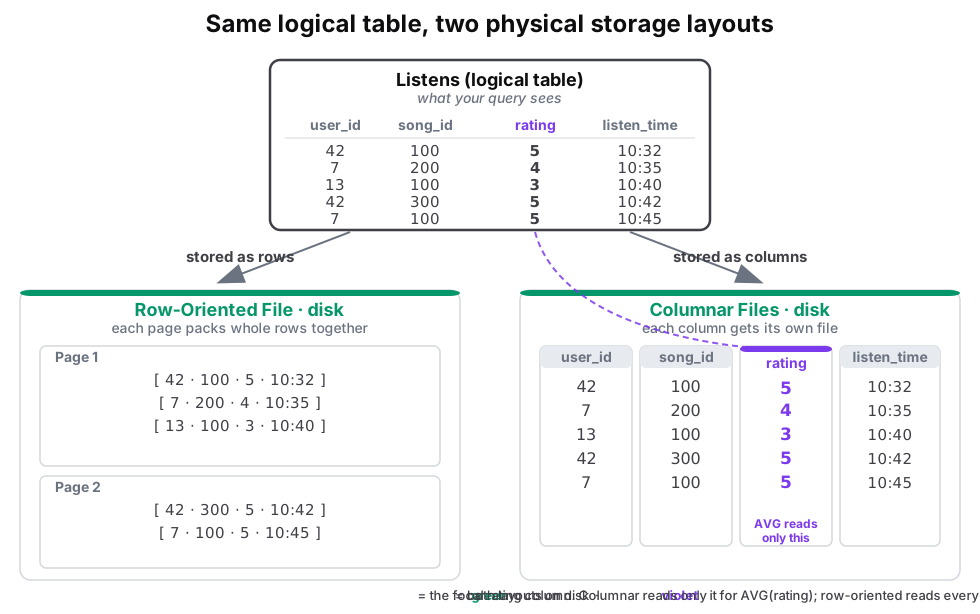 Figure: The same logical Listens table stored two ways on disk: row-oriented packs whole rows together into pages; columnar puts each column in its own fileThe same logical Listens table stored two ways on disk: row-oriented packs whole rows together into pages; columnar puts each column in its own file. Both layouts live on disk, shown by green frames. The rating column is the highlight, shown in violet: a query for AVG(rating) reads only that one file in columnar, but every row page in row-oriented. Color key: green is the on-disk file layouts, violet is the focal rating column.
| user_id | song_id | rating | listen_time |
|---|---|---|---|
| 42 | 100 | 5 | 10:32 |
| 7 | 200 | 4 | 10:35 |
| 13 | 100 | 3 | 10:40 |
| 42 | 300 | 5 | 10:42 |
| 7 | 100 | 5 | 10:45 |
| Page 1 |
|---|
| [ 42 · 100 · 5 · 10:32 ] |
| [ 7 · 200 · 4 · 10:35 ] |
| [ 13 · 100 · 3 · 10:40 ] |
| Page 2 |
|---|
| [ 42 · 300 · 5 · 10:42 ] |
| [ 7 · 100 · 5 · 10:45 ] |
| user_id | song_id | rating | listen_time |
|---|---|---|---|
| 42 | 100 | 5 | 10:32 |
| 7 | 200 | 4 | 10:35 |
| 13 | 100 | 3 | 10:40 |
| 42 | 300 | 5 | 10:42 |
| 7 | 100 | 5 | 10:45 |
Figure 1. The physical layout decides which bytes a query reads. The same logical Listens table appears in both layouts. Row-oriented storage packs whole rows into a page, so reading row 5 returns all four columns in one read and a write is one append. Columnar storage gives each column its own file, so AVG(rating) touches only the rating file and skips the other three. Which layout wins depends on the query: SELECT AVG(rating) favors columnar (row layout wastes about 75% of the I/O on this 4-column toy, far more on wide tables), while SELECT * WHERE listen_id = 42 and inserts or updates favor row, since one record is one packed page rather than a seek-and-reassemble across four files.
Row-Oriented: The Slotted Page
A 64 MB row-oriented page uses a slotted page design to handle variable-length rows and the fragmentation that updates create.
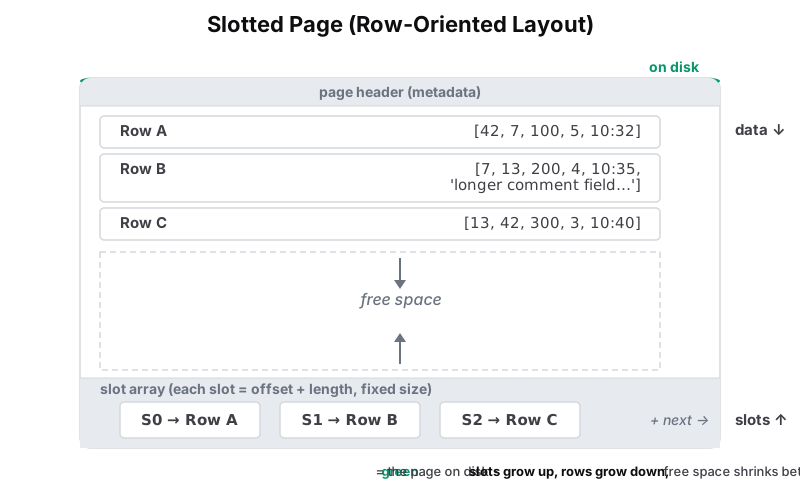 Figure: Slotted page layout: a single 64MB row-oriented pageSlotted page layout: a single 64MB row-oriented page on disk. Data records grow from the top down (Row A, B, C). The slot array grows from the bottom up; three slot cells (S0, S1, S2) point to their rows by label. Free space sits in the middle and shrinks as both grow toward each other. Color key: green is the page on disk (persistent); the rows and slots inside are neutral.
Figure 2. A 64 MB slotted page stores variable-length records from the top downward and a fixed-size slot array from the bottom upward. Free space remains between them. Each slot stores an (offset, length) pointer, so S0 points to Row A and S1 to Row B. An in-place update writes the row without moving it when the row keeps the same size. When a row grows, the DB moves the row to a new location inside the page and updates the slot, so references like page_id, slot_id remain stable.
Columnar: Compression at Scale
Same idea inverted: a page holds many values for a single column. Sequential bytes are all the same type, and that's exactly what compression algorithms exploit aggressively.
More data means better compression. A single column of Spotify's Listens barely compresses at nine rows, but at a hundred million rows the same column commonly shrinks 5x to 10x: popular songs repeat millions of times, active users have thousands of listens, timestamps run nearly sequential. Rows compress too, but far less, because the mix of types in one row makes it hard for encoders.
Compression saves I/O. Column encodings reduce the bytes a scan reads. Review RLE, dictionary, and delta encoding in M2 and vector quantization.
Columnar Made Practical: Parquet
Pure columnar gives each column its own file. That makes scans fast but loses everywhere else: one row becomes a seek per column, and a table with 1,000 columns needs 1,000 files.
Parquet is an open-source columnar format that fixes this. It uses a PAX layout: first slice the rows into row-groups (about 128 MB, roughly a million rows), then store each column contiguously inside the group as a column chunk, itself split into roughly 1 MB pages (Parquet's page is a finer unit than the 64 MB DbFile page above). One file holds the whole table, a row stays in one place, and a footer carries per-row-group min/max statistics, so a query reads the footer and skips the column data of groups that cannot match.
Directory partitioning. Data systems often partition Parquet datasets by a column such as year, storing files in separate directories:
-
year=2024/: skipped -
year=2025/: read -
year=2026/: skipped
For WHERE year = 2025, the query engine reads files in year=2025/ and skips the other year directories.
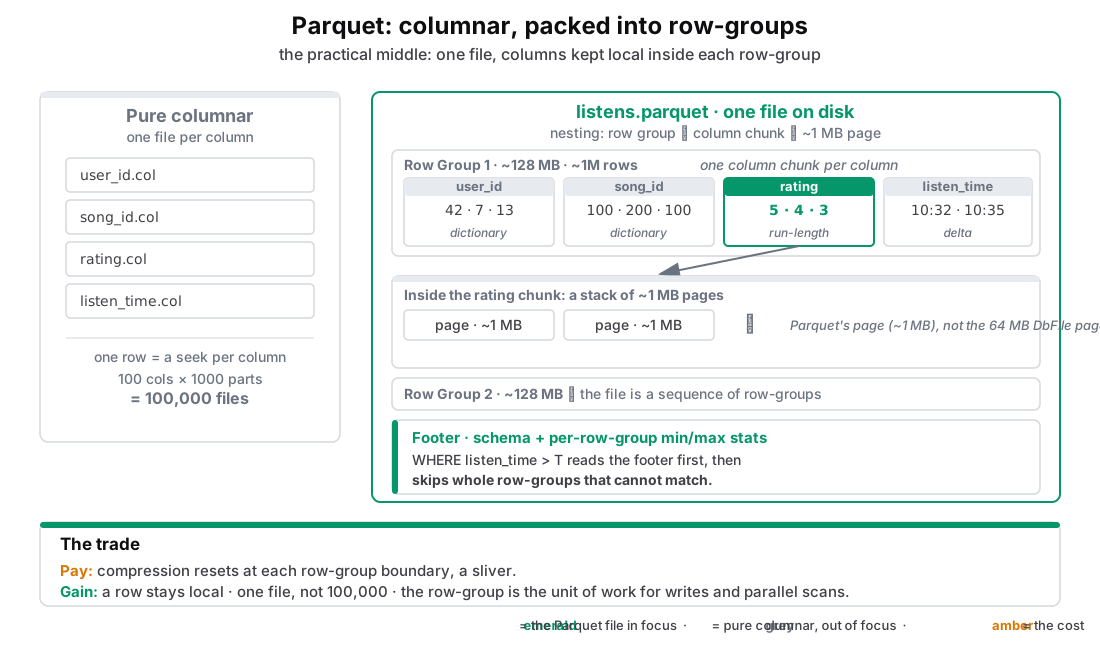 Figure: Parquet nests rows into row-groups, columns into column chunks, and bytes into ~1 MB pages, all in one file, for a sliver of compression in exchange for big gains in row access, file count, and write simplicityTwo layouts compared, revealed in steps. On the left, pure columnar (grey, out of focus) puts each column in its own file, so one row needs a seek per column and 1,000 columns require 1,000 files. On the right, one Parquet file (emerald, in focus) builds up in three beats: first the file as a sequence of row-groups of about 128 MB and a million rows, then the column chunks inside one row-group with the rating chunk highlighted, then a zoom showing a column chunk is a stack of roughly 1 MB pages. A note flags that Parquet's page is finer than the 64 MB DbFile page from earlier. A footer of per-row-group min/max statistics lets a query skip whole row-groups. The trade panel states the cost in amber and the gains in emerald. Color key: emerald is the Parquet file in focus, grey is pure columnar out of focus, amber is the cost.
Figure 3. Parquet stores columnar data inside row-groups in one file. A pure columnar layout stores one file per column, so reading one row performs a seek per column and 1,000 columns produce 1,000 files. Parquet keeps per-column compression and scan behavior. A row stays within one row-group, and row-groups support writes and parallel scans. The footer stores per-row-group min/max statistics, and predicates can skip groups without reading their column chunks. Encodings stop at row-group boundaries, which reduces compression slightly.