NULL Values
Concept. NULL means "unknown," not 0 or empty. Any comparison with NULL returns UNKNOWN, a third truth value, so a WHERE test drops that row.
Intuition. Leave a listen's rating blank and SQL stores NULL. Ask "is rating > 4?" about an unknown and the answer is UNKNOWN, not yes or no, so WHERE quietly drops the row and only IS NULL finds it.
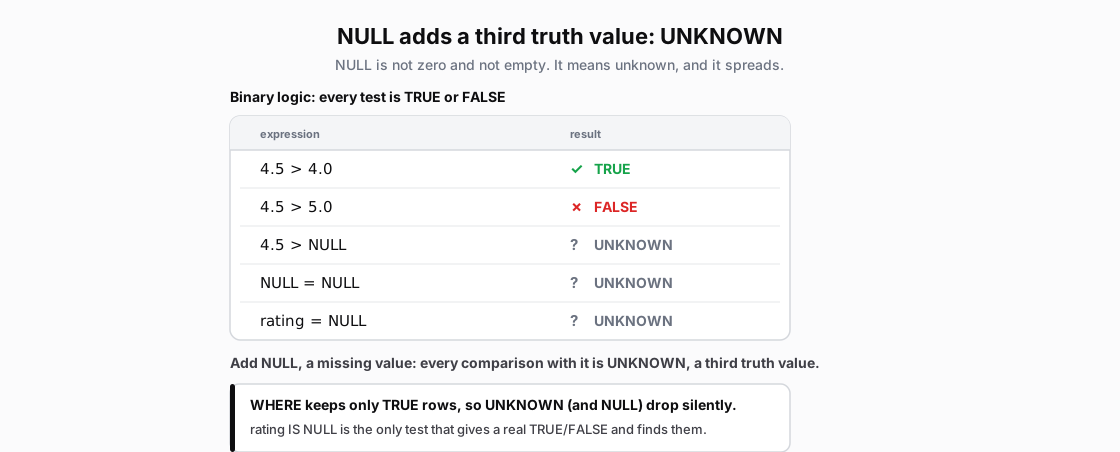 Figure: NULL adds a third truth value, UNKNOWNBinary logic: 4.5 > 4.0 is TRUE, 4.5 > 5.0 is FALSE. But any comparison with NULL (4.5 > NULL, NULL = NULL, rating = NULL) is UNKNOWN, the third truth value, shown grey with a question mark. WHERE keeps only TRUE rows. FALSE and UNKNOWN rows drop silently; rating IS NULL is the test that returns a real TRUE or FALSE and finds NULL rows. Color key: green TRUE, red FALSE, grey question mark UNKNOWN.
Figure 1. SQL uses three-valued logic. Comparisons with NULL evaluate to UNKNOWN. WHERE keeps only TRUE rows. FALSE and UNKNOWN rows drop silently.
| expression | result |
|---|---|
| 4.5 > 4.0 | TRUE |
| 4.5 > 5.0 | FALSE |
| 4.5 > NULL | UNKNOWN |
| NULL = NULL | UNKNOWN |
| rating = NULL | UNKNOWN |
Two-Valued Logic Refresher
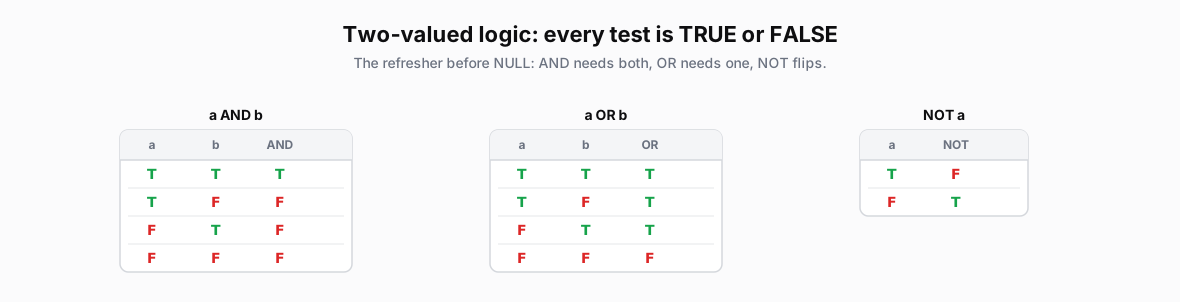 Figure: Two-valued boolean logic: AND, OR, NOT truth tablesTwo-valued boolean logic: AND, OR, NOT truth tables Color key: green TRUE, red FALSE, grey UNKNOWN/NULL.
| a | b | AND |
|---|---|---|
| T | T | T |
| T | F | F |
| F | T | F |
| F | F | F |
| a | b | OR |
|---|---|---|
| T | T | T |
| T | F | T |
| F | T | T |
| F | F | F |
| a | NOT |
|---|---|
| T | F |
| F | T |
Figure 2. Two-valued boolean logic. AND requires TRUE on both sides. OR requires TRUE on at least one side. NOT flips the value.
What Changes When NULL Enters
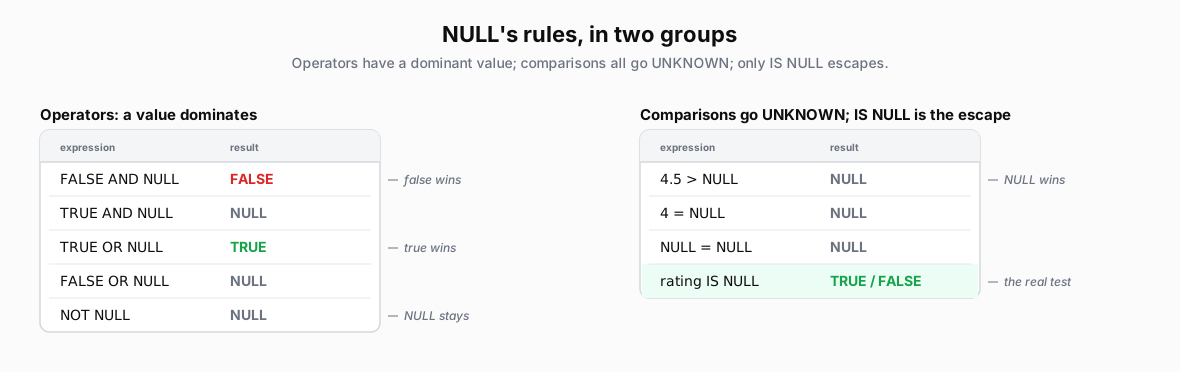 Figure: How AND, OR, and NOT handle UNKNOWNFALSE AND UNKNOWN is FALSE; TRUE AND UNKNOWN stays UNKNOWN. TRUE OR UNKNOWN is TRUE; FALSE OR UNKNOWN stays UNKNOWN. NOT UNKNOWN stays UNKNOWN. Use rating IS NULL to test whether a value is missing.
| expression | result |
|---|---|
| FALSE AND NULL | FALSE |
| TRUE AND NULL | NULL |
| TRUE OR NULL | TRUE |
| FALSE OR NULL | NULL |
| NOT NULL | NULL |
| expression | result |
|---|---|
| rating IS NULL | TRUE / FALSE |
Figure 3. FALSE decides an AND expression, and TRUE decides an OR expression. Otherwise, UNKNOWN remains. Use IS NULL to test whether a value is missing.
NULL with AND/OR Logic
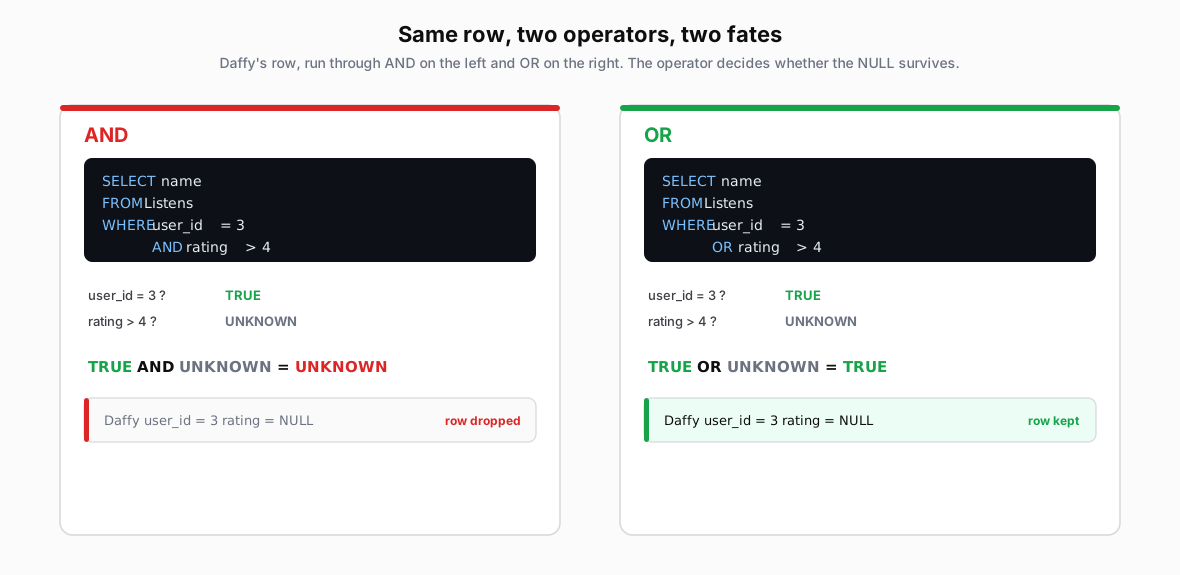 Figure: AND keeps one row; OR keeps seven rows, including the NULL rowAll nine Listens rows pass through user_id = 3 AND rating > 4 and through the OR version. The AND predicate keeps only listen 8; listen 9 becomes UNKNOWN and drops. The OR predicate keeps seven rows, including listen 9 because user_id = 3 makes the whole predicate TRUE. Color key: purple bars mark Daffy's rows; strikethrough marks rows WHERE drops; green is TRUE, red is FALSE, grey is UNKNOWN.
Figure 4. WHERE applies the complete predicate to every row. The AND query keeps only listen 8; listen 9 evaluates to UNKNOWN and drops. The OR query keeps seven rows, including listen 9, because user_id = 3 makes the complete predicate TRUE. A NULL value does not drop a row by itself.
NULL in WHERE Clause
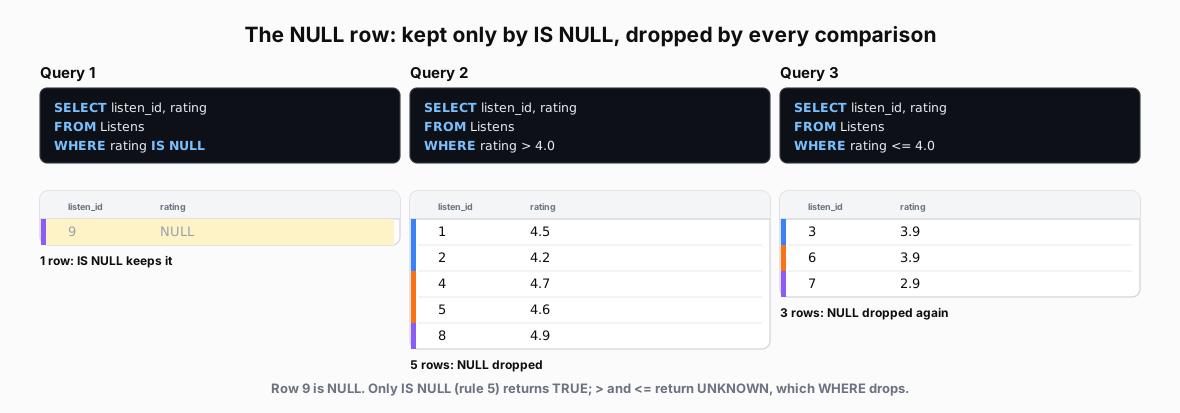 Figure: The same NULL row across three WHERE filtersThe same NULL row across three WHERE filters Color key: green TRUE, red FALSE, grey UNKNOWN/NULL.
Figure 5. The three filters account for every row: 5 ratings above 4, 3 ratings at or below 4, and 1 NULL. The comparison filters drop row 9 because they evaluate to UNKNOWN. IS NULL finds it.
| listen_id | rating |
|---|---|
| 9 | NULL |
| listen_id | rating |
|---|---|
| 1 | 4.5 |
| 2 | 4.2 |
| 4 | 4.7 |
| 5 | 4.6 |
| 8 | 4.9 |
| listen_id | rating |
|---|---|
| 3 | 3.9 |
| 6 | 3.9 |
| 7 | 2.9 |
SELECT listen_id, rating FROM Listens WHERE rating > 4.0;   -- 5 rows
SELECT listen_id, rating FROM Listens WHERE rating <= 4.0;  -- 3 rows
SELECT listen_id, rating FROM Listens WHERE rating IS NULL; -- 1 row
The counts reconcile the table: 5 + 3 + 1 = 9. Without the IS NULL query, row 9 appears to vanish.
NULL in Aggregates
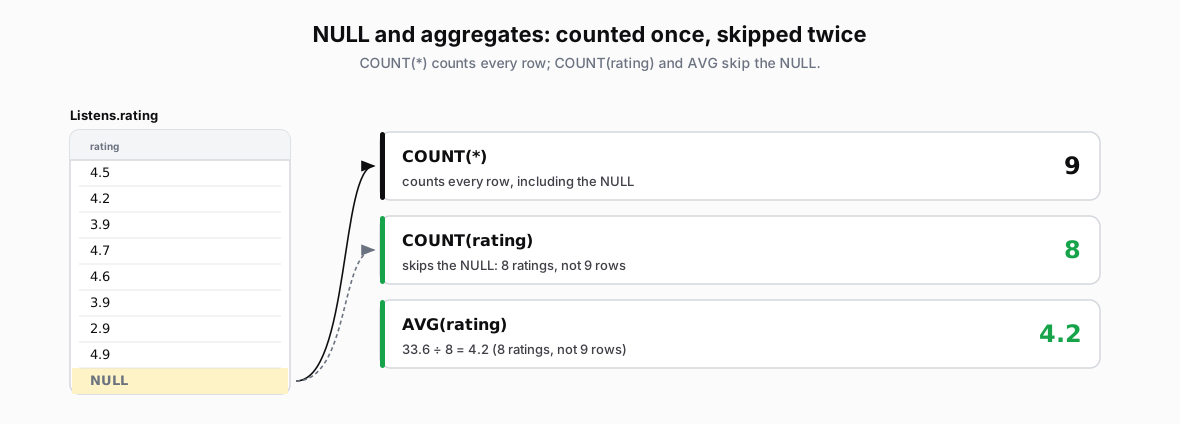 Figure: COUNT(*)=9 counts all; COUNT(rating)=8 and AVG=4.2 skip the NULLCOUNT(*)=9 counts all; COUNT(rating)=8 and AVG=4.2 skip the NULL Color key: green TRUE, red FALSE, grey NULL/UNKNOWN.
Figure 6. COUNT(*) counts every row, so it returns 9. COUNT(rating) counts non-NULL values, so it returns 8. AVG(rating) divides by that same non-NULL count of 8, not 9.
-- Compare how aggregates handle NULL values
SELECT
    COUNT(*) AS total_rows,
    COUNT(rating) AS rated_rows,
    AVG(rating) AS avg_rating,
    SUM(rating) AS sum_rating,
    MIN(rating) AS min_rating,
    MAX(rating) AS max_rating
FROM Listens
| total_rows | rated_rows | avg_rating | sum_rating | min_rating | max_rating | Notes |
|---|---|---|---|---|---|---|
| 9 | 8 | 4.2 | 33.6 | 2.9 | 4.9 | COUNT(*) counts all; others skip NULL |
The eight known ratings sum to 33.6, so AVG(rating) returns 33.6 / 8 = 4.2. SUM, AVG, MIN, MAX, and COUNT(column) skip NULLs; COUNT(*) counts every row.
NULL in DISTINCT
-- Get unique rating values (NULLs treated as one group)
SELECT DISTINCT rating
FROM Listens
| rating | Annotations |
|---|---|
| NULL | NULL forms one unique value |
| 2.9 | From listen_id 7 |
| 3.9 | Keeping only one (from listen_ids 3, 6) |
| 4.2 | From listen_id 2 |
| 4.5 | From listen_id 1 |
| 4.6 | From listen_id 5 |
| 4.7 | From listen_id 4 |
| 4.9 | From listen_id 8 |
DISTINCT treats all NULLs as one unique value, even though NULL = NULL is UNKNOWN. (GROUP BY behaves the same way; covered on the GROUP BY page.)
Common Mistakes
The = NULL Trap
rating = NULL is UNKNOWN on every row, and WHERE keeps only TRUE rows, so the query returns nothing.
-- WRONG: rating = NULL is always UNKNOWN (not TRUE)
SELECT * FROM Listens WHERE rating = NULL

-- CORRECT: Use IS NULL to properly test for NULL
SELECT * FROM Listens WHERE rating IS NULL
The NOT NULL Gotcha
When rating is NULL, rating > 4.0 is UNKNOWN, and NOT UNKNOWN is still UNKNOWN, so WHERE drops the row.
-- WRONG: NOT (rating > 4.0) still excludes NULLs
SELECT * FROM Listens WHERE NOT (rating > 4.0)

-- CORRECT: Explicitly include NULLs if you want them
SELECT * FROM Listens
WHERE rating <= 4.0 OR rating IS NULL