Window Functions: Calculations Without Collapsing
Concept. A window function uses OVER to calculate a value for each input row, such as an average or a rank. Unlike GROUP BY, it keeps the individual rows.
Intuition. AVG(rating) OVER (PARTITION BY user_id) computes Mickey's average alongside every one of Mickey's listen rows without collapsing them. The Listens table comes back at 9 rows, plus one new column.
GROUP BY vs PARTITION BY
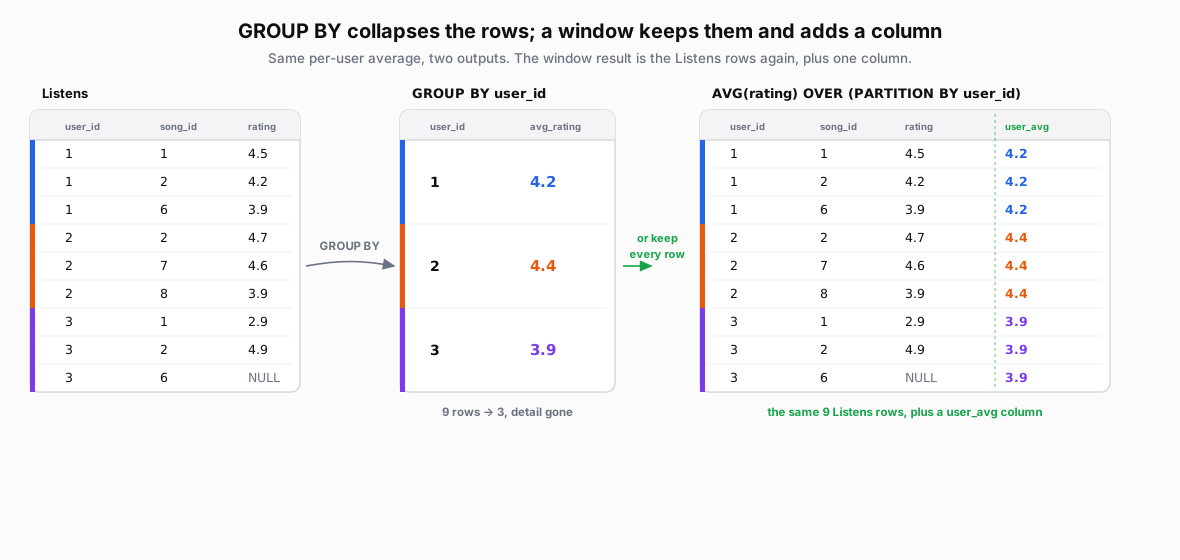 Figure: GROUP BY collapses; a window keeps the rows in a new table plus a columnThe nine Listens rows. GROUP BY collapses them to three rows of per-user average. A window function instead returns the same nine Listens rows in a new table, each with a user_avg column holding its user average.
| user_id | song_id | rating |
|---|---|---|
| 1 | 1 | 4.5 |
| 1 | 2 | 4.2 |
| 1 | 6 | 3.9 |
| 2 | 2 | 4.7 |
| 2 | 7 | 4.6 |
| 2 | 8 | 3.9 |
| 3 | 1 | 2.9 |
| 3 | 2 | 4.9 |
| 3 | 6 | NULL |
| user_id | avg_rating |
|---|---|
| 1 | 4.2 |
| 2 | 4.4 |
| 3 | 3.9 |
| user_id | song_id | rating | user_avg |
|---|---|---|---|
| 1 | 1 | 4.5 | 4.2 |
| 1 | 2 | 4.2 | 4.2 |
| 1 | 6 | 3.9 | 4.2 |
| 2 | 2 | 4.7 | 4.4 |
| 2 | 7 | 4.6 | 4.4 |
| 2 | 8 | 3.9 | 4.4 |
| 3 | 1 | 2.9 | 3.9 |
| 3 | 2 | 4.9 | 3.9 |
| 3 | 6 | NULL | 3.9 |
Figure 1. The same per-user average, two ways. GROUP BY collapses the nine listen rows into one summary row per user (Mickey 4.2, Minnie 4.4, Daffy 3.9), losing the detail. A window function, AVG(rating) OVER (PARTITION BY user_id), keeps all nine rows and attaches each user's average as a new column.
GROUP BY: Collapses Rows
-- One row per user; detail rows are gone.
SELECT user_id, AVG(rating) AS avg_rating
FROM Listens
GROUP BY user_id;
Daffy's average ignores the NULL: AVG(2.9, 4.9, NULL) = 7.8 / 2 = 3.9.
PARTITION BY: Keep All Rows
-- Keep all 9 rows; attach each user's average.
SELECT user_id, song_id, rating,
       AVG(rating) OVER (PARTITION BY user_id) AS user_avg
FROM Listens
ORDER BY user_id, song_id;
Daffy's NULL-rated row remains in the output and receives user_avg = 3.9.
The OVER Clause
In AVG(rating) OVER (PARTITION BY user_id), AVG(rating) says what to calculate and OVER (...) describes the window:
-
Partition:
PARTITION BY user_idseparates the users. With no PARTITION BY, all input rows form one partition. NULL partition keys belong to the same partition. -
Order:
ORDER BYinside OVER orders rows for the calculation. It does not guarantee the final output order; use the query's outer ORDER BY for that. -
Frame: For a window aggregate, the frame selects rows within the partition. The average above uses the whole partition. An ordered frame can instead support a running total or moving average.
Ranking Functions
Window functions can rank rows without collapsing them. Start with one function, RANK. It adds a rank column, ordered by rating within each user, highest first:
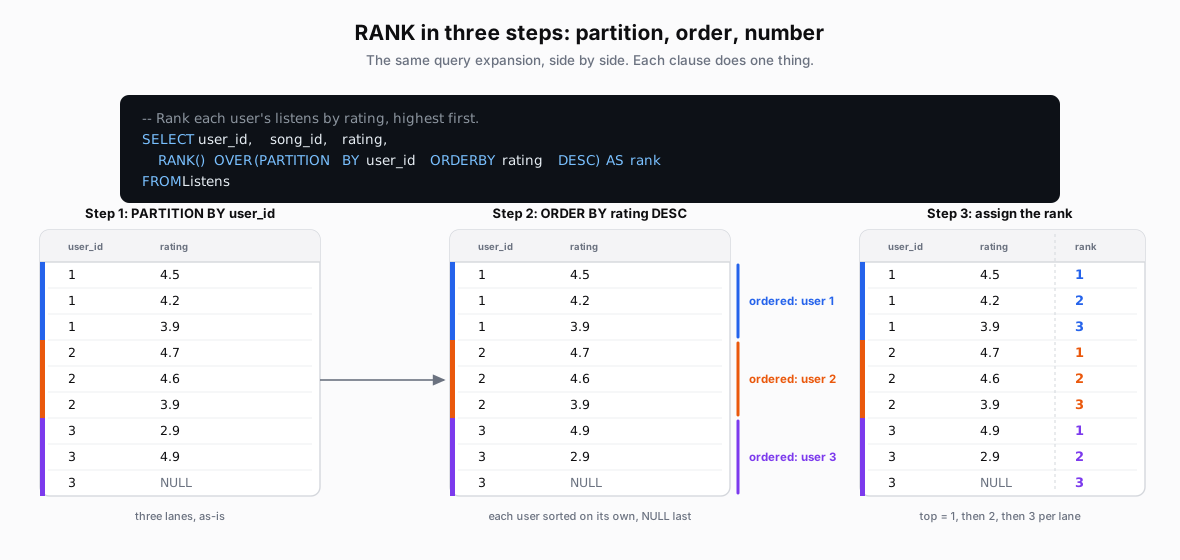 Figure: RANK in three steps: partition, order, assignThe RANK query, then three side-by-side tables: PARTITION BY makes three lanes, ORDER BY rating DESC NULLS LAST sorts each lane with NULL last, and the rank column numbers each lane from one.
| user_id | rating |
|---|---|
| 1 | 4.5 |
| 1 | 4.2 |
| 1 | 3.9 |
| 2 | 4.7 |
| 2 | 4.6 |
| 2 | 3.9 |
| 3 | 2.9 |
| 3 | 4.9 |
| 3 | NULL |
| user_id | rating |
|---|---|
| 1 | 4.5 |
| 1 | 4.2 |
| 1 | 3.9 |
| 2 | 4.7 |
| 2 | 4.6 |
| 2 | 3.9 |
| 3 | 4.9 |
| 3 | 2.9 |
| 3 | NULL |
| user_id | rating | rank |
|---|---|---|
| 1 | 4.5 | 1 |
| 1 | 4.2 | 2 |
| 1 | 3.9 | 3 |
| 2 | 4.7 | 1 |
| 2 | 4.6 | 2 |
| 2 | 3.9 | 3 |
| 3 | 4.9 | 1 |
| 3 | 2.9 | 2 |
| 3 | NULL | 3 |
-- Rank each user's listens by rating, highest first.
SELECT
  user_id,
  song_id,
  rating,
  RANK() OVER (PARTITION BY user_id ORDER BY rating DESC NULLS LAST) AS RANK
FROM Listens;
Read the clauses in order: PARTITION BY user_id restarts the ranking for each user; ORDER BY rating DESC puts the highest rating first; NULLS LAST puts unrated listens at the end.
Handling ties
RANK is one of three ranking functions. With no duplicate ratings they all produce the numbers above, so the choice only matters on a tie. The full query asks for all three at once:
SELECT user_id, song_id, rating,
  ROW_NUMBER() OVER (PARTITION BY user_id ORDER BY rating DESC NULLS LAST) AS ROW_NUMBER,
  RANK()       OVER (PARTITION BY user_id ORDER BY rating DESC NULLS LAST) AS RANK,
  DENSE_RANK() OVER (PARTITION BY user_id ORDER BY rating DESC NULLS LAST) AS DENSE_RANK
FROM Listens;
To see them diverge, imagine Mickey had a 4th listen rated 4.5, a tie with his existing 4.5:
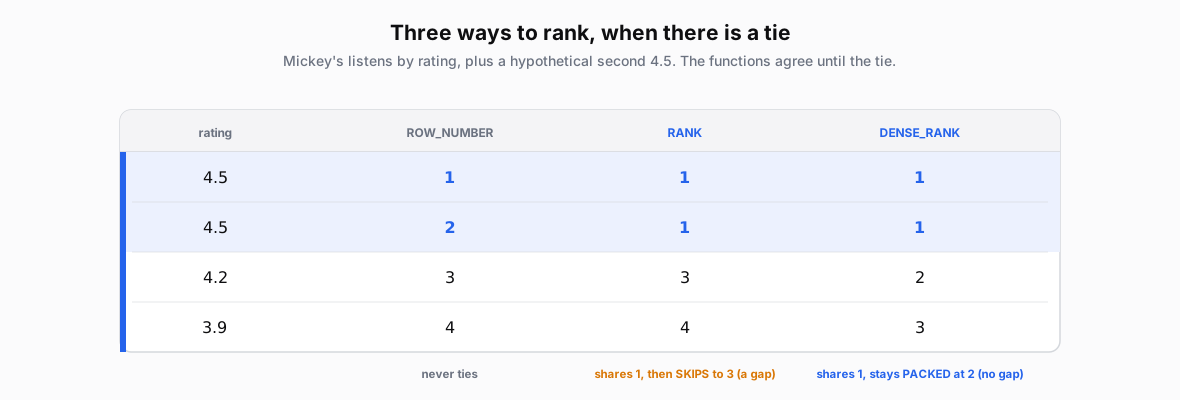 Figure: ROW_NUMBER, RANK and DENSE_RANK on a tieFour rows sorted by rating with two tied 4.5s. ROW_NUMBER is 1,2,3,4. RANK is 1,1,3,4 (skips after the tie). DENSE_RANK is 1,1,2,3 (no gap).
Figure 2. The three ranking functions agree until a tie. ROW_NUMBER is always unique (1, 2, 3, 4). RANK lets the tie share a rank then skips, leaving a gap (1, 1, 3, 4). DENSE_RANK lets the tie share a rank but stays packed, no gap (1, 1, 2, 3). The shaded band is Mickey's hypothetical 4.5 tie.
Without a tiebreaker in the window’s ORDER BY, ROW_NUMBER may assign tied rows in either order.
Other Window Calculations
These use the same OVER clause. Choose a function for the calculation, then specify its partition and ordering. For aggregates, also choose the frame.
-
Running total:
SUMwith an ordered frame fromUNBOUNDED PRECEDINGtoCURRENT ROWaccumulates values from the start of the partition. -
Moving average:
AVGover a frame such asROWS BETWEEN 2 PRECEDING AND CURRENT ROWuses the current row and up to two preceding rows. Specify an ordering to define which rows precede it. -
Previous or next value (optional):
LAGandLEADread another row in the partition's order, usually the previous or next row. -
Relative position:
NTILE(4)divides ordered rows into four buckets as evenly as possible;PERCENT_RANK()reports relative rank from 0 to 1.
Check the Ranking You Intended
For the highest-rated listens per user, check three choices:
-
Per user or overall? Use
PARTITION BY user_idfor separate rankings. Without it, all users' listens compete in one ranking. -
Highest or lowest first? Use
ORDER BY rating DESCfor highest first; ASC puts the lowest non-NULL rating first. -
Where do unrated listens go? Use
NULLS LASTto put them after rated listens. The default depends on the database and sort direction.
Takeaway
A window (also called partition function) adds a calculation while keeping individual rows. Check the partition, ordering, and tie rule to understand the result.