GROUP BY: Grouping and Aggregating Data
Concept. GROUP BY puts rows with the same values in the named columns into one group and produces one output row per group. Aggregate functions like COUNT and AVG compute once per group.
Intuition. GROUP BY user_id drops the 9 Listens rows into buckets, one per user; each bucket is a group. The 9 rows become one row per user: Mickey, Minnie, Daffy. COUNT and AVG run once per group: Mickey's total listens, Minnie's average rating.
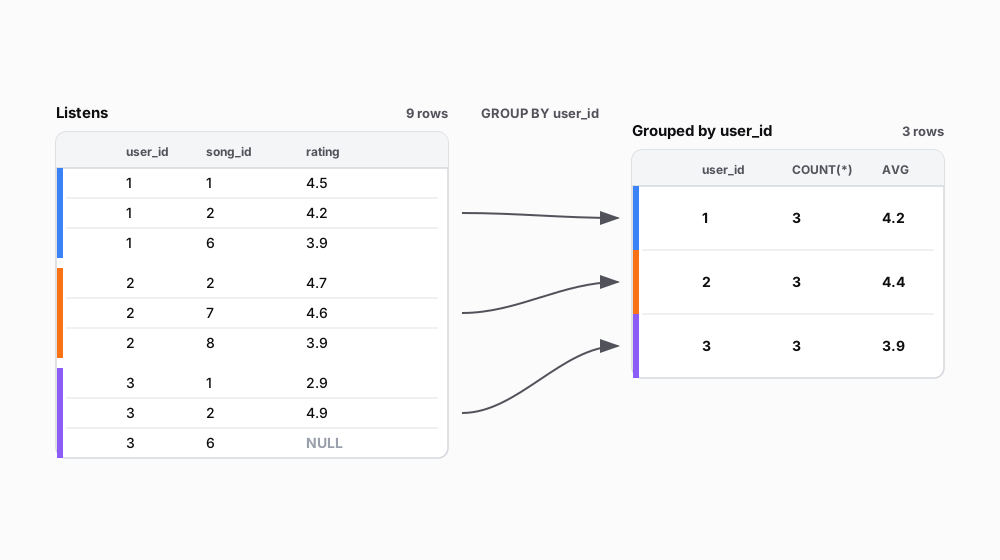 Figure: GROUP BY collapses a nine-row Listens table into a three-row grouped tableA nine-row Listens table (user_id, song_id, rating), colour-barred by user, is grouped by user_id into a three-row table of user_id, COUNT and AVG.
| user_id | song_id | rating |
|---|---|---|
| 1 | 1 | 4.5 |
| 1 | 2 | 4.2 |
| 1 | 6 | 3.9 |
| 2 | 2 | 4.7 |
| 2 | 7 | 4.6 |
| 2 | 8 | 3.9 |
| 3 | 1 | 2.9 |
| 3 | 2 | 4.9 |
| 3 | 6 | NULL |
| user_id | COUNT(*) | AVG |
|---|---|---|
| 1 | 3 | 4.2 |
| 2 | 3 | 4.4 |
| 3 | 3 | 3.9 |
Figure 1. GROUP BY produces one output row per group: nine listen rows collapse to three rows keyed by user_id, each carrying that group's aggregate values.
Simple GROUP BY
 Figure: GROUP BY user_id: nine listens collapse into three groups, one row eachGROUP BY user_id collapses nine Listens rows into three groups, one per user, each with COUNT of three. Pluto has no listens, so Pluto gets no group and no output row. Color key: per-user identity bars (Mickey blue, Minnie orange, Daffy purple, Pluto cyan).
| listen_id | user_id | song_id | rating |
|---|---|---|---|
| 1 | 1 | 1 | 4.5 |
| 2 | 1 | 2 | 4.2 |
| 3 | 1 | 6 | 3.9 |
| 4 | 2 | 2 | 4.7 |
| 5 | 2 | 7 | 4.6 |
| 6 | 2 | 8 | 3.9 |
| 7 | 3 | 1 | 2.9 |
| 8 | 3 | 2 | 4.9 |
| 9 | 3 | 6 | NULL |
| user_id | listen_count |
|---|---|
| 1 | 3 |
| 2 | 3 |
| 3 | 3 |
Figure 2. Nine input listens collapse into three output rows, one per group, COUNT(*) = 3 each. Pluto has zero listens, so Pluto forms no group and appears in no output row.
GROUP BY with Multiple Aggregates
-- Get listening stats per user: count, average, max, min ratings
SELECT
    user_id,
    COUNT(*) AS listen_count,      -- Counts ALL rows in group (including NULLs)
    AVG(rating) AS avg_rating,      -- AVG ignores NULL values
    MAX(rating) AS max_rating,      -- Finds highest non-NULL rating
    MIN(rating) AS min_rating       -- Finds lowest non-NULL rating
FROM Listens
GROUP BY user_id                    -- Each user gets their own stats
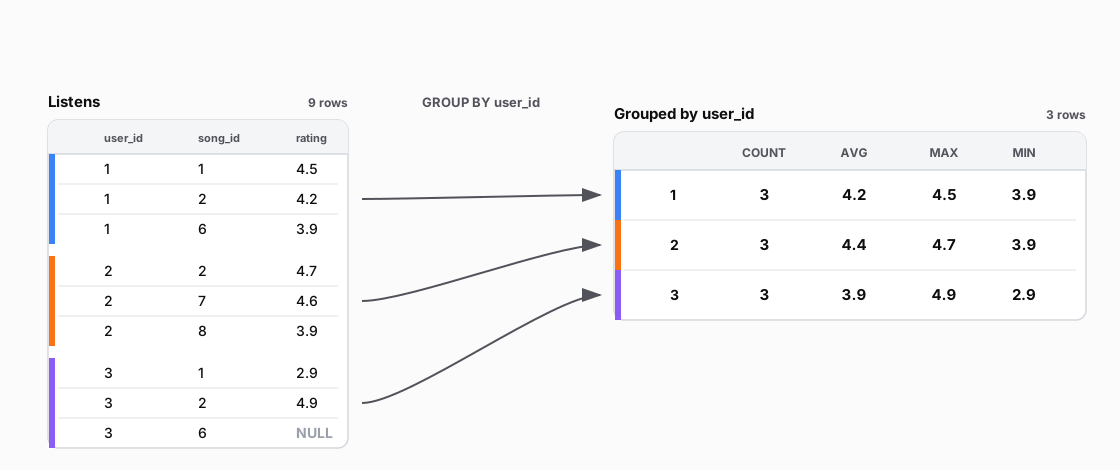 Figure: GROUP BY user_id with four aggregates per group: COUNT, AVG, MAX, MINNine listens grouped by user into three rows, each carrying COUNT, AVG, MAX and MIN of the ratings. COUNT counts the rows; AVG, MAX and MIN ignore NULL ratings.
| user_id | song_id | rating |
|---|---|---|
| 1 | 1 | 4.5 |
| 1 | 2 | 4.2 |
| 1 | 6 | 3.9 |
| 2 | 2 | 4.7 |
| 2 | 7 | 4.6 |
| 2 | 8 | 3.9 |
| 3 | 1 | 2.9 |
| 3 | 2 | 4.9 |
| 3 | 6 | NULL |
| user_id | COUNT | AVG | MAX | MIN |
|---|---|---|---|---|
| 1 | 3 | 4.2 | 4.5 | 3.9 |
| 2 | 3 | 4.4 | 4.7 | 3.9 |
| 3 | 3 | 3.9 | 4.9 | 2.9 |
Figure 3. One pass computes all four aggregates, and each sees only its own group's rows. COUNT(*) counts every row; AVG, MAX, and MIN skip the NULL.
GROUP BY Multiple Columns
-- Count how many times each user played each song
SELECT
    user_id,
    song_id,
    COUNT(*) AS play_count,
    AVG(rating) AS avg_rating
FROM Listens
GROUP BY user_id, song_id    -- multi-column GROUP BY: unique (user, song) pairs
ORDER BY user_id, song_id    -- Sort output: first by user, then by song
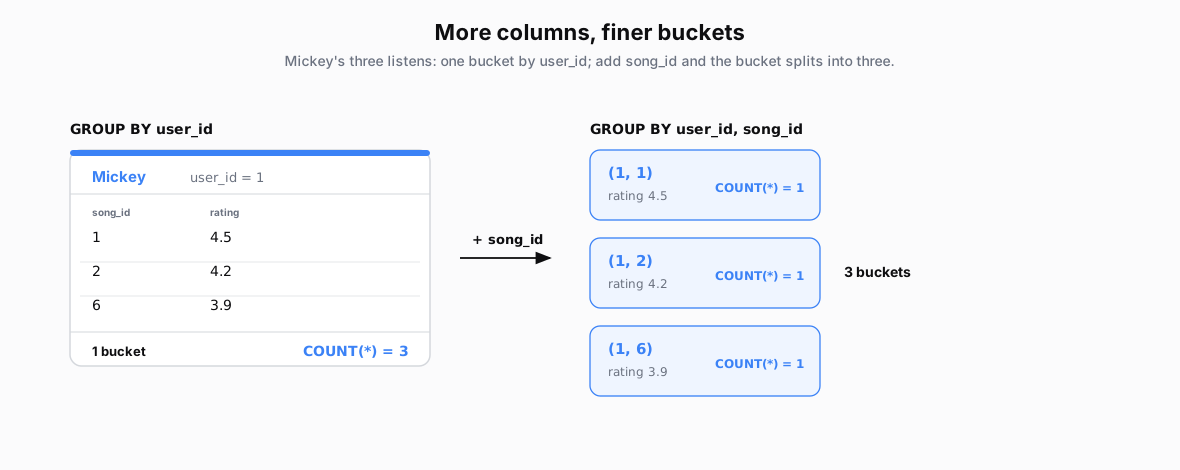 Figure: Multi-column GROUP BY splits one group into finer groupsBy user_id, Mickey is one group of three rows with COUNT three. Adding song_id splits it into three groups of one row each, COUNT one.
| song_id | rating |
|---|---|
| 1 | 4.5 |
| 2 | 4.2 |
| 6 | 3.9 |
Figure 4. The group key consists of the listed columns. GROUP BY user_id forms one group for Mickey with three rows. GROUP BY user_id, song_id forms three groups for Mickey, one per (user, song) pair, and each group contains one row.
GROUP BY with WHERE
-- Count high-rated songs (>4.0) per user
SELECT
    user_id,
    COUNT(*) AS high_rating_count,
    AVG(rating) AS avg_high_rating
FROM Listens
WHERE rating > 4.0            -- WHERE filters BEFORE grouping (NULL > 4.0 = false)
GROUP BY user_id              -- Groups only the filtered rows
ORDER BY user_id              -- Sort by user_id ascending (default)
Step 1: WHERE rating > 4.0 · 9 rows → 5 rows (crossed-out rows fail the test; NULL is UNKNOWN, also removed)
| listen_id | user_id | rating | rating > 4.0 | |
|---|---|---|---|---|
| 1 | 1 | 4.5 | 4.5 > 4.0 | |
| 2 | 1 | 4.2 | 4.2 > 4.0 | |
| 3 | 1 | 3.9 | 3.9 > 4.0 | |
| 4 | 2 | 4.7 | 4.7 > 4.0 | |
| 5 | 2 | 4.6 | 4.6 > 4.0 | |
| 6 | 2 | 3.9 | 3.9 > 4.0 | |
| 7 | 3 | 2.9 | 2.9 > 4.0 | |
| 8 | 3 | 4.9 | 4.9 > 4.0 | |
| 9 | 3 | NULL | NULL → unknown |
Step 2: GROUP BY on Filtered Data
| user_id | COUNT(*) | AVG(rating) | Notes: Post-Filtered Rows | |
|---|---|---|---|---|
| 1 | 2 | (4.5+4.2)/2 = 4.35 | Ratings from listen_ids=1,2 | |
| 2 | 2 | (4.7+4.6)/2 = 4.65 | Ratings from listen_ids=4,5 | |
| 3 | 1 | 4.9/1 = 4.9 | Ratings from listen_id=8 |
Output
| user_id | high_rating_count | avg_high_rating | |
|---|---|---|---|
| 1 | 2 | 4.35 | |
| 2 | 2 | 4.65 | |
| 3 | 1 | 4.9 |
In general, WHERE filters rows first, GROUP BY groups only the rows that survive, and the aggregates see only those rows.
GROUP BY with NULL Values
-- Count how many listens for each rating value (including NULL)
SELECT
    rating,
    COUNT(*) AS COUNT
FROM Listens
GROUP BY rating               -- NULL values form their own group
ORDER BY rating               -- NULLs appear first or last (DB-dependent)
NULL Grouping Behavior
| rating | Notes: Groups |
|---|---|
| 2.9 | Group: 2.9; listen_id = 7 |
| 3.9 | Group: 3.9; listen_id = 3,6 |
| 4.2 | Group: 4.2 ; listen_id = 2 |
| 4.5 | Group: 4.5 ; listen_id = 1 |
| 4.6 | Group: 4.6 ; listen_id = 5 |
| 4.7 | Group: 4.7 ; listen_id = 4 |
| 4.9 | Group: 4.9 ; listen_id = 8 |
| NULL | Group: NULL ; NULLs group together listen_id = 9 |
Output
| rating | count | Notes |
|---|---|---|
| 2.9 | 1 | Single occurrence |
| 3.9 | 2 | Two occurrences |
| 4.2 | 1 | Single occurrence |
| 4.5 | 1 | Single occurrence |
| 4.6 | 1 | Single occurrence |
| 4.7 | 1 | Single occurrence |
| 4.9 | 1 | Single occurrence |
| NULL | 1 | NULL forms its own group |
In general, all NULLs fall into one group, even though NULL = NULL is UNKNOWN in a WHERE test. ORDER BY puts that group first or last, depending on the database.
COUNT(*) vs COUNT(column)
-- Compare total listens vs rated vs timed listens per user
SELECT
    user_id,
    COUNT(*) AS total_listens,           -- COUNT(*) includes NULL rows
    COUNT(rating) AS rated_listens,      -- COUNT(column) skips NULL values
    COUNT(listen_time) AS timed_listens  -- Different NULLs = different counts
FROM Listens
GROUP BY user_id
ORDER BY user_id
| user_id | total_listens | rated_listens | timed_listens | Notes | |
|---|---|---|---|---|---|
| 1 | 3 | 3 | 2 | 1: has time 2: time=NULL 3: has time | |
| 2 | 3 | 3 | 2 | 4: time=NULL 5: has time 6: has time | |
| 3 | 3 | 2 | 1 | 7: time=NULL 8: has time 9: time=NULL |
COUNT Variants:
-
COUNT(*) = all rows (including NULLs)
-
COUNT(column) = non-NULL values only
-
COUNT(DISTINCT column) = unique non-NULL values
Key Rules
-
Simple Grouping:
GROUP BY user_idcreates one group per user -
Multi-Column Grouping:
GROUP BY user_id, song_idgroups by combinations -
Aggregate Scope: Functions like COUNT() operate within each group.
SELECT user_id, COUNT(*), AVG(rating) -
Execution Order: FROM → WHERE → GROUP BY → HAVING → SELECT → ORDER BY → LIMIT. SELECT runs fifth, after the groups exist.
-
NULL Grouping: NULL values form their own group
-
SELECT Restriction: Only GROUP BY columns and aggregates allowed in SELECT (else invalid: a non-aggregated column that is not in GROUP BY)
Common Mistakes
The Non-Grouped Column Error; UNSAFE queries
We grouped by user_id, so each user collapses to one row. But we also asked for song_id, and Mickey's one group holds three different songs. Which one goes in his single row?
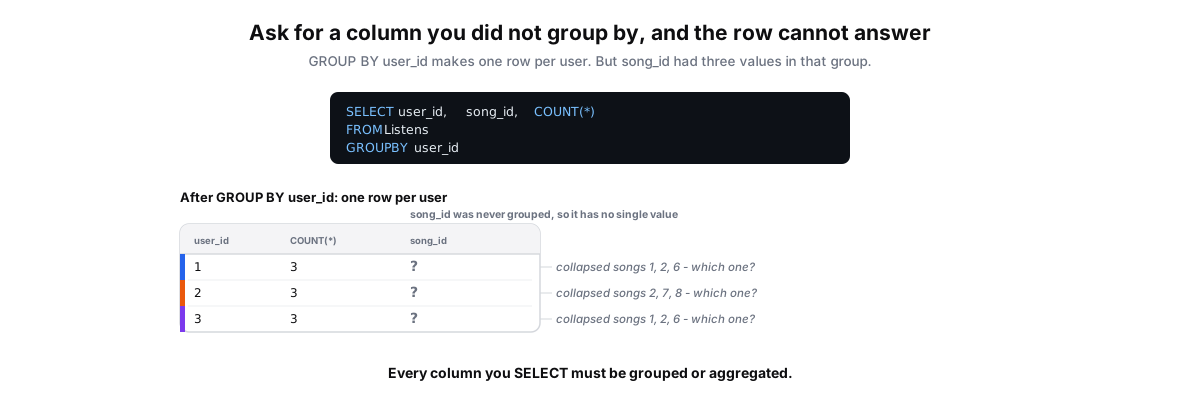 Figure: A grouped row cannot show a column you did not group byGROUP BY user_id collapses each user's listens to a single row. The query also asks for song_id, which was not grouped, so it shows a grey question mark: Mickey's row collapsed songs 1, 2 and 6, and the database cannot pick one. Margin notes list the candidate songs. Color key: grey question mark marks the unresolved column, per-user identity bars color the rows.
| user_id | COUNT(*) | song_id |
|---|---|---|
| 1 | 3 | ? |
| 2 | 3 | ? |
| 3 | 3 | ? |
Figure 5. GROUP BY user_id leaves one row per user, but song_id was never grouped. Mickey's group holds songs 1, 2, and 6, so the database cannot pick one song_id for his row: it errors or silently guesses.
Fix: add song_id to GROUP BY. Each (user, song) pair becomes its own group, so every song_id resolves to exactly one value.
-- Safe: every non-aggregate column is in GROUP BY
SELECT user_id, song_id, COUNT(*)
FROM Listens
GROUP BY user_id, song_id;
WHERE Can't See Aggregates
-- WRONG: WHERE can't filter on aggregates (they don't exist yet)
SELECT user_id, AVG(rating)
FROM Listens
WHERE AVG(rating) > 4.0
GROUP BY user_id

-- CORRECT: Use HAVING to filter groups after aggregation
SELECT user_id, AVG(rating)
FROM Listens
GROUP BY user_id
HAVING AVG(rating) > 4.0
Problem: WHERE executes before grouping; aggregates don't exist yet
The COUNT NULL Trap
-- Misleading: COUNT(rating) skips NULL ratings
SELECT user_id,
       COUNT(rating) AS total_ratings  -- Skips NULLs!
FROM Listens
GROUP BY user_id

-- Better: Show both total rows and non-NULL ratings
SELECT user_id,
       COUNT(*) AS total_listens,
       COUNT(rating) AS rated_listens
FROM Listens
GROUP BY user_id
Problem: COUNT(column) behavior with NULL often unexpected
Redundant DISTINCT
-- REDUNDANT: GROUP BY already ensures unique user_id values
SELECT DISTINCT user_id, COUNT(*)
FROM Listens
GROUP BY user_id

-- SIMPLER: GROUP BY alone creates unique groups
SELECT user_id, COUNT(*)
FROM Listens
GROUP BY user_id
Problem: GROUP BY already ensures unique group values