SQL Sets and Set Operations
Concept. Set operators combine two query results. UNION returns rows that appear in either result. INTERSECT returns rows that appear in both results. EXCEPT returns rows that appear in the first result and do not appear in the second result. UNION removes duplicates. UNION ALL keeps duplicates.
Intuition. Stack the genres Mickey played onto the genres he was recommended. UNION merges them into one deduplicated set, INTERSECT keeps the genres in both, EXCEPT keeps the ones he played but was not recommended.
Sets vs Multi-sets
Key concept: SQL tables are multi-sets (bags).
Mathematical set
- No duplicates allowed
- {1, 2, 3}: each element once
- Order doesn't matter
SQL multi-set (bag)
- Duplicates are allowed
- {1, 1, 2, 3, 3, 3}: elements can repeat
- Each duplicate counts separately
SQL Set Operations Overview
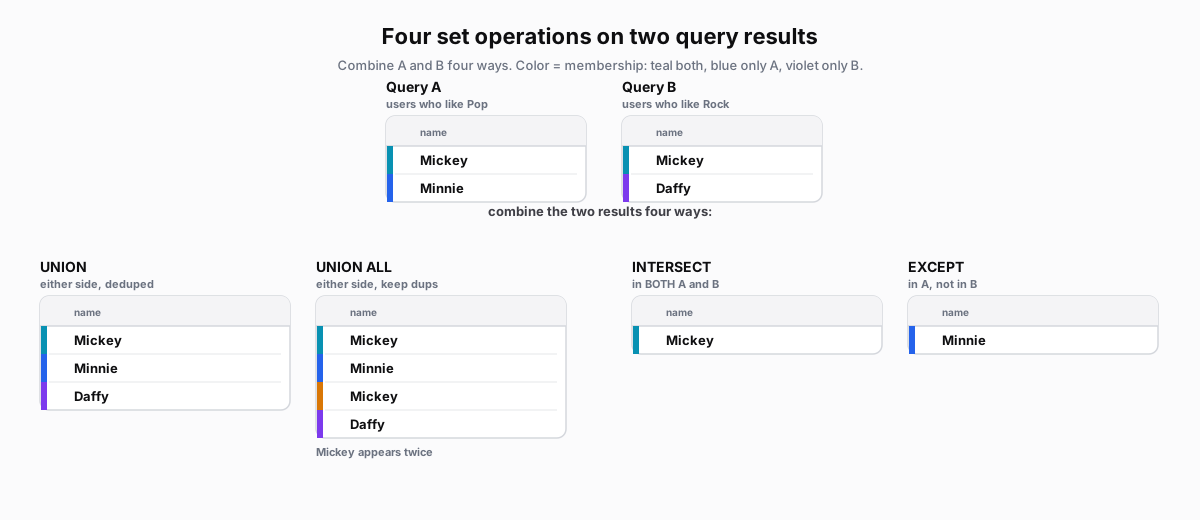 Figure: The four set operations as row tablesTwo query results: A is Mickey and Minnie, B is Mickey and Daffy; Mickey (teal) is in both, Minnie (blue) only in A, Daffy (violet) only in B. UNION returns the three distinct users; UNION ALL keeps the duplicate Mickey for four rows; INTERSECT returns only Mickey (in both); EXCEPT (A minus B) returns only Minnie. Color key: teal in both, blue only A, violet only B, amber the kept duplicate.
| name |
|---|
| Mickey |
| Minnie |
| name |
|---|
| Mickey |
| Daffy |
| name |
|---|
| Mickey |
| Minnie |
| Daffy |
| name |
|---|
| Mickey |
| Minnie |
| Mickey |
| Daffy |
| name |
|---|
| Mickey |
| name |
|---|
| Minnie |
Figure 1. Each operator combines the two user sets differently: UNION keeps either side, INTERSECT keeps the overlap, EXCEPT keeps the left side minus the overlap.
UNION: Combine and Remove Duplicates
Creates a true set from two queries. Duplicate rows appear only once.
-- Artists from Pop songs
SELECT DISTINCT artist                -- Query A: Pop artists
FROM Songs
WHERE genre = 'Pop'

UNION                                 -- UNION: Combines and removes duplicates

-- Artists from Rock songs
SELECT DISTINCT artist                -- Query B: Rock artists
FROM Songs
WHERE genre = 'Rock'                  -- Result: All artists from EITHER genre
Result: Taylor Swift, Ed Sheeran (each artist appears once)
UNION ALL: Combine and Keep Duplicates
UNION ALL keeps every row, duplicates and all.
-- All Pop listens
SELECT l.user_id, l.song_id
FROM Listens l
JOIN Songs s ON l.song_id = s.song_id
WHERE genre = 'Pop'                   -- First result set

UNION ALL                             -- UNION ALL: Keeps all rows (duplicates too!)

-- All Classic listens
SELECT l.user_id, l.song_id
FROM Listens l
JOIN Songs s ON l.song_id = s.song_id
WHERE genre = 'Classic'               -- If user listened to both, appears twice
Performance: UNION ALL skips the dedup pass, so it avoids the sort UNION needs.
INTERSECT: Find Common Rows
Returns only rows that appear in BOTH queries.
-- Users who listened to Pop
SELECT DISTINCT user_id
FROM Listens l
JOIN Songs s ON l.song_id = s.song_id
WHERE genre = 'Pop'                   -- Query A: Pop listeners

INTERSECT                             -- INTERSECT: Only rows in both results

-- Users who listened to Classic
SELECT DISTINCT user_id
FROM Listens l
JOIN Songs s ON l.song_id = s.song_id
WHERE genre = 'Classic'               -- Result: Users who like BOTH genres
Result: Users 1, 2, and 3 (Mickey, Minnie, and Daffy all listened to both Pop and Classic).
EXCEPT: Find Difference
Returns rows from first query that are NOT in second query.
-- All songs
SELECT song_id, title FROM Songs       -- Query A: All songs in database

EXCEPT                                 -- EXCEPT: A minus B (set difference)

-- Songs that have been listened to
SELECT DISTINCT s.song_id, s.title
FROM Songs s
JOIN Listens l ON s.song_id = l.song_id  -- Query B: Songs with listens
                                         -- Result: Songs NEVER listened to
Result: Songs 3, 4, 5, 9, 10 (Shape of You, Photograph, Shivers, Bad Blood, DJ Mix). Never played.
Practice: Multi-set vs Set Behavior
-- This table has duplicates (multi-set)
SELECT genre FROM Songs;              -- Raw data: Duplicates preserved
-- Result: Pop, Pop, Rock, Rock, Rock, Classic, Classic, Classic, Rock, NULL

-- Remove duplicates to get a set
SELECT DISTINCT genre FROM Songs;     -- DISTINCT: Each value once only
-- Result: Pop, Rock, Classic, NULL   -- NULL counts as a distinct value!

-- UNION removes duplicates (set operation)
SELECT genre FROM Songs WHERE artist = 'Taylor Swift'
UNION                                 -- Set operation: Removes duplicates
SELECT genre FROM Songs WHERE artist = 'Ed Sheeran';
-- Result: Pop, Rock (no duplicates)

-- UNION ALL keeps duplicates (multi-set operation)
SELECT genre FROM Songs WHERE artist = 'Taylor Swift'
UNION ALL                             -- Multi-set: Preserves all duplicates
SELECT genre FROM Songs WHERE artist = 'Ed Sheeran';
-- Result: Pop, Pop, Rock, Rock, Rock, Rock (all occurrences)