SQL Problem Solving: Reading and Debugging Queries
Concept. Read and debug a query by tracing its input rows through each clause. Debug tables, also called handtraces, record the intermediate results and expose logic errors.
Intuition. Follow the rows through joins and grouping, then mark which groups HAVING removes. The intermediate tables show where an incorrect answer went wrong.
Trace a GROUP BY and HAVING Query
What does this query return? Does it correctly find user-genre pairs with at least two listens? Trace each clause to check.
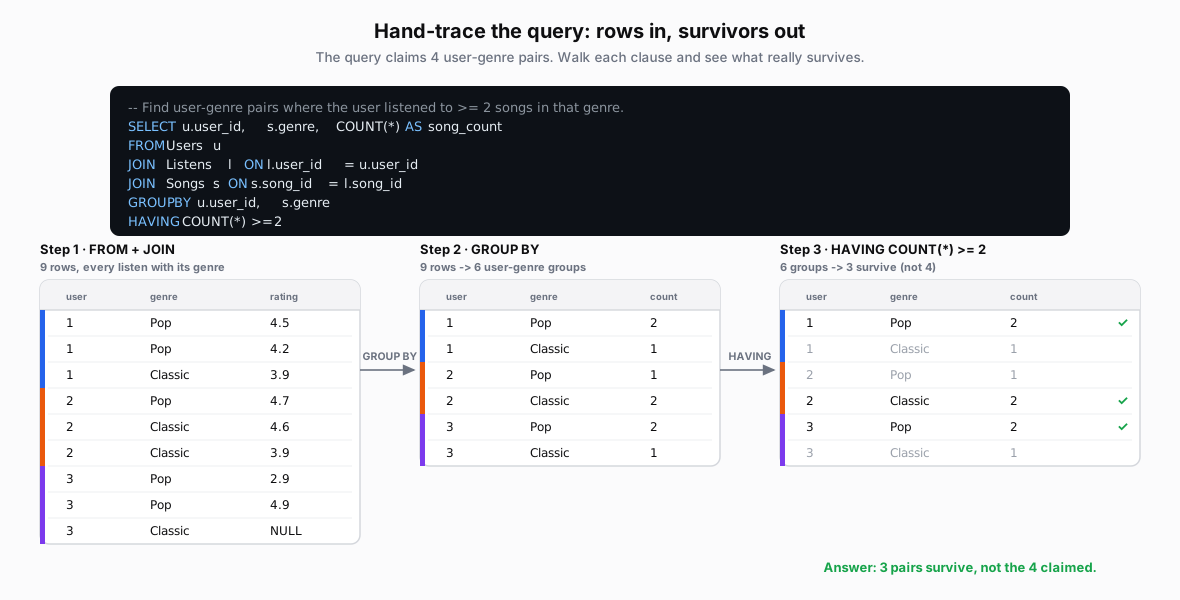 Figure: Hand-trace of the GROUP BY / HAVING queryThe query, then three tables side by side: FROM+JOIN gives 9 rows, GROUP BY makes 6 user-genre groups, and HAVING COUNT >= 2 keeps 3 user-genre pairs.
| user | genre | rating |
|---|---|---|
| 1 | Pop | 4.5 |
| 1 | Pop | 4.2 |
| 1 | Classic | 3.9 |
| 2 | Pop | 4.7 |
| 2 | Classic | 4.6 |
| 2 | Classic | 3.9 |
| 3 | Pop | 2.9 |
| 3 | Pop | 4.9 |
| 3 | Classic | NULL |
| user | genre | count |
|---|---|---|
| 1 | Pop | 2 |
| 1 | Classic | 1 |
| 2 | Pop | 1 |
| 2 | Classic | 2 |
| 3 | Pop | 2 |
| 3 | Classic | 1 |
| user | genre | count |
|---|---|---|
| 1 | Pop | 2 |
| 1 | Classic | 1 |
| 2 | Pop | 1 |
| 2 | Classic | 2 |
| 3 | Pop | 2 |
| 3 | Classic | 1 |
Test on a Small Table
Isolate one problem at a time: build a few rows that trigger it, work out the answer by hand, and compare.
-
JOINs can multiply rows or drop unmatched ones. Example: take one user with two listens and one with none. A LEFT JOIN should return three rows, one with NULL listen columns.
-
NULLs make comparisons UNKNOWN, so WHERE silently drops the row. Example: keep Daffy's NULL rating and see which filters drop it.
-
Groups decide what one output row means; grouping by the wrong columns changes it. Example: for listens per user, write down the three rows you expect (Mickey, Minnie, Daffy) before running the query. Grouping by user and genre would give six.
-
Aggregates count differently:
COUNT(*)counts rows;COUNT(column)andAVGskip NULLs. Example: work Daffy's group by hand:COUNT(*)3,COUNT(rating)2,AVG3.9. -
Windows depend on partition, sort order, and ties. Example: rank all ratings; the two 3.9s should tie.
Test on a Large Table
Test with queries: facts that must hold, and spot-checks of a chosen slice such as Daffy (NULL rating) and Pluto (no listens). Try each check on your small table first and build debug tables for those; if it misses the bug there, it will miss it at scale.
-
JOINs: a many-to-one join should keep every row of the many side. More rows means a key repeats; fewer means rows had no match. Example:
Listens JOIN Songs ON song_idshould return as many rows asListens. To list users with no match, useUsers LEFT JOIN Listens … WHERE l.user_id IS NULL, which returns Pluto. -
NULLs: a filter and its opposite should together cover every row; the gap is the NULLs. Example:
rating > 4.0returns 5 rows andrating <= 4.0returns 3, but Listens has 9. The missing row is the NULL, andCOUNT(*) - COUNT(rating)is 1. ForNOT IN, one NULL in the subquery makes the whole query return nothing. -
Groups: the output row count should match what one row stands for. Example: one row per user should give
COUNT(DISTINCT user_id), 3 rows. Six rows means you also grouped by genre. -
Aggregates: spot-check one group with a direct query. Example:
SELECT COUNT(*), COUNT(rating), AVG(rating) FROM Listens WHERE user_id = 3should match Daffy's row: 3, 2, 3.9. -
Windows: spot-check one partition by sorting it directly. Example: Minnie's ratings sort as 4.7, 4.6, 3.9, so her ranks should be 1, 2, 3. Ranks 2, 3, 6 mean
PARTITION BYis missing.
Takeaway
Follow the intermediate tables to find the first step where the result differs from what you intended. Label columns and mark the rows each filter removes.