How Postgres Runs on Linux
Concept. Linux runs on any hardware. Postgres runs using Linux's processes and a shared pool of RAM.
Intuition. Two programs on one machine can both use the same address, both hold a file open, and both run as if they had the processor to themselves. The kernel, the part of Linux that owns the machine, keeps the maps that make all of it work.
This page is optional background for the modules that follow.
The stack
Start at the bottom. CPUs, memory chips, an SSD, a card that reaches storage in another rack.
Linux manages all of it. It gives each program a unique process with virtual RAM, a virtual CPU, and files. iMovie's process cannot see inside a Chrome's process or Postgres' process, so a crash is isolated to one program and nothing else.
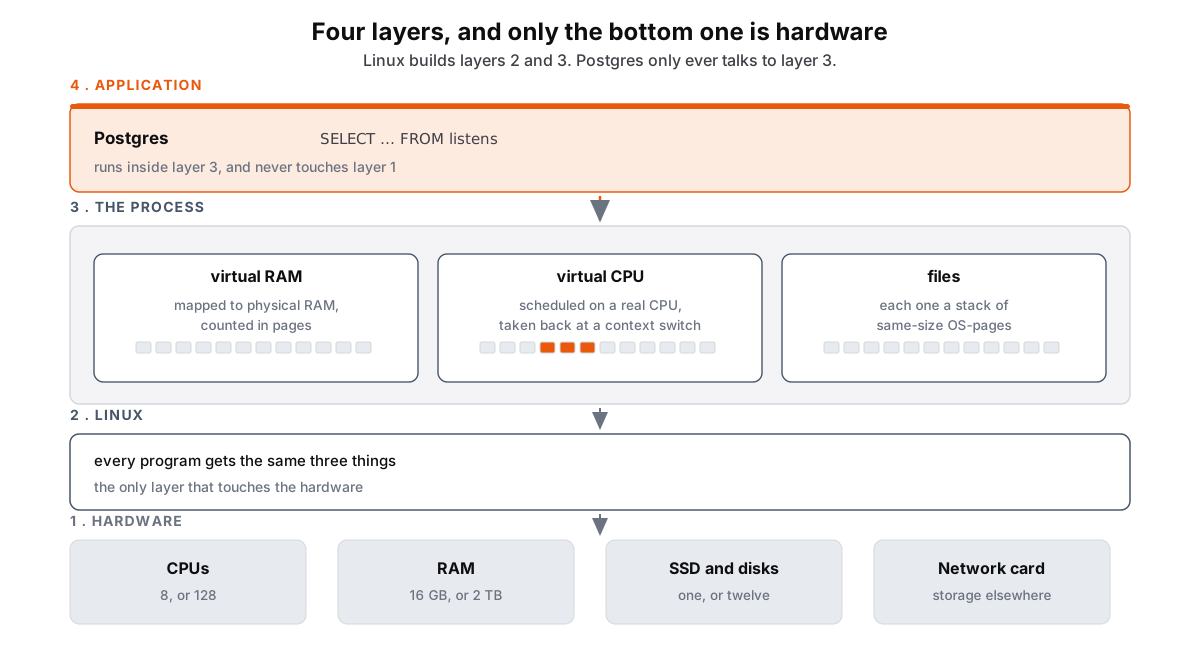 Figure: Four layers from hardware up to your databaseFour stacked layers, numbered from the bottom. Layer one, grey, is the hardware: CPUs, eight or a hundred and twenty-eight; RAM, sixteen gigabytes or two terabytes; SSDs and disks; and a network card reaching storage elsewhere. Layer two, slate, is Linux, which context-switches the CPUs between programs, maps addresses to RAM, and names files and finds their blocks; it is the only layer that touches the hardware. Layer three is the process, a sandbox per program, holding three boxes: a memory virtual RAM, a slice of the real thing counted in pages; a virtual CPU, a slice of a real one taken away and given back; and files, each a stack of same-size pages. RAM and files are both drawn as rows of small page squares, and the CPU slice as a bar with three of its ticks highlighted. Layer four, orange, is your application running a SELECT, which runs inside layer three and never touches layer one. Arrows run down the stack from each layer to the one below. Color key: orange is your application, slate is Linux and what it builds, grey is real hardware.
Figure 1. Linux runs on hardware and exports processes. A process includes a private memory space that Linux maps to physical RAM, a set of open files referenced through handles, and time on a CPU that the kernel schedules via context switches. Postgres runs as a program inside a process and uses only these interfaces.
Two of those three are counted in pages: virtual RAM and files. Linux's unit is the OS-page, a block of fixed size, and everything is measured in how many OS-pages it takes.
The sandbox is drawn around the process. A single process can hold dozens of threads, all sharing that one memory space and those same open files, so two threads can reach the same byte at the same moment. That is why a program needs locks of its own.
In high-performance apps, processes can also ask for shared memory, a region several processes map at once and all of them can write.
One pool, many workers
Postgres runs as a set of processes (e.g., one per client connection) attaches to a single shared-memory region.
Most of that region is the buffer pool. Postgres reads a table in fixed chunks it calls blocks. In this course, we call them DB-pages so we can compare them against other data systems. The pool holds the DB-pages it has already read off the disk, and every connection sees the same copy. A hundred connections querying one table read it into memory once instead of a hundred times, and a row one connection commits is a row the next connection can see.
Every read() and write() Postgres makes crosses into the OS kernel. If one process crashes and corrupts the shared memory, Postgres restarts every worker after one of them crashes, because the crashed worker may have left the pool inconsistent.
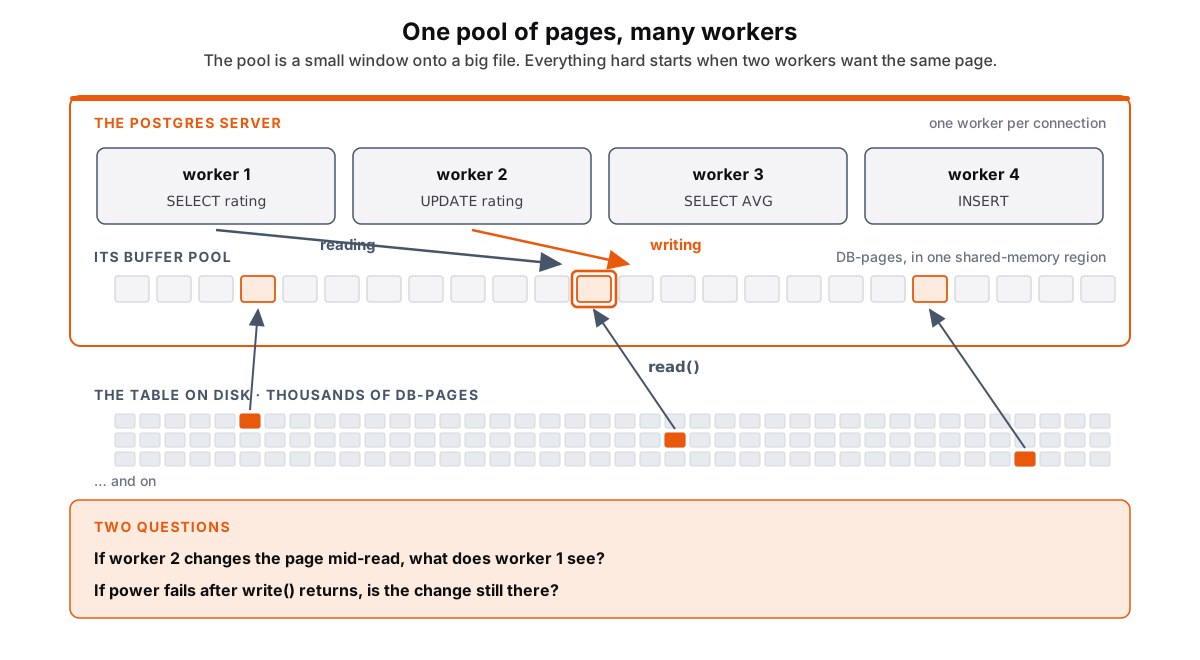 Figure: A short pool of pages over a big file of them, and two workers on one pageAt the bottom, the table on disk is drawn as a field of small grey squares, three rows of forty, every one a page of the same size, with a note that a real table has thousands of them. Above it an orange box is the Postgres server. Inside it, four slate worker boxes, one per connection, running SELECT rating, UPDATE rating, SELECT AVG and INSERT. Below the workers, a short row of twenty-four squares is the buffer pool, one shared-memory region every worker is attached to. Three pages then turn orange in scattered places across the file and arrows carry them up into three slots of the pool, labelled read(), three pages in out of thousands. Finally two arrows drop from worker 1 and worker 2 onto the same one of those pages, labelled reading and writing, and it is outlined in orange. A closing panel asks the two questions: worker 1 is halfway through that page when worker 2 changes it, what should worker 1 see; and worker 2's write has already returned, so if the power fails now is the change still there. Color key: orange is a page in play, slate is a worker and the kernel's read, grey is the disk.
Figure 2. A table occupies many DB-pages on disk. The buffer pool holds a small subset of those DB-pages, pulled from scattered locations. Multiple workers can access the same cached DB-page, including one worker that reads it and another that modifies it. Linux treats both workers as ordinary processes that read and write ordinary memory.
Two questions:
-
Concurrency: Worker 1 is halfway through a DB-page when worker 2 changes it. What should worker 1 see?
-
Durability: Worker 2's
write()has already returned. If the power fails now, is the change still there?
Each gets a module of its own later.
From one machine to many
An OS-page is 4 KB on x86-64. A DB-page is whatever size the database picks. Postgres picks 8 KB. A big-data system picks 64 MB: bigger data, bigger unit, and 64 MB is what counts as one read. As a ratio of DB-page to OS-page, Postgres runs 1:2 and a big-data system runs 1:16,384.
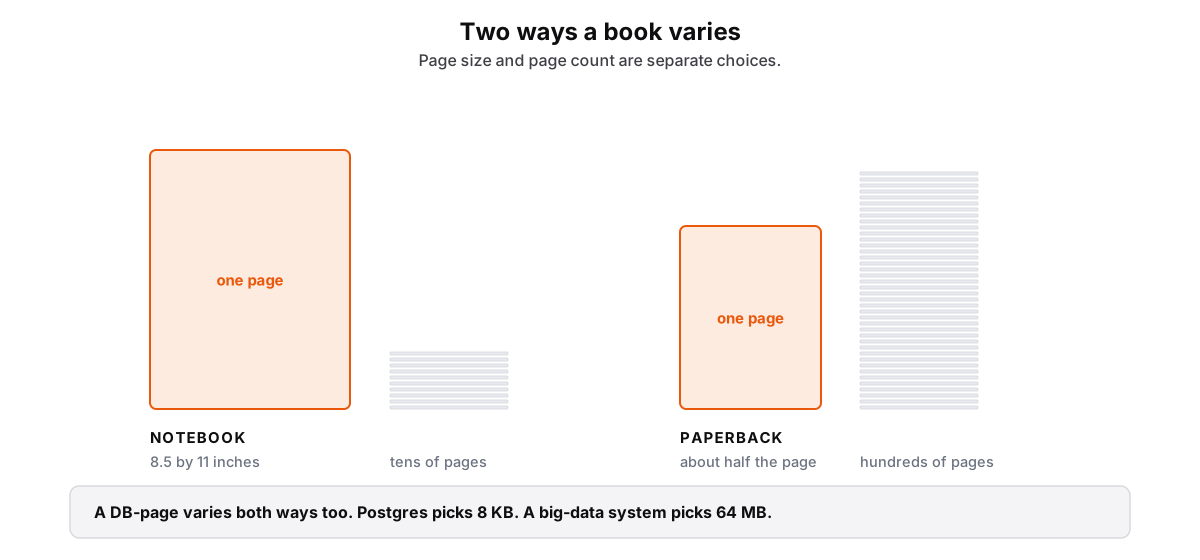 Figure: A notebook and a paperback: page size against page countTwo books side by side, drawn the same way. On the left a notebook: a tall orange rectangle labelled one page, 8.5 by 11 inches, and beside it a short stack of ten grey bars seen edge-on, tens of pages. On the right a paperback: a rectangle about half the area, also labelled one page, and beside it a much taller stack of forty bars, hundreds of pages. Both stacks sit on the same baseline so the two contrasts read together: the notebook has the bigger page and fewer of them, the paperback the smaller page and far more. A panel underneath reads: a DB-page varies both ways too, Postgres picks 8 KB, a big-data system picks 64 MB. Color key: orange is one page, the unit; grey is the count.
Figure 3. Page size and page count vary independently. A DB-page also has a fixed size, and a table spans as many DB-pages as its data requires.
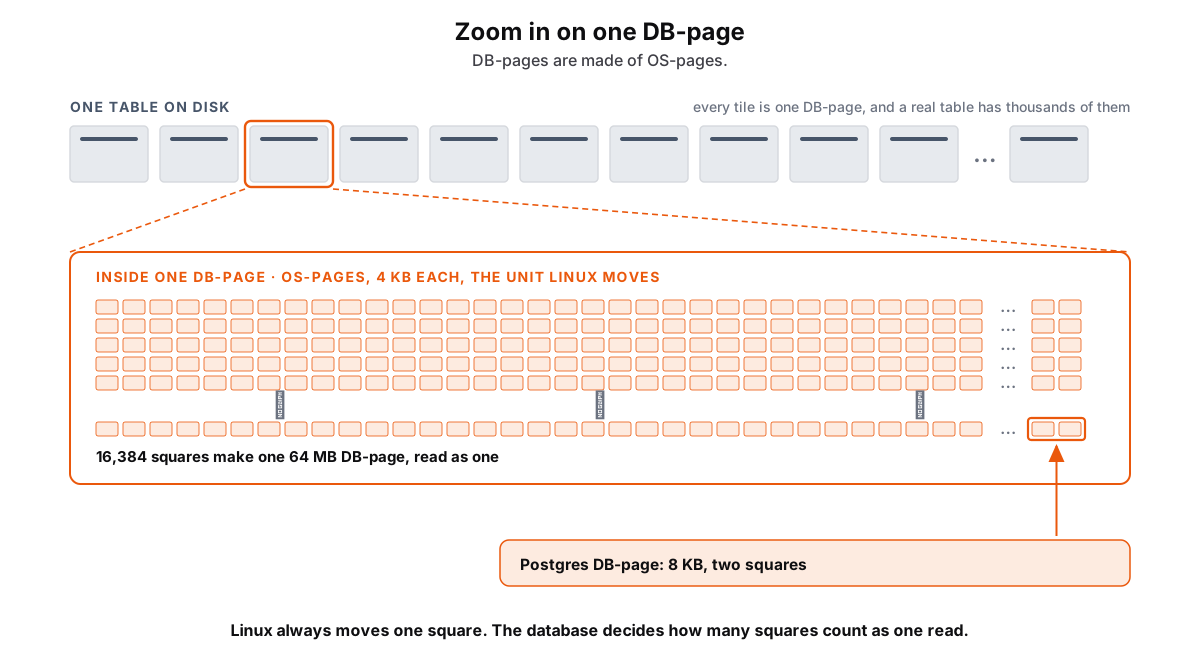 Figure: One DB-page magnified into the OS-pages it is made ofAcross the top, a table on disk is drawn as a long row of eleven grey tiles with an ellipsis between them, labelled: every tile is one DB-page, and a real table has thousands of them. The third tile is outlined in orange and two dashed lines widen from it down to a large panel, the magnified view of that one DB-page. The panel is filled with a grid of much smaller grey squares, the OS-pages, 4 KB each, with an ellipsis cutting each row short and vertical ellipses before the last row, so the drawn squares read as a sample: 16,384 of them make one 64 MB DB-page, and a big-data system reads all 16,384 as one. Finally two adjacent squares are outlined and an arrow rises to them from a panel reading: Postgres picks the small end, one DB-page is 8 KB, two squares. The closing line says Linux always moves one square, and the database decides how many squares count as one read. Color key: grey is the kernel's unit, orange is the database's choice.
Figure 4. A table on disk consists of DB-pages. Each DB-page spans an integer number of 4 KB OS-pages on x86-64. Postgres groups two OS-pages into one 8 KB DB-page. A big-data system groups 16,384 OS-pages into one 64 MB DB-page.
Linux optimizes based on what it has already seen. Postgres optimizes on what it is about to do, because it analyzes what the query is about to execute before it touches a byte.