Bloom Filters
Concept. A Bloom filter stores a set in a bit array and uses k hash functions to map each item to k bit positions. It answers membership queries in constant time with two outcomes: "definitely not in the set" or "probably in the set." It uses about 10 bits per item, far less than a hash set, and it produces no false negatives.
Intuition. A Bloom filter over Listens.song_id fits in a few KB at this scale. Before reading any page, probe the filter with "is song X here?" A "no" answer eliminates the page read. A "maybe" answer triggers the real read. True misses skip the page read in almost all cases.
Space-efficient probabilistic data structure
Tells you "definitely not in set" or "maybe in set".
Visual: How Bloom Filters Work
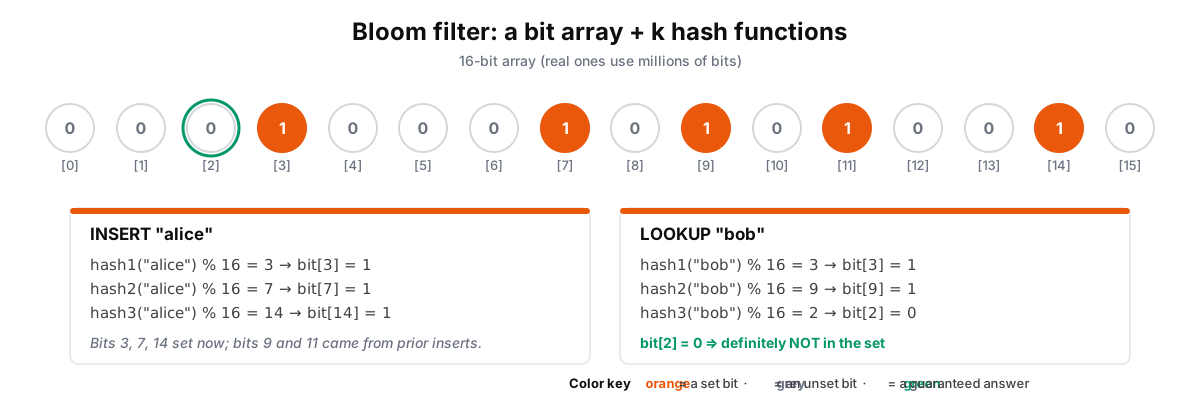 Figure: Bloom filter: insert alice, look up alice, look up bobA 16-bit Bloom filter with k = 3 hash functions; bits 9 and 11 were set by earlier inserts. 1, INSERT "alice" hashes to bits 3, 7 and 14 and sets them. 2, LOOKUP "alice" checks bits 3, 7 and 14; all are 1, so alice is probably in the set, which could be a false positive because other items set bits too. 3, LOOKUP "bob" checks bits 3, 9 and 2; bit 2 is 0, so bob is definitely not in the set: one 0 is proof, so there are no false negatives. Color key: orange is a set bit, grey an unset bit, green is a guaranteed answer.
| [0] | [1] | [2] | [3] | [4] | [5] | [6] | [7] | [8] | [9] | [10] | [11] | [12] | [13] | [14] | [15] |
|---|---|---|---|---|---|---|---|---|---|---|---|---|---|---|---|
| 0 | 0 | 0 | 1 | 0 | 0 | 0 | 1 | 0 | 1 | 0 | 1 | 0 | 0 | 1 | 0 |
| INSERT "alice" |
|---|
| hash1("alice") % 16 = 3 → bit[3] = 1 |
| hash2("alice") % 16 = 7 → bit[7] = 1 |
| hash3("alice") % 16 = 14 → bit[14] = 1 |
| LOOKUP "bob" |
|---|
| hash1("bob") % 16 = 3 → bit[3] = 1 |
| hash2("bob") % 16 = 9 → bit[9] = 1 |
| hash3("bob") % 16 = 2 → bit[2] = 0 |
Figure 1. A Bloom filter stores a 16-bit array and k = 3 hash functions; earlier inserts set bits 9 and 11. (1) INSERT "alice" hashes to bits 3, 7, and 14 and sets them. (2) LOOKUP "alice" checks the same three bits: all are 1, so "alice" is probably in the set. All 1s can also be a false positive, because other items set bits too. (3) LOOKUP "bob" checks bits 3, 9, and 2: bit[2] = 0 guarantees "bob" is not in the set (green). Any 0 means "definitely not in the set", so false negatives never occur. A bigger bit array lowers the false-positive rate at the cost of space; k is tuned to the array size and item count. In general, a Bloom filter checks membership in RAM before paying an expensive IO.
The false-positive rate is p ≈ (1 − e−kn/m)k, minimized at k = (m/n) · ln 2. At about 10 bits per item with optimal k ≈ 7 the rate is about 1%, so a billion-item filter needs only ~1.25 GB of bits, versus tens of GB for an equivalent in-memory hash set. That space saving, at the cost of a small false-positive rate, is why Bloom filters guard expensive lookups.
Recall the earlier problem where we looked at RAM: checking RAM first avoids the slow disk read.
Problem-Solving Applications
For detailed examples of how Bloom filters solve real-world problems at scale, see the Data Structures Problem Solving guide, which covers:
-
CDN Cache Optimization (Cloudflare): How Cloudflare uses Bloom Filters to prevent "One-Hit Wonder" files (assets requested only once) from ever being written to their SSD caching layer. This intercepts billions of useless IO write operations, preventing physical hardware degradation of their global SSDs (tying back to our Storage Hierarchy constraints).
-
Web Crawler Efficiency: How Google and Bing prevent duplicate page crawling
-
Real-time Username Validation: How social platforms provide instant availability feedback
Tradeoffs in bits
// Bloom Filter - 20 lines that save 10x space
class BloomFilter:
    bits = BitArray(size=m)      // m bits, all 0
    k = 3                         // number of hash functions

    Add(item):
        for i in 0..k-1:
            index = hash_i(item) % m
            bits[index] = 1

    Contains(item):
        for i in 0..k-1:
            index = hash_i(item) % m
            if bits[index] == 0:
                return False      // Definitely not in set
        return True               // Maybe in set

// Optimal parameters (math magic)
m = -n * ln(p) / (ln(2)^2)      // bits needed
k = m/n * ln(2)                  // hash functions

Example: 1M items, 1% false positive
→ m = 9.6M bits = 1.2MB
→ k = 7 hash functions
The Trade-off
| Space per item | False positive rate | Hash functions (k) |
|---|---|---|
| 4 bits | 15% | 3 |
| 10 bits | 1% | 7 |
| 14 bits | 0.1% | 10 |
Rule of thumb: 10 bits per item = 1% false positives = sweet spot
System Design Note: Bloom filters are the standard solution for "have we seen this?" queries at scale. For more worked examples, see the Data Structures Problem Solving guide. Case Study 2.2 puts this at planet scale: how Chrome Safe Browsing ships one Bloom filter to 3 billion devices.