Paging & Storage: How Does One Machine Process 128 GB with Only 16 GB of RAM?
Concept. Disks and SSDs read in fixed-size DB-pages (typically 64 MB in big-data systems).
Intuition. How do you process 128 GB on a machine with 16 GB of RAM? You read it 64 MB at a time. The disk hands you a full page on every IO whether you want one byte or all of it, so algorithms count pages, not bytes, and the page that holds Mickey's listens costs the same whether you're after one row or fifty.
Paging: From CPU to RAM
The CPU computes out of its registers and L1/L2/L3 cache, which the hardware fills from RAM in 64-byte cache lines. Between RAM and the SSD the unit is bigger: data moves one fixed-size page at a time, and one page moved is one IO. Classic Unix and Postgres use 4-8 KB pages; big-data systems use 64 MB. Why? OSes manage many small files in file systems. DBs tend to work with tables that are TBs. From here on page means a DB-page, the database's page, and DB-page when we need to distinguish from OS-page OSes move.
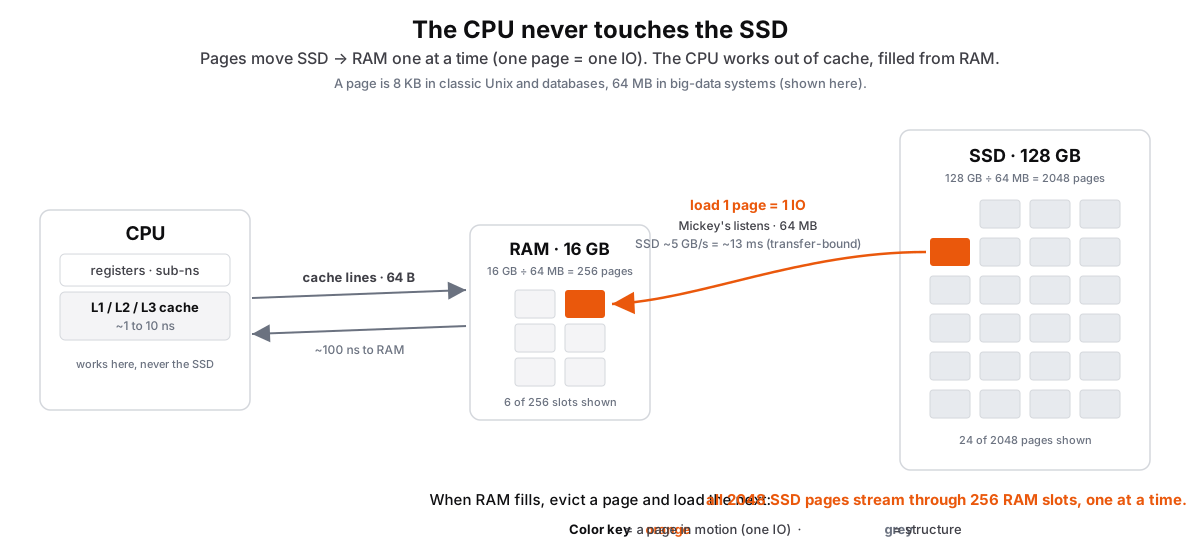 Figure: The CPU works through cache and RAM, never the SSD, and data moves one page at a timeThree tiers left to right. The CPU on the left works only out of its registers and L1, L2, L3 cache, which the hardware fills from RAM in 64-byte cache lines, in nanoseconds. RAM in the middle holds 16 GB divided by 64 MB, which is 256 fixed-size page slots, drawn as a small grid. The SSD on the right holds 128 GB divided by 64 MB, which is 2048 pages, drawn as a larger grid of the same-size cells; one is highlighted orange as it is paged into a free RAM slot, labelled one page, 64 MB, one IO, transfer-bound at about 5 GB per second so about 13 milliseconds. When RAM fills, a page is evicted and the next is paged in, so all 2048 SSD pages stream through the 256 RAM slots one page at a time. Color key: orange is a page in motion (the unit of one IO), grey is structure.
Figure 1. The CPU computes only out of its registers and cache; it does not operate on the SSD directly. The SSD gives RAM a 64 MB page per IO, and RAM feeds the CPU 64-byte cache lines in nanoseconds. That page costs the same whether the query wants one row or the whole block, and at ~5 GB/s a 64 MB transfer takes ~13 ms, so cost is page count. **Paging** refers to the overall steps in moving the needed subset of pages in-n-out of RAM.
Why Paging Matters: The Speed Gap
Nanoseconds and milliseconds are hard to feel. Let's rescale every access as if a cache hit took one second.
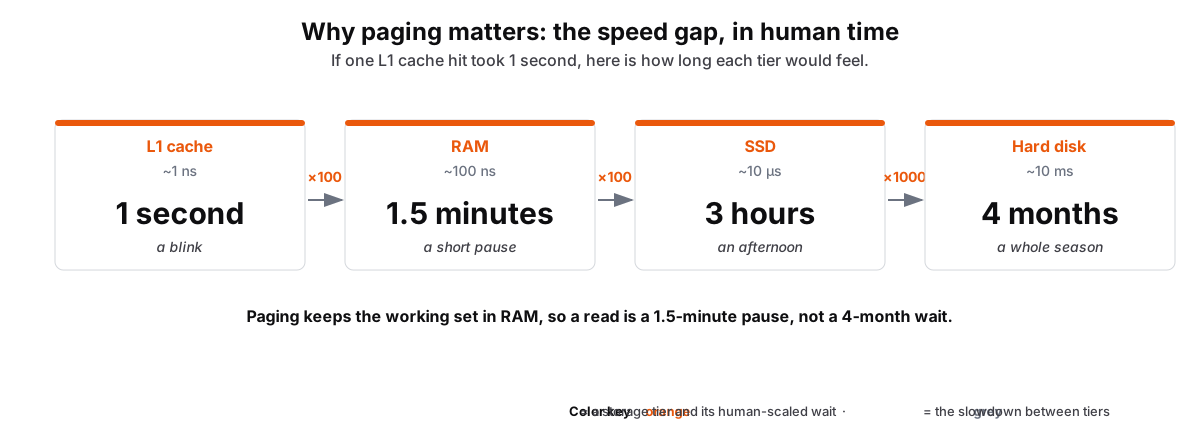 Figure: Why paging matters: the speed gap scaled to human timeFour storage tiers left to right, each access time rescaled as if one L1 cache hit took 1 second. L1 cache is 1 second, RAM is 1.5 minutes (100 times slower), SSD is 3 hours (another 100 times), and a hard disk is 4 months (another 1000 times). The point: a disk read feels like a season when a RAM read feels like a short pause, which is why paging keeps the working set in the fast tiers. Color key: orange is a storage tier and its human-scaled wait, grey is the slowdown factor between tiers.
Figure 2. Rescale latency so an L1 cache hit takes one second. RAM becomes 1.5 minutes, an SSD read becomes 3 hours, and a hard disk read becomes 4 months. Paging keeps the working set in RAM. A query that reads from disk on every page pays the hard disk or SSD cost once per page.
Storage Hierarchy: Speed, Cost, and Capacity
Faster storage costs more and holds less. RAM is about 100x faster than SSD and 100,000x faster than HDD, and price per terabyte runs the opposite way.
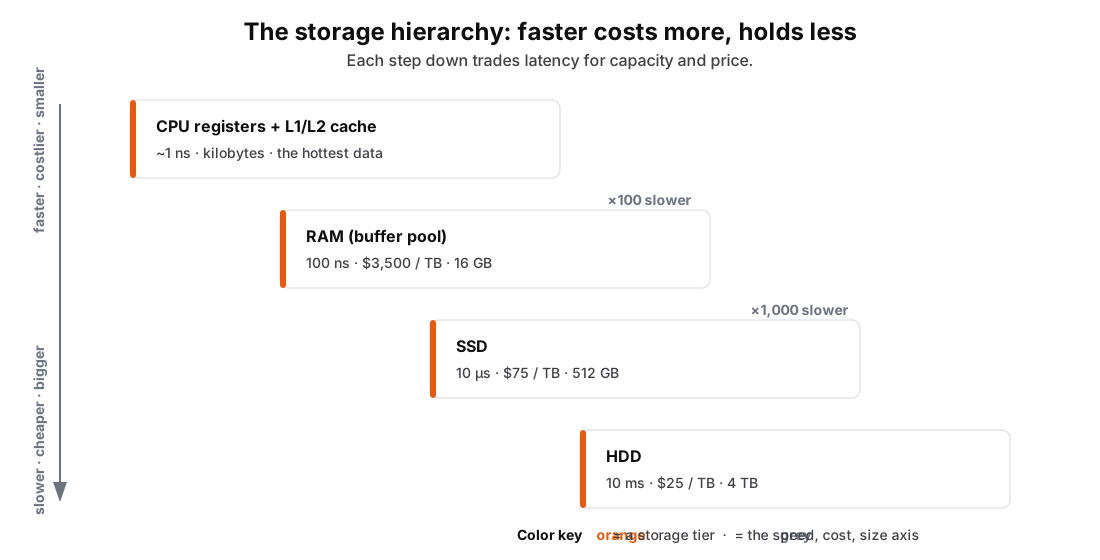 Figure: The storage hierarchy as a staircaseFour storage tiers as a descending staircase. Cache and registers at about 1 ns sit at the top, then RAM at 100 ns, 3,500 dollars per TB, 16 GB. One step down is SSD at 10 microseconds, 75 dollars per TB, 512 GB, 100 times slower. One more step is HDD at 10 milliseconds, 25 dollars per TB, 4 TB, another 1,000 times slower. A left-side axis marks faster, costlier, smaller at the top and slower, cheaper, bigger at the bottom. Color key: orange is a storage tier, grey is the speed cost size axis.
Figure 3. Cache, RAM, SSD, and HDD form a latency ladder. Each step down runs roughly 100x to 1,000x slower and costs less per terabyte while providing more capacity: RAM at 100 ns and $3,500/TB, SSD at 10 µs and $75/TB, HDD at 10 ms and $25/TB. Fast algorithms keep their working set in the fastest tier it fits.
IO Cost Definitions
IO cost is two numbers: a fixed startup overhead, then a sustained transfer rate.
Access Latency: time to initiate an IO before any data moves
- A fixed overhead paid once per IO, independent of size (the per-tier values are in the hierarchy above)
Throughput: the sustained transfer rate once data starts moving
- RAM 100 GB/s, SSD 5 GB/s, HDD 100 MB/s (not shown above; this is the other half of the cost)
Key Insight: For large pages (64MB), transfer time dominates access time. For small pages, access time dominates.
Refresher: Read your OS materials on how the OS' IO controllers work. DBs rely on OS for those details.
Modern Reality: CPUs/GPUs Can't Escape the Disk Bottleneck
The 10,000,000× Gap
The gap between storage and compute is 10,000,000x: one HDD seek (10 ms) is the time a CPU needs for ten million operations. Even with the data on a fast SSD, the slow part is the link that feeds the processor, not compuing in GPUs.
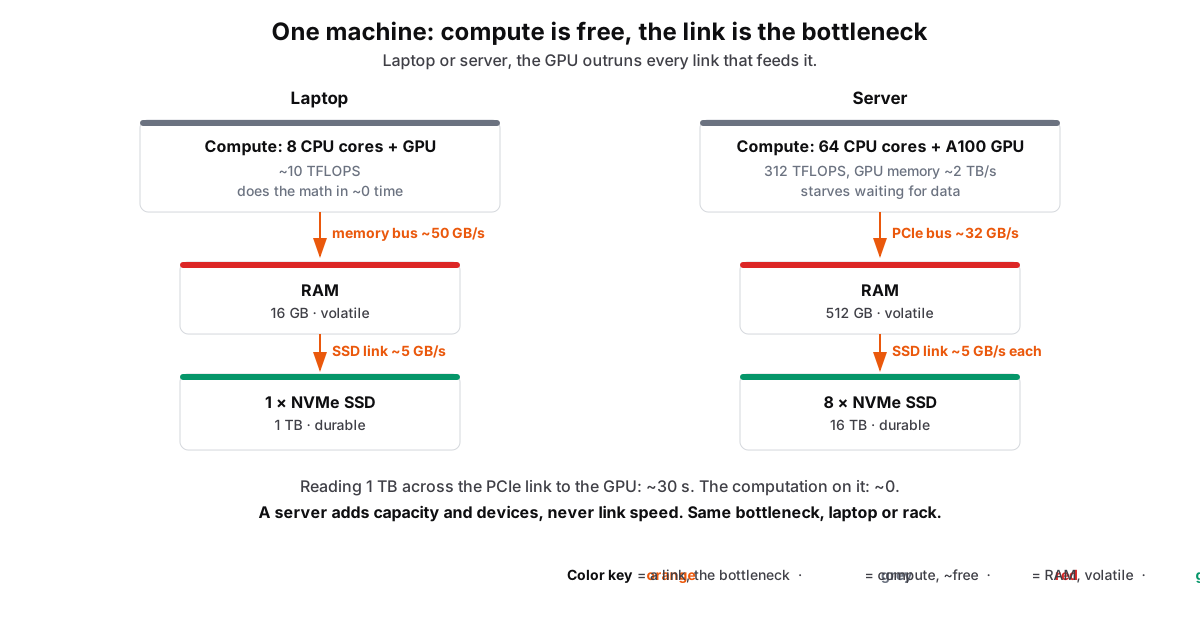 Figure: One machine: compute is free, the link is the bottleneckTwo single-machine setups side by side, a laptop and a server, each drawn as a vertical data path: compute (CPU plus GPU) at the top, then RAM, then SSD storage at the bottom, joined by links. Compute is grey because it is effectively free: a GPU does hundreds of trillions of operations per second. RAM has a red strip because it is volatile, lost on power off. The SSD has a green strip because it is durable, it survives. The links are orange because that is the bottleneck: the PCIe bus feeds the GPU at only about 32 GB/s and an SSD reads at about 5 GB/s. The server has more cores, more RAM, and many SSDs, but each link runs at the same speed, so scaling adds capacity, not bandwidth. Color key: orange is a data-movement link, the bottleneck; grey is compute, effectively free; red is RAM, volatile; green is the SSD, durable.
Figure 4. Inside one machine, the links between chips are the bottleneck. The GPU does ~3x10¹⁴ ops/s, but PCIe moves only ~32 GB/s and the SSD ~5 GB/s. Reading a 1 TB dataset over PCIe to the GPU takes ~30 s while the math on it takes almost none, so the data spends its life in transit. RAM (red) forgets on power-off, the SSD (green) keeps its data, and both reach the GPU over those same links. Adding cores, RAM, and SSDs raises capacity but leaves the links just as slow.
GPUs Are Data Hungry
The bottleneck chain:
-
Data lives on disk - Your 1TB dataset won't fit in 80GB GPU memory (e.g. A100 has 80GB in 2025)
-
PCI interfaces between hardware components are narrow - 32GB/s seems fast until you have 1TB to move
-
Compute is free - 312 TFLOPS means compute takes ~0 time
Recommended: How Cache, Memory and Storage Work
The hardware behind this page, from cache and RAM down to the SSD.