Case Study 2.2: How early Chrome Safe Browsing used a Bloom filter
Concept. Chrome Safe Browsing checks if a user is visiting a phishing site. Early implementations stored a Bloom filter of malicious URL hashes on each device. A definite miss was decided locally. A possible match sent a hash prefix to Google for confirmation.
Intuition. Keep a compact summary on the device. Most safe URLs end with a local miss. A possible match triggers a prefix lookup, and the device compares the returned full hashes locally. The Bloom filter may create false positives, but it creates no false negatives for inserted hashes.
Chromium's historical Safe Browsing code used Bloom filters. Current Safe Browsing APIs maintain a local database of SHA-256 hash prefixes. This page uses the early Bloom-filter design to show an example of underlying systems tradeoff.
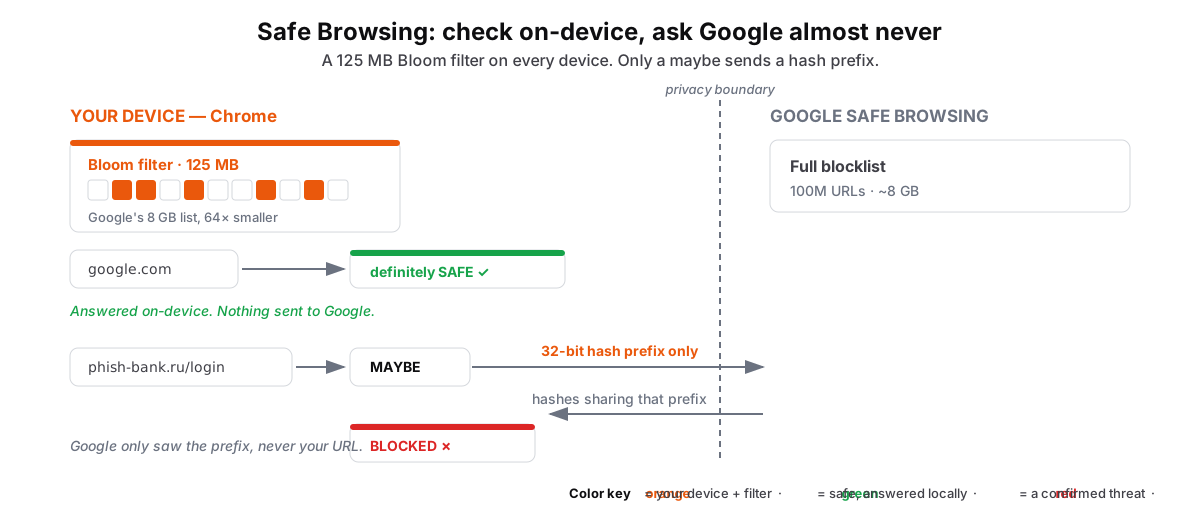 Figure: Early Chrome Safe Browsing: a local Bloom filter and a prefix checkA worked early Safe Browsing design. A dashed boundary separates the device from Google. The device holds a 125 MB Bloom filter estimated from an 8 GB raw list, a 64-times reduction. A definite miss ends locally. A possible match sends a 32-bit hash prefix to Google, which returns the full hashes sharing that prefix so the device can finish the check.
Figure 1. This example starts with 100 million URLs averaging 80 bytes, or 8 GB. At 10 bits per item, a Bloom filter occupies about 125 MB, 64 times less space. A definite miss ends locally. A possible match sends a 32-bit hash prefix to Google, which returns the matching full hashes so the device can finish the check. The server receives a prefix instead of the full URL.
The Safe Browsing design problem
Safe Browsing must check URLs without uploading every visited URL or storing a full raw list on every device. To make the scale concrete, this example uses 3 billion users and 100 million malicious URLs. The storage arithmetic below illustrates the Bloom-filter tradeoff.
Three constraints
-
Storage: At an average of 80 bytes each, 100 million URLs occupy roughly 8 GB.
-
Privacy: Sending every visited URL to Google would reveal the user's browsing requests.
-
Infrastructure: Sending every check across the network would multiply request volume across 3 billion users.
The Bloom-filter design
This design used a probabilistic summary instead of the full list. Under the assumptions above, a Bloom filter of URL hashes needs about 125 MB.
The compression advantage
-
Raw list: 100M URLs × 80 bytes = 8,000 MB (8 GB)
-
Bloom filter: 100M items × 10 bits/item = 1,000M bits = 125 MB at roughly a 1% false-positive rate
-
Space reduction: The Bloom filter is about 64× smaller than the raw list.
The two-stage check
The Bloom filter handles definite misses locally and sends possible matches through a second check.
-
Local check: The device hashes the URL and probes its 125 MB Bloom filter.
-
Definite miss: If any required bit is zero, the hash is absent from the filter and the device sends nothing.
-
Possible match: If every required bit is one, the device sends a 32-bit hash prefix. Google returns the malicious hashes sharing that prefix, and the device compares the full hashes locally.
Worked Python implementation
import math
import mmh3 # MurmurHash3
from bitarray import bitarray

class SafeBrowsingFilter:
    def __init__(self, expected_items, fpr):
        # bits_per_item = -1.44 * log2(fpr); ~10 bits at 1% FPR
        self.size = int(expected_items * -1.44 * math.log2(fpr))
        self.bit_array = bitarray(self.size)
        self.bit_array.setall(0)
        self.hash_count = 7  # ~optimal for 1%

    def add_malicious_url(self, url):
        for seed in range(self.hash_count):
            index = mmh3.hash(url, seed) % self.size
            self.bit_array[index] = 1

    def check_url(self, url):
        for seed in range(self.hash_count):
            index = mmh3.hash(url, seed) % self.size
            if self.bit_array[index] == 0:
                return "SAFE"  # Definitely absent
        return "MAYBE_THREAT"  # Confirm with a prefix check

# Setup filter for 1M malicious URLs
sbf = SafeBrowsingFilter(1_000_000, 0.01)
sbf.add_malicious_url("phish-bank.ru/login.html")

# Instant local lookup
print(f"'google.com': {sbf.check_url('google.com')}")  # SAFE
print(f"'phish-bank.ru/login.html': {sbf.check_url('phish-bank.ru/login.html')}")  # MAYBE_THREAT
Comparing the three designs
| Method | Space (100M URLs) | What the server receives | User experience |
|---|---|---|---|
| Full list on device | ~8 GB | Nothing during a check | Large download |
| Cloud lookup | 0 MB | Every lookup | Network round-trip |
| Bloom filter | ~125 MB | A prefix for possible matches | Local answer for definite misses |
Takeaway: Chrome used a local Bloom filter to end definite misses on the device and send only possible matches through a hash-prefix check. Current Safe Browsing stores hash prefixes, but it keeps the same two-stage pattern.
Video
Play video: 📘 Case Study 2.2: How Chrome Safe Browsing uses Bloom Filters