Writing Debug Tables: Hand-Tracing a Query
Concept. Debug tables, also called handtraces, validate a query's logic by walking the input rows through each clause and writing down what survives at each step. They expose semantic errors that syntax-checking tools miss.
Intuition. When an LLM claims a query groups Listens into 4 user-genre pairs but a trace shows 3, build a debug table. List the 9 Listens rows, then for each clause (FROM, WHERE, GROUP BY, HAVING) cross out the rows that drop. The surviving rows are the real answer.
Why This Matters
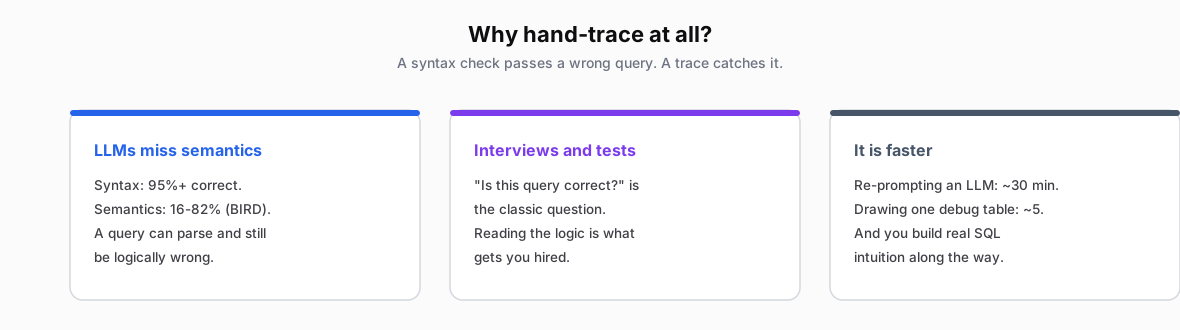
LLMs and Semantics
- Syntax: 95%+ accurate
- Semantics: 16-82% accurate per BIRD benchmarks
- See LLMs and SQL
Whiteboard Interviews and Tests
- Filter out expensive LLM cut-and-pasters
- "Is this query correct?" - common question
- Logic, not memorized syntax, is what is tested
- See Learning Outcomes
Faster
- Avoid reprompting loop: 30 minutes
- Drawing one debug table: 5 minutes
- Catch the bug on the first pass
Example 1: Users' Genres with 2+ Songs
The query under test. An L L M wrote this and claims it returns 4 user-genre pairs. We hand-trace to verify.
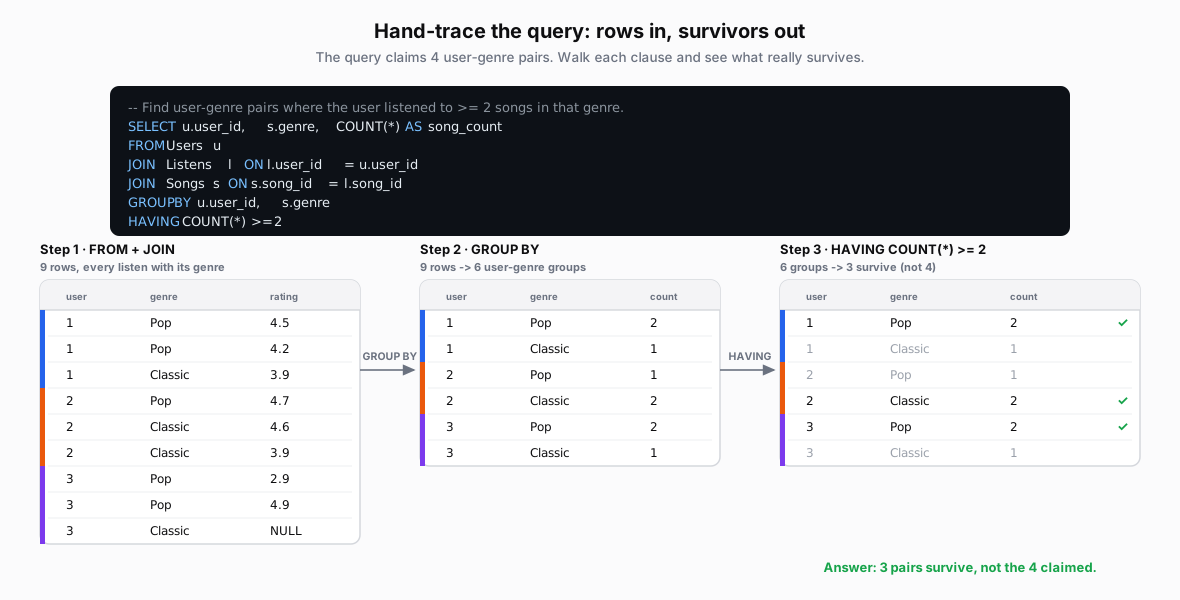
The figure walks all three clauses. Below is the full joined working set the trace starts from, showing exactly which songs each user listened to (the figure abbreviates each row to user, genre, rating):
FROM + JOIN · 9 rows, every listen with its song's genre
| user_id | name | song_id | genre | rating | |
|---|---|---|---|---|---|
| 1 | Mickey | 1 | Pop | 4.5 | |
| 1 | Mickey | 2 | Pop | 4.2 | |
| 1 | Mickey | 6 | Classic | 3.9 | |
| 2 | Minnie | 2 | Pop | 4.7 | |
| 2 | Minnie | 7 | Classic | 4.6 | |
| 2 | Minnie | 8 | Classic | 3.9 | |
| 3 | Daffy | 1 | Pop | 2.9 | |
| 3 | Daffy | 2 | Pop | 4.9 | |
| 3 | Daffy | 6 | Classic | NULL |
Shortcuts for Big Data
Nobody Traces 100,000 Rows
You never trace every row. You trace the rows that matter and approximate the rest. The shorthand below keeps a hand-trace honest without drowning in data.
| Scenario | Full Trace | Shorthand |
|---|---|---|
| 1000 rows after JOIN | Show all 1000 | "First 3... middle ties... last 2" |
| GROUP BY with counts | List every row | "Rock: ~500, Pop: ~300" |
| Window function ranks | Show all ranks | "Top 3, any ties, bottom 2" |
| Complex aggregation | Calculate exactly | "AVG ≈ 4.2" (close enough!) |
Quick Verification Checklist
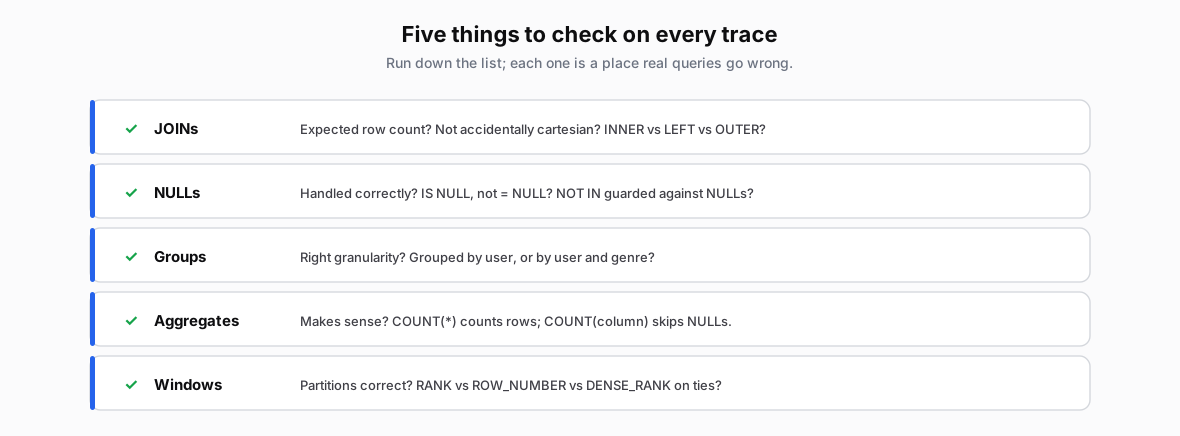
- JOINs: Expected row count? (not accidentally cartesian? INNER? LEFT? OUTER?)
- NULLs: Handled correctly? (IS NULL vs = NULL?)
- Groups: Right granularity? (user vs user+genre?)
- Aggregates: Makes sense? (COUNT(*) vs COUNT(column)?)
- Windows: Partitions correct? (RANK vs ROW_NUMBER?)
Remember: It's YOUR Tool
- A correctness check: skip the obvious parts, focus on the confusing bits.
- Like multiplication tables in school - use them often early to build intuition
- You'll naturally start skipping easy steps as your SQL brain develops
- Use simple conventions that interviewers and graders can follow (for partial credit!)
- Approximate liberally - "~500 rows" is perfectly fine
For Interviews, PSETs, Tests
Cryptic hieroglyphs.
𓀀 → 𓂋 𓊖 = 2 𓆣
𓁶 → 𓂋 𓄿 = 1 ✗
𓅱 → 𓂋 𓊖 = 2 𓆣
∴ 𓆣 = {𓀀𓊖, 𓅱𓊖}
"Trust me, 𓀀 means Mickey and 𓆣 means keep..."
Clear convention.
User 1, Pop: 2 songs → Keep ✓
User 2, Pop: 1 song → Filter ✗
User 3, Pop: 2 songs → Keep ✓
Final: {(1,Pop,2), (3,Pop,2)}
Interviewer: "I can follow this!" (+partial credit)