Problem Solving: The Taylor Swift Ticket Disaster
Concept. Correct transactions still need an application design that handles heavy demand. The Taylor Swift Eras Tour sale put fifty thousand fans on one checkout flow at once, and the flow held coarse locks for minutes at a time. Three redesigns fix it: hold locks for less time, lock fewer seats, and fall back to an async queue when blocking is unavoidable. The mechanism is the same one from scheduling and locking; the win is in how the application uses it.
Intuition. The old flow locked a whole zone the moment you picked it, then kept that lock while you browsed seats and typed your card. Thousands of seats sat frozen behind one slow user. Lock briefly, lock small, and the same hardware serves a hundred times more fans.
The Core Problems
The Eras Tour sale on Ticketdisaster.com creates massive concurrent load on one checkout flow.
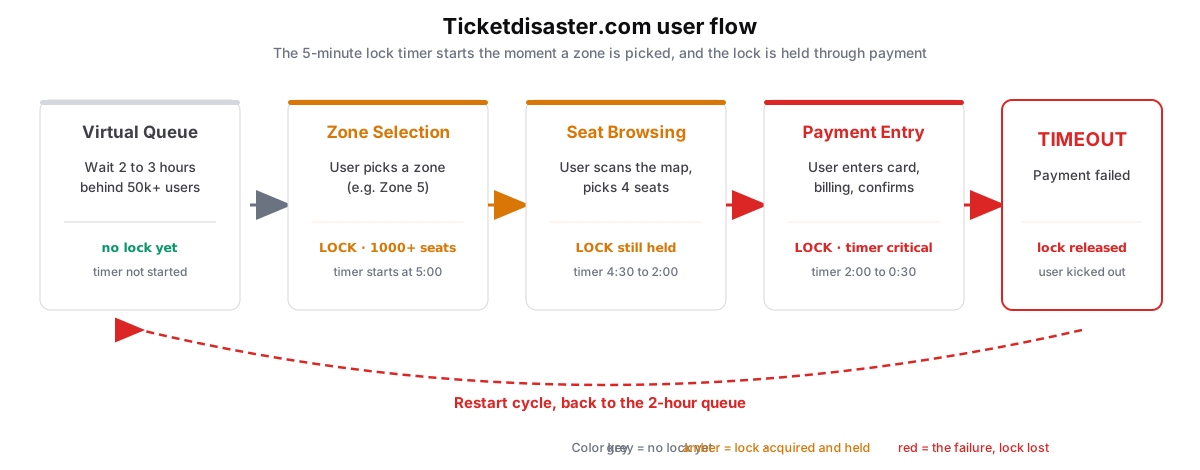 Figure: Ticketdisaster.com checkout flow under Eras Tour loadA five-step flow read left to right. Virtual Queue holds no lock, grey. Zone Selection locks 1000-plus seats and starts a 5-minute timer, amber. Seat Browsing keeps the lock held, amber. Payment Entry runs the timer critical, red. Timeout releases the lock and kicks the user out, red. A dashed loop sends the user back to the 2-hour queue. Color key: grey = no lock yet, out of focus; amber = lock acquired and held; red = the failure, lock lost.
Figure 1. The Ticketdisaster.com checkout flow under Eras Tour load. The lock acquires the instant a user picks a zone and stays held through browsing and payment, so one slow user freezes a thousand seats for minutes. The three worst bottlenecks come next.
Three bottlenecks drive the failure:
Queue management
Fans wait hours in a virtual queue behind thousands of others, with no priority handling or smart routing. The app must show available seats and a live count per event, and serving that read to thousands of concurrent users is itself a bottleneck.
Lock contention
Zone-level locks block thousands of seats for a single user session. When a fan dislikes the first zone, they retry with another, adding load and stretching lock duration further.
Payment blocking
The lock stays held through the entire payment process, five to ten minutes per user. Worse, reserved-but-not-purchased seats are uncertain: you cannot cleanly count them as available or taken while payment is pending. That uncertainty is the core problem.
The Smart Solutions: Ticketsfaster.com
Three redesigns scale the same flow to 100x more load. None of them invents a new lock; they change when and how the application takes one.
Strategy 1: Higher-Resolution Locking
Locking a whole zone blocks everyone else in it. Locking individual seats lets thousands of fans browse different seats at once.
 Figure: Fix two: shrink the lockBefore, red: locking a whole zone freezes a thousand seats, so nine hundred ninety-nine other fans are blocked and only about a hundred users run at once. After, green: locking a single seat blocks nobody else, so about ten thousand users browse different seats at once. Color key: red is the old flow, green is the fixed flow.
Figure 2. Shrink the lock. A zone lock freezes a thousand seats, so nine hundred ninety-nine other fans wait on one. A seat-level lock blocks nobody else, and about a hundred times more fans browse at once.
Before: zone-level locks
Lock scope:
- Entire zone: 1,000 seats locked, 999 users blocked
- Section block: 100 seats locked, 99 users blocked
Problem: massive lock contention
Result: only ~100 concurrent users
Why: locking 1,000 seats blocks 999 potential buyers
After: seat-level locks
Lock scope:
- Individual seat: 1 seat locked, 0 users blocked
- Seat group: 2 to 8 seats locked, 1 to 2 users blocked
Solution: minimal lock contention
Result: ~10,000 concurrent users
Benefit: 100x more users browse different seats at once
-
Lock scope: 99% reduction, from 1,000 seats to 1 to 8.
-
Wait time: 95% faster. Almost no blocking.
-
Key insight: Higher-resolution locks mean lower contention and better throughput.
Strategy 2: Cut Lock Duration
The other lever is how long you hold the lock. The slowest step in checkout is a human typing: card number, billing address, the CVV. None of it needs a lock. So collect it all up front, in the queue, before you ever lock a seat, and hold the lock only for the final write.
 Figure: Fix one: cut lock durationBefore, red: the app locks the whole zone and holds it through browsing and payment, five to ten minutes, so only about a hundred users run at once. After, green: the fan previews and pre-fills while waiting with no lock, then locks only for the final write, thirty seconds, so about ten thousand users run at once. Color key: red is the old flow, green is the fixed flow.
Figure 3. Cut lock duration. The old flow holds the zone lock through browsing and payment, five to ten minutes, so only about a hundred fans run at once. The fix does the slow steps in the queue with no lock and takes the lock only for the final write, about thirty seconds, so about ten thousand fans run at once.
Before: long lock sessions
Workflow:
- Enter virtual queue
- Wait for your turn (hours)
- Select a zone, lock the entire zone (1000+ seats)
- Browse seats, 5+ minutes with the lock held
- Enter payment, more time with the lock held
- Complete or time out, then release the lock
Lock duration: 5 to 10 minutes
Seats blocked: 1000+ per user
Concurrent users: ~100 max
After: quick lock sessions
During the queue (no lock):
- View approximate availability by zone
- Pre-fill card number, billing address, and CVV
- Set tentative zone preferences
When your turn arrives (minimal lock):
- Select specific seats from the preferred zone
- Lock only chosen seats (1 to 8, not 1000)
- Confirm pre-filled payment (30 seconds)
- Complete the purchase, release the lock immediately
Lock duration: 30 seconds
Seats blocked: 1 to 8 per user
Concurrent users: ~10,000 max
-
Speed: 90% faster. Lock time drops from minutes to ~30 seconds.
-
Capacity: 100x more concurrent users (~100 to ~10,000).
-
Key insight: Move browsing and decision-making outside the critical section.
Strategy 3: Fall Back to an Async Timestamp System
When load still overwhelms the locks, drop real-time blocking entirely. Take requests instantly, stamp them, and process them in the background.
 Figure: Fix three: fall back to asyncBefore, red: fans block in real time, holding locks through hours-long queues, so only about a hundred users run at once. After, green: fans submit instantly with a timestamp, a background system processes them in order and emails the confirmation, so about fifty thousand users run at once. Color key: red is the old flow, green is the fixed flow.
Figure 4. Fall back to async. Instead of blocking in real time, fans submit instantly with a timestamp, a background job processes them in order, and the confirmation arrives by email. The three-hour queue becomes a sixty-second submit.
Before: real-time blocking
Process: fans wait hours in virtual queues while holding database locks through browsing and payment. Each transaction blocks seats for 5+ minutes.
Experience: 3-hour queue waits
Scalability: ~100 concurrent users
Problem: synchronous processing creates massive bottlenecks
After: async confirmation
Process: fans submit ticket requests instantly with timestamps. Background systems process requests in order and email confirmations within 60 minutes. No blocking waits.
Experience: 60-minute confirmations
Scalability: ~50,000 concurrent users
Benefit: fans submit instantly and get confirmation by email
-
Response time: 99% faster. Submission in 60 seconds vs. a 3-hour queue wait.
-
Scalability: 500x more concurrent users (~100 to ~50,000).
-
Key insight: When blocking is unavoidable, make waits predictable and transparent.
Key Takeaways
Three moves generalize from Ticketsfaster to any high-contention system (inventory, seat reservations, limited drops, payments):
-
Shrink lock granularity. Lock the seat, not the zone: the smallest scope that stays correct.
-
Shorten lock duration. A human typing card and address is the slow part, and none of it needs the lock. Pre-fill it up front, then take the lock only for the final write.
-
Fall back to async when contention is unavoidable. A timestamp queue beats real-time locking; make the wait predictable and transparent.