Change Tracking: Log the Diff, Don't Copy
Concept. Log changes instead of copying the whole database. Storing a full copy for every version is impossible when thousands of transactions modify the data at once, so the database logs each change instead and replays the log to reconstruct what was true at any past moment.
Intuition. A trading app can't snapshot millions of accounts on every trade, yet it must still show your exact balance at the instant you hit Sell. A hospital must show what a chart said the moment a drug was given. An exchange must replay its order book to the microsecond a crash hit. All of them need any past version, none can afford full copies. The fix is the one Google Docs and Git already use: log the change, not the whole thing.
The Version Problem
Picture a trading app. Millions of users, thousands of trades landing every second, each one moving a balance. A user disputes a trade: the app showed $5,000 when they hit Sell, then it filled lower. To settle it, you have to show the exact state of that account at that instant, 10:31:04. Not now. Then.
And it is not only the user. Regulators require the same history. The SEC can order a firm to reconstruct any trade, to prove there was no insider trading or manipulation, and record-keeping rules make it the law. Two things ride on knowing what was true at a moment: a user's trust, and staying on the right side of a regulator.
Could you just copy the whole database and keep every version? You never know which account or which instant will be questioned, so you would keep a full snapshot at every instant. With millions of accounts changing thousands of times a second, that is billions of rows copied per second. Impossible.
Same shape elsewhere. A hospital has to show what a patient's chart said the moment a drug was given, while staff edit charts all day. An exchange has to replay its order book to the microsecond a crash hit, out of millions of orders a second. Everyone needs a past version; nobody can copy the whole thing to keep one.
That is the version problem: you need to know what was true at any moment, but you cannot keep full copies when thousands are changing the data at once. So stop copying and start logging. Save each change, not the whole database, and replay the changes to reach any version.
 Figure: The version problem: everyone needs a past version, but full copies explode under concurrency, so a database logs the change insteadTwo panels. On the left, the problem in red: to keep every past version you would copy the whole database on every change, and with millions of accounts changing thousands of times a second that is billions of rows per second, impossible. On the right, the answer in violet: log only the change, one small entry each, and replay the entries to reconstruct what was true at any past moment. The log shows three entries: at 10:31:04, account 12 cash goes from 5000 to 4820; at 10:31:04, account 88 cash goes from 210 to 640; at 10:31:05, account 12 shares go from 3 to 4. To know account 12 at 10:31:04, replay the entries up to then. Color key: red = copying every version, which cannot scale; violet = the change log and the version it rebuilds; grey = the full-database copies you avoid.
Figure 1. Keeping every version by copying the whole database (red) is billions of rows a second under real load, impossible. Logging each change instead (violet) is a handful of small entries, and any past version replays from them, 10:31:04 included. You reach any moment without ever storing a full copy.
You Already Use It
Every time you edit a document or commit to a repo, you use a change log. Two systems make it concrete, and both do the same two things: they don't copy, and they let you reach any version.
Google Docs
Don't copy: Google Docs never keeps fifty full copies of your document, it logs each edit. Any version: it holds the current document plus that edit log, and snapshots itself now and then, so it never rebuilds from your first keystroke. To show the document as it was an hour ago, Docs starts from a recent snapshot and replays the edits forward to that moment; to undo, it steps back from where you are now. Replaying forward is exactly what a database calls redo, and stepping back is undo.
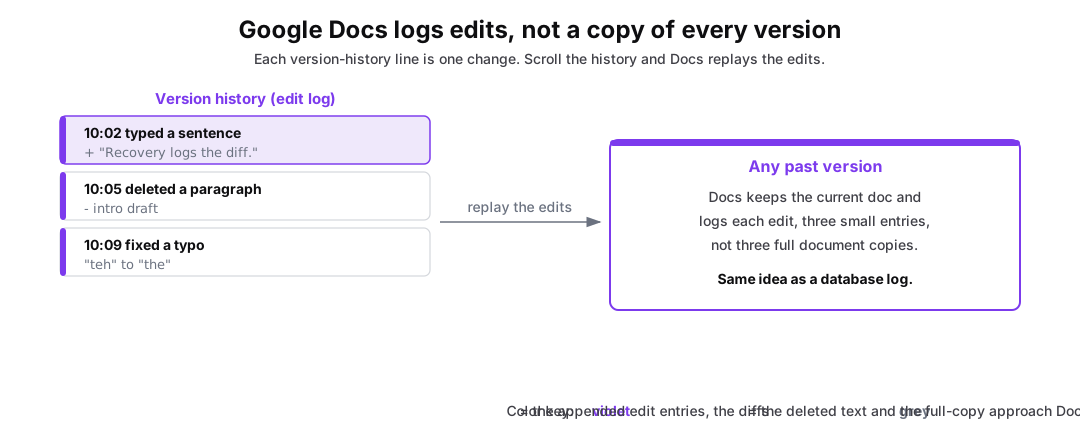 Figure: Google Docs version history is a log of edits, not fifty stored copies.A Google Doc evolves left to right. The history panel does not hold fifty full copies of the document. It appends one entry per edit: typed a sentence, deleted a paragraph, fixed a typo. Docs keeps the current document and snapshots itself now and then, so scrolling the history replays edits from a recent snapshot, not from the first keystroke, to reconstruct any past version. This is exactly the model a database uses for crash recovery. Color key: violet = the appended edit entries, the diffs; grey = the full-copy approach it avoids.
Figure 2. Google Docs keeps periodic snapshots and logs every edit between them, violet, not a full copy of every version. Any past version replays from a nearby snapshot forward. The same move a database log makes: save the change, reach any version.
Git
Don't copy: a Git commit is a snapshot, but files that did not change are shared, not recopied, so history stays small without full copies. Any version: check out any commit to see exactly what the code was at that point, or revert to it.
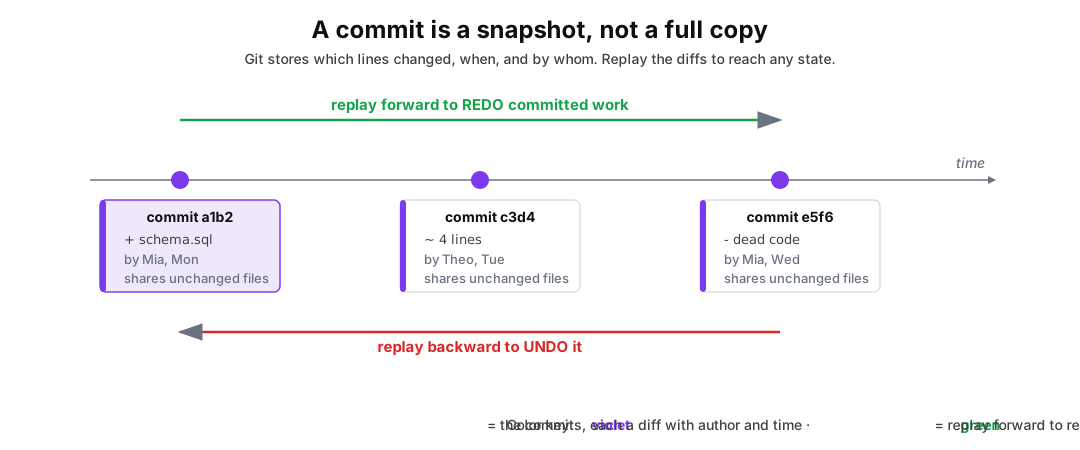 Figure: A git commit is a snapshot that shares unchanged files, not a full copy. Move forward to redo, backward to undo.Three commits run left to right along a time axis: a1b2, plus schema.sql, by Mia, Mon; c3d4, about four lines changed, by Theo, Tue; e5f6, minus dead code, by Mia, Wed. Each carries the note shares unchanged files. A green arrow runs left to right above the row, labeled replay forward to redo committed work, and a red arrow runs back below it, labeled replay backward to undo it. Color key: violet the commits, each with its author and time, green forward to redo, red backward to undo.
| commit a1b2 | commit c3d4 | commit e5f6 |
|---|---|---|
| + schema.sql | ~ 4 lines | - dead code |
| by Mia, Mon | by Theo, Tue | by Mia, Wed |
| shares unchanged files | shares unchanged files | shares unchanged files |
Figure 3. A Git commit is a snapshot, not a full copy: files that did not change are shared, so history stays small. Moving forward to a later commit redoes work, green; reverting one undoes it, red. A database recovery log gives the same two moves.
The Database Does Both
A database does exactly this, at the finest grain: it logs the old and the new value of every change, a handful of entries per transaction, never a table snapshot. From that log it rebuilds any past version. That one capability powers an audit, an undo, and, the focus of this module, recovery: after a crash, restore the correct state by redoing committed changes and undoing the rest. Crashes are rare, but the log earns its keep every day. Redo and undo are the next page.