Multi-resolution slides
Lecture PDFs
What it is
- One lecture, at several levels of detail.
- Light slides for class; detailed slides add captions, takeaways, and note links.
- The main HTML site stays current; a PDF is a snapshot to annotate and keep.
Programmatic generation
How we generate every view from one source, like any app.
- Views: code combines content and templates into HTML slides, light PDFs, detailed PDFs, and accessible content.
- Output templates set each format, what to include, and the color scheme.
- Content lives once in Google's DB (Firebase). All concepts (figures, captions, breadcrumbs) are organized as a graph, so we produce breadcrumbs and links from how the concepts connect.
Here is one figure both ways.
Light slides · shown in class
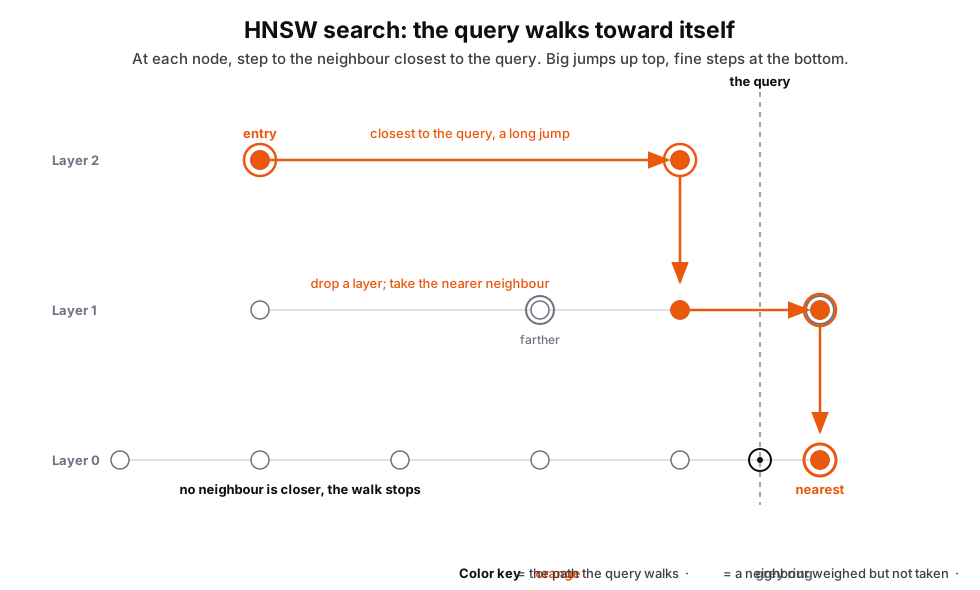
Figures only, clean to project.
Detailed slides · captions + links to notes
Figure 3. Top layers are freeways: long links jump you near the query. The bottom layer is local streets: short hops close in. It checks only a handful of candidates, so it is fast but can miss the true nearest.
Same figure, plus the caption, takeaways, and a link to the full notes. Example only; every detailed slide carries its own.
| Lecture | Date | Light slides | Detailed slides (captions + notes) |
|---|---|---|---|
| Lecture 10 | October 22 | ||
| Project 2 · Overview | October 20 | — | |
| Lecture 8 | October 15 | ||
| Lecture 7 | October 13 | ||
| Lecture 6 | October 8 | ||
| Lecture 4 · IO and storage | October 1 | ||
| Lecture 4 · Algorithms | October 1 | ||
| Lecture 3 — Part 1 | September 29 | — | |
| Lecture 3 — Part 2 | September 29 | — | |
| Lecture 2 | September 24 | — | |
| Lecture 1 — Part 1 | September 22 | — | |
| Lecture 1 — Part 2 | September 22 | — |